
New Wonders Discovered as NASA Releases New Images of Jupiter
By Tata
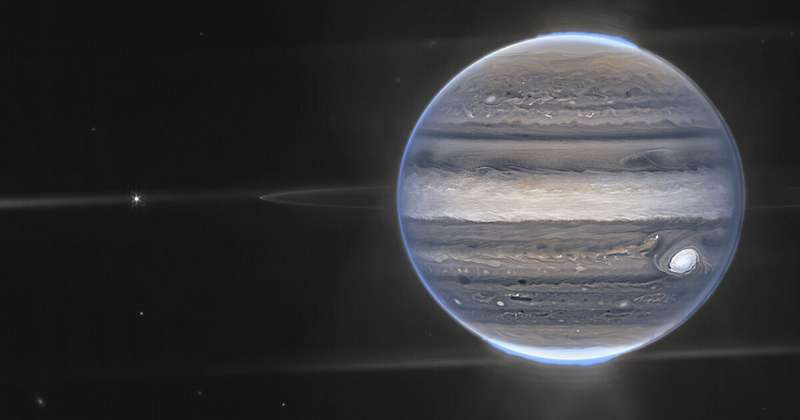
The unending quests by man to study what happens on the other planets and beyond are gradually yielding results, with recent images released by NASA showing what Jupiter looks like. The new images of the planet were captured by NASA’s James Webb Space Telescope. “Webb’s Jupiter observations will give scientists even more clues to Jupiter’s inner life,” NASA said on its website. “The two images come from the observatory’s Near-Infrared Camera (NIRCam), which has three specialized infrared filters that showcase details of the planet.”
The observations of Jupiter were led by Imke de Pater, professor emerita of the University of California, and Thierry Fouchet, a professor at the Paris Observatory.
“We hadn’t really expected it to be this good, to be honest. It’s really remarkable that we can see details on Jupiter together with its rings, tiny satellites, and even galaxies in one image,” Imke de Pater said.
The released images were not directly captured by the Telescope one after the other. Instead, several images captured by the James Webb Space Telescope were put together by a team of photo experts to create a standalone view of Jupiter. The standalone view revealed that auroras extend to high altitudes above the northern and southern poles of Jupiter.
“The auroras shine in a filter that is mapped to redder colors, which also highlights light reflected from lower clouds and upper hazes. A different filter, mapped to yellows and greens, shows hazes swirling around the northern and southern poles,” NASA continued. “A third filter, mapped to blues, showcases light that is reflected from a deeper main cloud.”
The Packaging Process of the Images
A common man would not be able to understand the images captured by the James Webb Space Telescope unless some modifications are made. In other words, the images are sent to earth as raw data that need further processing. For a clear view of the pictures, scientists then translate the information sent by the telescope into readable images.
A team at the Space Telescope Science Institute (STScI) processes Webb images before an official release, while non-professional astronomers (citizen scientists) also check public data archives and process images.
The new images of Jupiter were processed by Judy Schmidt, a citizen scientist from California. For some images, she collaborated with Ricardo Hueso from the University of Basque Country in Spain.
“I try to get it to look natural, even if it’s not anything close to what your eye can see,” Judy said.
Judy said working with Jupiter was more difficult than working on planets that are farther because of its speed of rotation.
“Combining a stack of images into one view can be challenging when Jupiter’s distinctive features have rotated during the time that the images were taken and are no longer aligned,” Judy added.
While it takes earth 24 hours to complete its rotation, it takes Jupiter as little as 10 hours despite being 318 times bigger than the earth. Sometimes she has to digitally make adjustments to stack the images in a way that makes sense.
Scientists are already analyzing the images to get new scientific results about Jupiter, the largest planet in our solar system.
“This one image sums up the science of our Jupiter system program, which studies the dynamics and chemistry of Jupiter itself, its rings, and its satellite system,” Fouchet said.
This story was first published by Antigua News on : antigua.news/2022/08/23/new-wonders-discovered-as-nasa-releases-new-images-of-jupiter. © 2022 Antigua News. Republication without permission is not allowed.
Read our editorial standards and corrections policy. Spotted an error? Contact the newsroom.
More from World
View section
Myanmar Says It Will Defy Parts of the Rohingya Genocide Ruling
The Gambia won an order for the safe return of Rohingya refugees. Myanmar’s president says he will choose which measures to accept, and an armed group controls most of the land they fled.
By Dario Item

Spain Votes After an Eviction Shook Its Government
An elderly tenant’s eviction helped trigger the November 29 snap election. Pedro Sánchez is recovering in some polls, but the right still has the clearer route to a governing majority.
By Dario Item

Dozens of KFC Restaurants Closing Across 10 U.S. States as Major Franchise Operator Files for Bankruptcy
Financial troubles, falling sales and millions in unpaid franchise fees have forced a major KFC operator into bankruptcy, with 72 restaurant locations affected and more closures possible.
By Cory Wayland

Robert Pattinson is the new James Bond
The Twilight and The Batman star succeeds Daniel Craig as 007 in the next James Bond film, directed by Denis Villeneuve and written by Steven Knight.
By Mick the Ram
Comments
Be the first to comment.