
Dredging work at St John’s Harbor held up again

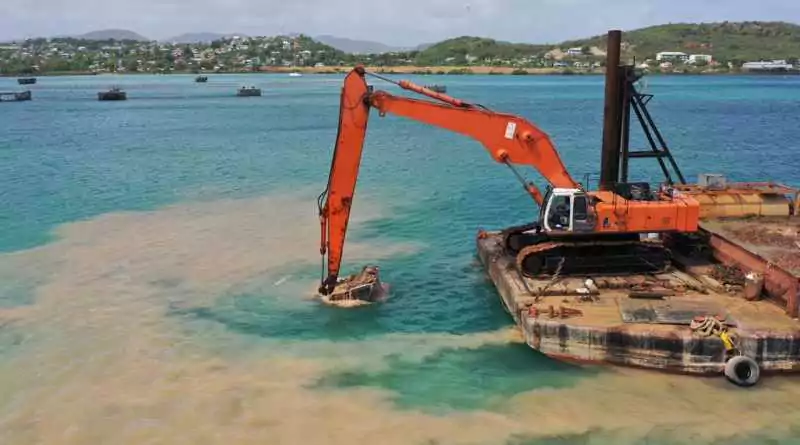
Information Minister Melford Nicholas said the dredging of the St John’s Harbor – a project that has been on the cards now for some time – is again being held up due to apparent technical challenges.
The dredging work is meant to enable OASIS-class ships to berth at the new pier, but issues relating to the material to be dredged and the dredging equipment being used are preventing that milestone from being reached.
Nicholas said some hard and dense rock has been difficult to dislodge, to widen and deepen the channel through which the vessels will travel and as a result, the dredging equipment utilized by the contractor has been repeatedly damaged.
In response to that challenge, special equipment is reportedly being acquired from Panama, and the work will be completed in just a few weeks, once the equipment arrives in Antigua.
“We are hopeful,” Nichola said at the Cabinets press conference on Thursday, saying that “hopefully by the time the new craft arrives from Panama, it will be able to work on an overtime basis to ensure we can achieve the shortage possible route. We remain hopeful…” he said.
A similar challenge was reported last December, despite previous claims that the country would welcome its first Oasis-class ship before the end of the year.
Back then, it was said that a special cutting machine was acquired to remedy the situation, with work being done around the clock to complete the process.
In the latest update, no definitive timeline was offered for the historic arrival of the country’s first Oasis-class vessel.
The absence of such vessels traveling to tourism-dependent Antigua has been deemed a blight on the industry, due to the sheer number of passengers they transport, and the potential earnings that could come as a result.
The Oasis Class ships are the largest cruise ships in the world, with some of the vessels capable of transporting more than 6,000 passengers at any one time.
This story was first published by Antigua News on : antigua.news/2022/09/23/dredging-work-at-st-johns-harbor-held-up-again. © 2022 Antigua News. Republication without permission is not allowed.

About the author
Shermain Bique-Charles is an accomplished journalist with over 24 years of dynamic experience in the industry. Renowned for her exceptional storytelling and investigative skills, she has garnered numerous awards that highlight her commitment to journalistic integrity and excellence. Her work not only informs but also inspires, making her a respected voice in the field.
Read our editorial standards and corrections policy. Spotted an error? Contact the newsroom.
More from Antigua and Barbuda
View section
National Youth Ambassador Kristine Louisa and Barbados’ Ashley Lashley Donate Essential Supplies to Sir Lester Bird Medical Centre
The Hopeful Hearts Foundation and Ashley Lashley Foundation have provided clothing, blankets, diapers and a television to support the hospital’s Paediatrics and Social Services Departments.
By Cory Wayland

Young Fencer Zuri Alfred Ventures Into Technology, Fashion and Entrepreneurship
After earning international recognition in fencing, the young athlete is turning her attention to innovative projects aimed at making the sport more accessible while exploring opportunities in business.
By Cory Wayland

Solid Waste Authority Warns Coconut Vendor of Possible Penalties Over Improper Waste Disposal
The National Solid Waste Management Authority says business operators must take responsibility for their commercial waste following a viral video in which a coconut vendor called for the Authority to clean up his business location.
By Cory Wayland

Michael Joseph Selected to Lead CARICOM Climate Finance and Science Negotiations at COP31
Antigua and Barbuda's Environment Minister will take on two major negotiating responsibilities as Caribbean countries push for stronger climate financing, scientific action and protection of the 1.5°C temperature goal.
By Cory Wayland
Comments
Be the first to comment.