
Armstrong’s defense cries foul, questioning the actions of DPP

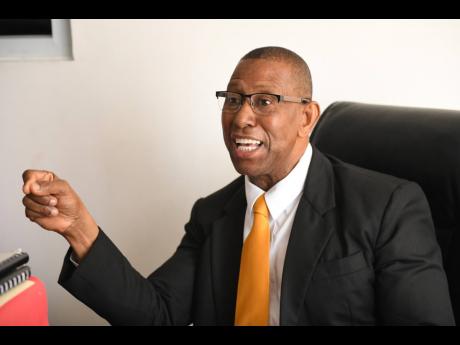
The defense team representing fraud-accused DPP Anthony Armstrong is expected to make a decision soon on whether they will challenge a decision by the Office of Director of Public Prosecutions (ODPP) in Jamaica, to transfer him to the Home Circuit Court.
The lead defense attorney Hugh Wildman, said he believes that the ODPP was wrong in principle to have transferred the matter. Wildman told Jamaica Gleaner that Armstrong’s legal team is considering taking the matter for a judicial review.
“Judicial review proceedings are now developed, where the exercise of the powers of the DPP are subject to judicial review, and I’m quite sure this is one occasion where it could be … .He has a legitimate expectation that he will be afforded the protection of a committal proceeding law, and he’s been deprived of that. So we think that this is justifiable action, if we choose to go that route, to challenge by way of judicial review,” Wildman told reporters in Kingston.
He said, “there was no need for this. If the DPP’s office thinks that the clerk cannot manage the submission, let her come up here and respond to it, let the Crown counsel come and respond to it or ask for a new date. But you don’t do that you take this draconian step of sending it down to the Supreme Court,”

In November last year, Armstrong was arrested and slapped with several fraud-related charges. It is alleged that the Antiguan DPP sold three properties belonging to a former client without permission some 18 years ago.
Last week, the case against Armstrong and his co-accused, Shelly-Ann Peart Campbell, who is the cousin of the complainant, was then transferred and their bail was revoked but their bail was reinstated when they appeared in the high court.
Armstrong was offered $500,000 bail and Peart Campbell, $300,000. They are to return to court on March 22.
This story was first published by Antigua News on : antigua.news/2023/01/30/armstrongs-defense-cries-foul-questioning-the-actions-of-dpp. © 2023 Antigua News. Republication without permission is not allowed.

About the author
The Editorial Staff refers to all reporters employed by Antigua.news. When an article is not an original creation of Antigua.news—such as when it is based on a press release, other media articles, letters to the editor, or court decisions—one of our staff members is responsible for overseeing its publication.
Read our editorial standards and corrections policy. Spotted an error? Contact the newsroom.
More from Caribbean
View section
Dominica Says EU Sets June 2028 Deadline to End CBI Programmes or Risk Visa-Free Access
Government seeks transition support and alternative revenue options as regional talks continue over the future of citizenship by investment.
By Shermain Bique-Charles

VIDEO: Doctors at Dominica China Friendship Hospital Stage Protest Outside Medical Facility
Healthcare professionals at the Dominica China Friendship Hospital gather outside the medical facility in an apparent protest, raising concerns over issues yet to be officially confirmed.
By Cory Wayland
St. Kitts DPP Seeks Antigua’s Help in Outstanding Case Involving Former Resort Clerk
By Shermain Bique-Charles

Royal Caribbean in Talks to Buy Half of Sandals in Reported $3 Billion Deal
By Shermain Bique-Charles
Comments
Be the first to comment.