
NODS rolls out activities for Disaster Risk Reduction Week

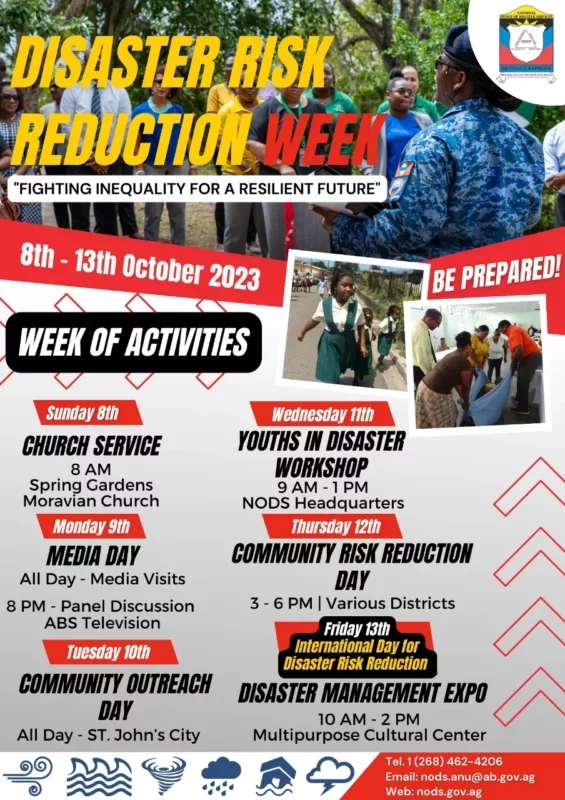
Several activities will take place next week in lead up to the observance of International Day for Disaster Risk Reduction on October 13th.
This year’s theme is “Fighting inequality for a resilient future”.
The National Office of Disaster Services (NODS) has organized a number of events starting with a service at the Spring Gardens Moravian Church at 8am on Sunday, October 8th.
On Monday, October 9th, NODS personnel and individuals will conduct interviews on ABS Television and various radio stations throughout the day as part of the media day, and a panel discussion will be held on ABS Television at 8pm.
Tuesday, October 10th is designated as Community Outreach Day during which tsunami warning signs will be erected throughout St. John’s.

On Wednesday, October 11th, NODS will host a Youth in Disaster Workshop from 9am to 1pm, with participation invited from each secondary school on the island.
Thursday, October 12th is Community Risk Reduction Day, with District Disaster Coordinators volunteering on behalf of NODS to interact with residents in their respective communities and distribute educational materials.
The activities will conclude on Friday, October 13th, which marks the International Day for Disaster Risk Reduction.
The day will be marked with a Disaster Management Expo from 10 am to 2 pm at the Multipurpose Cultural Centre, with several groups joining NODS to take part in this interactive and educational event.
International Day for Disaster Risk Reduction is celebrated every year on October 13th, highlighting the efforts of communities around the world in reducing their exposure to disasters and raising awareness about the risks they face.
This story was first published by Antigua News on : antigua.news/2023/10/07/nods-rolls-out-activities-for-disaster-risk-reduction-week. © 2023 Antigua News. Republication without permission is not allowed.

About the author
The Editorial Staff refers to all reporters employed by Antigua.news. When an article is not an original creation of Antigua.news—such as when it is based on a press release, other media articles, letters to the editor, or court decisions—one of our staff members is responsible for overseeing its publication.
Read our editorial standards and corrections policy. Spotted an error? Contact the newsroom.
More from Antigua and Barbuda
View section
Three-Year-Old Girl Found in Nut Grove Safely Reunited with Family
Police thank the public for responding to an appeal and urge parents and guardians to remain vigilant.
By Shermain Bique-Charles

Italis Among Two Killed in Creek Side Shooting
A 49-year-old man and an 18-year-old woman died after gunmen reportedly opened fire outside a shop.
By Shermain Bique-Charles

Police Seek Family of Three-Year-Old Girl Found Alone in Nut Grove
The child, who identified herself as Mya, is being cared for at Grays Farm Police Station.
By Shermain Bique-Charles

Matthew Condemns Fatal Creek Side Shooting of Two Rastafarian Community Members
St. John’s Rural South representative urges calm and acknowledges residents’ longstanding concerns about crime and safety.
By Shermain Bique-Charles
Comments
Be the first to comment.