
St Kitts and Nevis will discontinue hurricane warning for Tammy

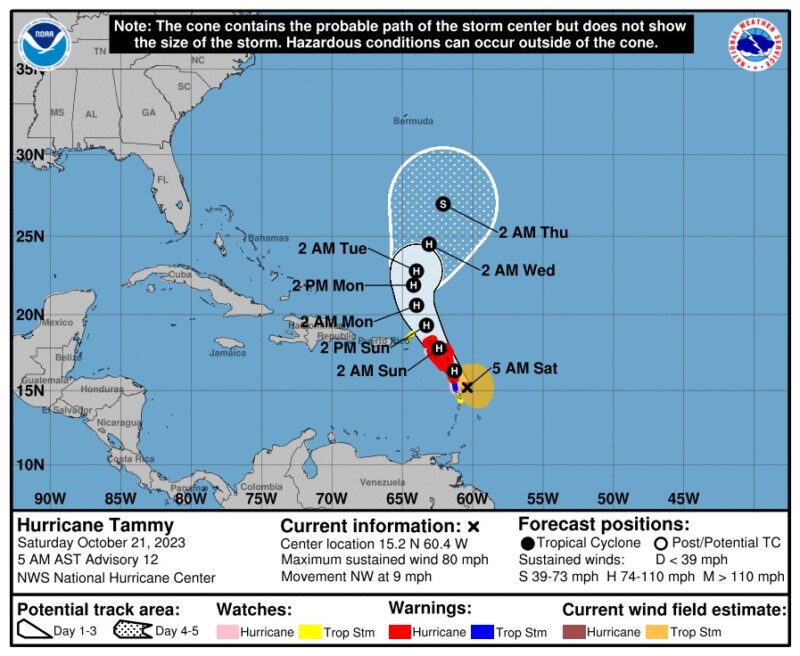
The hurricane warning for St. Kitts and Nevis will be lifted at 8 PM, according to Senior Meteorologist Elmo Burke.
During a media conference this evening, it was revealed that as of 5 PM, Hurricane Tammy was positioned approximately 95 miles east of the islands.
Burke stated that based on the current trajectory, Tammy is expected to travel northwesterly at a speed of about 10 miles per hour, likely to keep most of the tropical storm winds away from St. Kitts and Nevis. Therefore, the hurricane warning will be discontinued at 8 PM.
Despite this, the islands still anticipate additional overcast conditions to persist tonight and tomorrow, along with showers and thunderstorms.
Because of this, St. Kitts and Nevis may experience increased rainfall activity and a heightened risk of flash flooding. The National Emergency Operations Centre will remain active overnight to monitor the rainfall, and shelters will remain open.
Abdias Samuel, the National Disaster Coordinator at the National Emergency Management Agency (NEMA), has stated that updates regarding reopening the Ports of Entry will be given tomorrow morning.
The public is still advised to stay home and avoid the streets due to expected rainfall.
Meanwhile, Brent Dyer of the Nevis Disaster Management Department has reported that sporadic periods of rainfall have been experienced on Nevis, particularly on the northern side of the island.
Although wind speeds have died down a bit, some areas are still in a bit of a calm.
Eight persons are in shelters, and Dyer is appealing to the public to remain off the streets and not to be fooled by the wind speed lull since wind conditions are expected to deteriorate as the evening progresses.

This story was first published by Antigua News on : antigua.news/2023/10/21/st-kitts-and-nevis-will-discontinue-hurricane-warning-for-tammy. © 2023 Antigua News. Republication without permission is not allowed.

About the author
The Editorial Staff refers to all reporters employed by Antigua.news. When an article is not an original creation of Antigua.news—such as when it is based on a press release, other media articles, letters to the editor, or court decisions—one of our staff members is responsible for overseeing its publication.
Read our editorial standards and corrections policy. Spotted an error? Contact the newsroom.
More from Caribbean
View section
BREAKING | Dominica Heads to the Polls on December 16
Nomination Day is November 30 as Prime Minister Roosevelt Skerrit seeks a fresh mandate for the Dominica Labour Party.
By Shermain Bique-Charles

DOMINICA: Relief as Three Missing Men Are Found Alive at Sea Near Aves Islands
Davel Baron, Ryan Royer and a third man were rescued by a cargo vessel after being found drifting at sea, bringing relief following days of uncertainty over their whereabouts.
By Cory Wayland

Two Men Vanish at Sea in Dominica, Sparking Growing Fears for Their Safety
Police issue missing-person alerts for Davel Baron and Ryan Royer as concerns grow over their whereabouts.
By Cory Wayland

Saint Lucia Makes Decision on Citizenship by Investment Programme Amid EU Pressure
Prime Minister Philip J. Pierre confirms his government has formally responded to the European Union but says the decision will remain confidential until Brussels acknowledges receipt of the correspondence.
By Cory Wayland
Comments
Be the first to comment.