
Sunshine Hub Still on The Government’s Mind

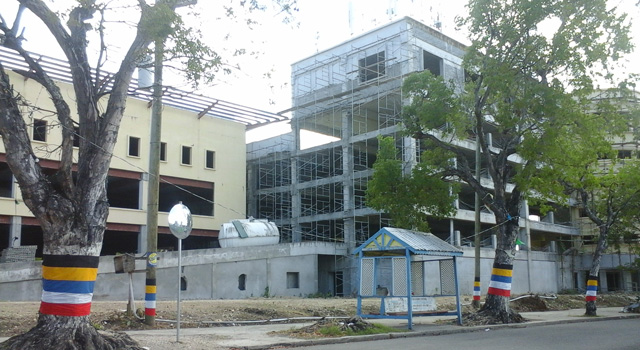
During his address, the Governor General of Antigua and Barbuda, Sir Rodney Williams, highlighted the government’s plans for redevelopment, with a specific focus on addressing the challenges posed by an unused car park called The Sunshine Hub, located at the top of High Street.
Governor General Williams shared insights into the government’s inherited successes and failures, detailing the efforts to rectify existing issues and transform underutilized structures into valuable assets for the community.
The government acquired The Sunshine Hub, which was originally built over 15 years ago on the city’s green space, for a small fraction of its original cost.
However, despite successful attempts at fixing most of the inherited failures, The Sunshine Hub presented a unique set of challenges that the government aims to tackle in the near future.
Governor General Williams revealed that the Ministry of Works had enlisted engineers and experts to examine The Sunshine Hub, with the intention of making recommendations for its rehabilitation.
Unfortunately, due to the Covid-19 pandemic, the government had to divert its resources to more pressing needs, temporarily delaying its plans for transformation.
As the country’s revenues show signs of recovery, Governor General Williams conveyed the government’s commitment to revisiting The Sunshine Hub project.
The aim is to convert the unfinished structure into a more useful space for the community, aligned with broader efforts to enhance infrastructure and public amenities.
The Sunshine Hub car park emerges as a focal point in Antigua and Barbuda’s ambitious redevelopment plans, as outlined by Governor General Sir Rodney Williams.

This story was first published by Antigua News on : antigua.news/2023/12/09/sunshine-hub-still-on-the-governments-mind. © 2023 Antigua News. Republication without permission is not allowed.

About the author
The Editorial Staff refers to all reporters employed by Antigua.news. When an article is not an original creation of Antigua.news—such as when it is based on a press release, other media articles, letters to the editor, or court decisions—one of our staff members is responsible for overseeing its publication.
Read our editorial standards and corrections policy. Spotted an error? Contact the newsroom.
More from Antigua and Barbuda
View section
CARICOM Represented in China as Delegates Attend International Media Programme
Representatives from eight CARICOM countries are taking part in a two-week international media programme in China focused on cultural exchange, cooperation and regional perspectives.
By Cory Wayland

Antiguan Diplomat Claxton Duberry Chairs UN Security and Disarmament Session
The First Secretary at Antigua and Barbuda’s UN mission highlights the role of small states in shaping responses to global security challenges.
By Shermain Bique-Charles

Seven Government Nurses Among UWI Five Islands’ First Public Health Master’s Graduates
Minister Michael Joseph says scholarship support is strengthening healthcare expertise as eight professionals complete the programme.
By Shermain Bique-Charles

Browne Outlines Storage, Abattoir and Water Projects to Strengthen Food Supply
Prime minister says government is combining support for farms with infrastructure needed to store, process and market local production.
By Shermain Bique-Charles
Comments
Be the first to comment.