
Antigua and Barbuda and China WTO Ambassadors Hold Bilateral Meeting

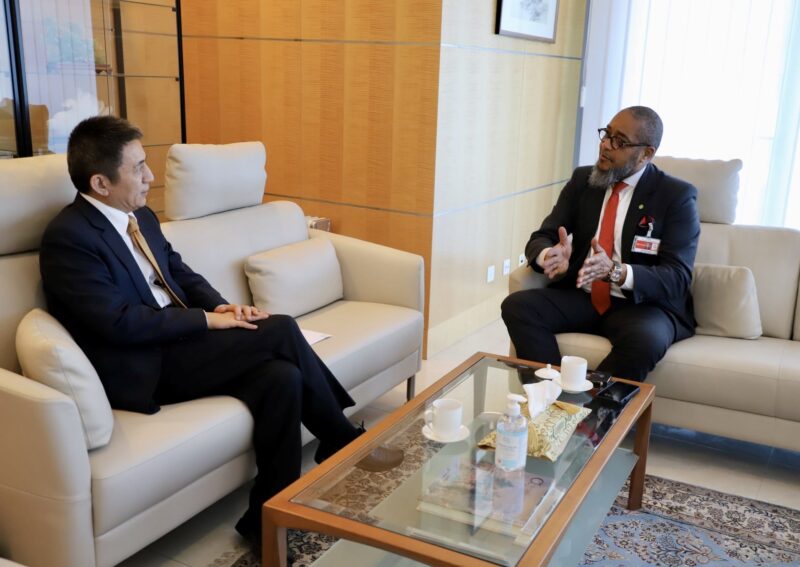
On Monday, the WTO ambassador of the People’s Republic of China, HE Mr Li Chenggang, and the WTO ambassador of Antigua and Barbuda, HE Mr Colin Murdoch, held a bilateral meeting at the Embassy of the People’s Republic of China in Geneva.
During the meeting, both ambassadors discussed various issues related to their countries’ ongoing work at the WTO, with a particular focus on the upcoming 13th ministerial conference in Abu Dhabi at the end of February.
Ambassador Li highlighted the long-standing and excellent relations between Antigua and Barbuda and China, which have continued for over forty years. He also mentioned the recent successful visit by PM Gaston Browne to China, where he met with Chinese leader Xi Jinping.
Ambassador Li emphasized that part of his responsibilities was to follow up on aspects of the decisions reached during Mr Browne’s visit.
Ambassador Murdoch stated that he expected relations between both countries to be strengthened following the meeting between Xi Jinping and PM Browne.
He expressed his commitment to working towards closer cooperation between China and Antigua and Barbuda at the WTO, noting that both countries had agreed in Beijing to strengthen cooperation in international agencies and bodies such as the WTO.

The two ambassadors discussed various issues that will come before the ministerial conference, including WTO reform, fisheries subsidies, and special and differential treatment for developing countries.
Ambassador Li noted that the OECS had been playing a very active role in the ongoing WTO negotiations and expressed his wish to establish a regular consultation mechanism even after the ministerial conference.
On the matter of WTO reform, Ambassador Murdoch briefed Ambassador Li on the OECS position on reform of the WTO dispute settlement system.
He took the opportunity to remind the ambassador of the case brought by Antigua and Barbuda against the United States (DS 285), which Antigua and Barbuda won but which still remains unsettled.
Ambassador Li informed that as a former trade negotiator for China, he was familiar with the case. Both diplomats agreed to establish regular meetings and to work more closely on WTO issues.
The meeting concluded with both ambassadors expressing their satisfaction with the progress made and their commitment to continuing their close cooperation on WTO matters.
This story was first published by Antigua News on February 13, 2024: antigua.news/2024/02/13/antigua-and-barbuda-and-china-wto-ambassadors-hold-bilateral-meeting. © 2024 Antigua News. Republication without permission is not allowed.

About the author
The Editorial Staff refers to all reporters employed by Antigua.news. When an article is not an original creation of Antigua.news—such as when it is based on a press release, other media articles, letters to the editor, or court decisions—one of our staff members is responsible for overseeing its publication.
Read our editorial standards and corrections policy. Spotted an error? Contact the newsroom.
More from Antigua and Barbuda
View section
‘They Can’t Dictate That’: Freeland Rejects Player Pressure Over National Coach
Freeland defends the coaching staff and says players should demonstrate their value through training and performance.
By Shermain Bique-Charles

Search Ends as All Four Juveniles Who Escaped Bolans Police Station Return to Police Custody
Police apprehended three of the juveniles during a search operation in Liberta on Thursday morning, less than a day after the fourth surrendered to authorities.
By Cory Wayland

Farmers Given 90 Days to Plant as Government Launches 102-Acre Land-Clearing Programme
Antigua launches a 102-acre agricultural land-clearing programme requiring beneficiaries to establish viable crops within 90 days of land preparation.
By Cory Wayland

Freeland Blames Poor Player Commitment for Antigua and Barbuda’s Basketball Withdrawal
Basketball president acknowledges unpaid stipends but says repeated low practice attendance drove the decision to withdraw.
By Shermain Bique-Charles
Comments
Be the first to comment.