
Gov’t attorney rejects claims that the Barbuda airport might be demolished.

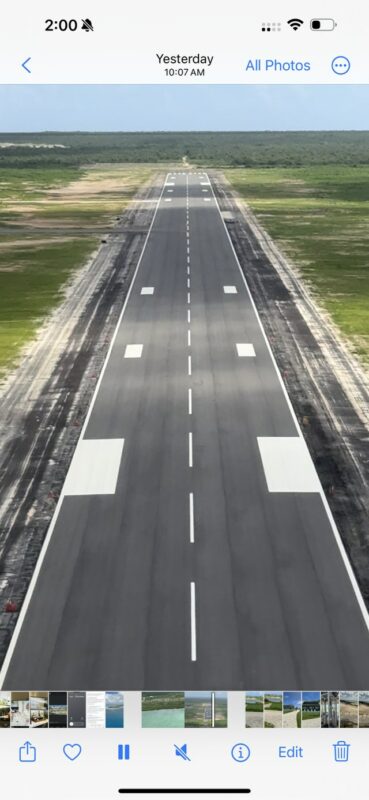

The legal battle over constructing a new airport in Barbuda continues as the government faces opposition from appellants John Mussington and Jacklyn Frank.
Leslie Thomas KC, lawyer for the appellants, has suggested that the government should tear down the airport and follow proper legal procedures as set out in the Physical Planning Act 2003 and other laws.
However, Dr. David Dorsett, who represented the government in the case, dismissed the notion and explained that several factors prevented the destruction of the facility, which is soon to be officially completed.
Speaking on the Observer AM show earlier this week, Dr. Dorsett responded to Thomas’ statements and said that the case “has not been resurrected to life eternal; like Lazarus, it will die because when one looks at enforcement”.

He also explained that several considerations must be taken into account before any corrective action can be undertaken, such as the statement of policy issued by the minister relative to the development, the nature and extent of the breach, the extent of the damage to the environment, the likely expense involved in bringing remedial measures, and what is going to be the benefit.
Dr. Dorsett emphasized that the airport was not like a sandcastle that can be easily washed away by the sea.
He also noted that it’s time for regional governments to accept that times have changed and that what used to be acceptable in the Eastern Caribbean is no longer acceptable.
However, Dr. Dorsett reiterated that having an airport in Barbuda is a good thing, comparing it to the airports on Saint Martin/Sint Maarten.
He pointed out that the government considers the appellants to be “busybodies” and that having an international airport in Barbuda is critical to the sister isle’s economy and development.
This story was first published by Antigua News on : antigua.news/2024/03/02/govt-attorney-rejects-claims-that-the-barbuda-airport-might-be-demolished. © 2024 Antigua News. Republication without permission is not allowed.

About the author
The Editorial Staff refers to all reporters employed by Antigua.news. When an article is not an original creation of Antigua.news—such as when it is based on a press release, other media articles, letters to the editor, or court decisions—one of our staff members is responsible for overseeing its publication.
Read our editorial standards and corrections policy. Spotted an error? Contact the newsroom.
More from Antigua and Barbuda
View section
Parker Defends Call for Age of Consent at 18 in Response to ASPIRE
Senator calls for stronger protection against sexual exploitation alongside adolescent healthcare, education and safeguards for relationships between young people close in age.
By Shermain Bique-Charles

Greene Says CHOGM Could Open Doors for UWI Five Islands
Foreign minister identifies international student recruitment and academic connections as potential longer-term opportunities. Meta description: Greene says CHOGM could help UWI Five Islands promote its programmes and build connections with Commonwealth countries.
By Shermain Bique-Charles

West Indies Oil Seeks Coordination on Fuel Deliveries During CHOGM
Police ask the company to provide delivery dates and times so movements can be coordinated with security arrangements.
By Cory Wayland

Two Women Sentenced to Prison Over $4,405 Clothing Theft in St. John’s
Cleo Lemonious and Latoya Pilliner pleaded guilty to stealing clothing from Hampton Boutique and were handed over to immigration authorities following their sentencing.
By Cory Wayland
Comments
Be the first to comment.