
Sir Ron reacts to developments in Haiti

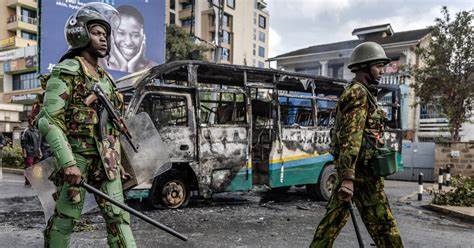
Antiguan and Barbuda’s Ambassador to the United States and the Organization of American States OAS is reacting to the civil unrest in Haiti and the resignation of Ariel Henry.
The defected leader of Haiti resigned Monday to make way for the creation of a transitional committee and the possible selection of a new leader.
Sir Ronald Sanders is welcoming the resignation noting for the new arrangements to work the relevant stakeholders in Haiti must have consensus.
“Dr Henry who is extremely unpopular commanded no support in Haiti except the small kaval of which he had formed the government needed to go”, he said.
“He had become an obstacle to solving the problems of Haiti, no one had any confidence in him,” he added.
The resignation follows a Caribbean Community and Common Market (CARICOM), meeting in Jamaica on Monday where regional leaders noted they had agreed to set up a transitional council to lay the foundations for elections in Haiti.
“We are pleased to announce the commitment to transitional governance arrangement which paves the way for a peaceful transition of power, continuity of governance, and action plan for near-term security and the road to free and fair elections. It further seeks to assure that Haiti will be governed by the rule of law,” said Guyana leader and CARICOM Chairman Irfaan Ali in a news conference, flanked by other Caribbean leaders.
Henry’s resignation will take effect after this special council has been formed.
The council’s initial task is to select an interim prime minister.
“It is supposedly being drawn from a group of representative organizations of the Haitian people which is what the international community has been urging for some time. What they have been saying is that we need a Haitian solution to this problem,” Sanders explained.
This story was first published by Antigua News on : antigua.news/2024/03/13/sir-ron-reacts-to-developments-in-haiti. © 2024 Antigua News. Republication without permission is not allowed.

About the author
The Editorial Staff refers to all reporters employed by Antigua.news. When an article is not an original creation of Antigua.news—such as when it is based on a press release, other media articles, letters to the editor, or court decisions—one of our staff members is responsible for overseeing its publication.
Read our editorial standards and corrections policy. Spotted an error? Contact the newsroom.
More from Antigua and Barbuda
View section
More Than 12,000 Registered for CHOGM as Overseas Participation Nears 5,000
Organisers say the accreditation total includes local workers and participants preparing to support the Commonwealth gathering.
By Shermain Bique-Charles

VIDEO: Sherese ‘Washington’ Bramble Arrested During Live CHOGM Town Hall Broadcast
Sources say police were seeking Bramble in connection with a separate matter unrelated to the meeting.
By Editorial Staff

Emergency Response Teams to Stage Mass Casualty Drill at Scotts Hill Ahead of CHOGM
Emergency personnel will simulate a serious vehicle crash to test hospital readiness, while a separate evacuation exercise is planned for the CHOGM opening ceremony venue.
By Cory Wayland

Karim Edwards’ Trial Over Fatal Friars Hill Road Crash Postponed Until December
More than four years after the collision that claimed the life of medical student Kenneth Mathew and left Priyanjana Das with life-altering injuries, the accused driver is still awaiting trial.
By Cory Wayland
Comments (1)
Man on the sea March 13, 2024, 9:38 AM