
Princess of Wales diagnosed with cancer

by Mick the Ram
In shock news, the Princess of Wales has announced that she has cancer and has begun a course of “preventative chemotherapy”.
The 42-year-old had abdominal surgery in January and was believed to have been recuperating well, but seemingly doctors discovered the presence of cancer post operation.
It has come as a huge shock, following on from King Charles III announcing he too was suffering from cancer.
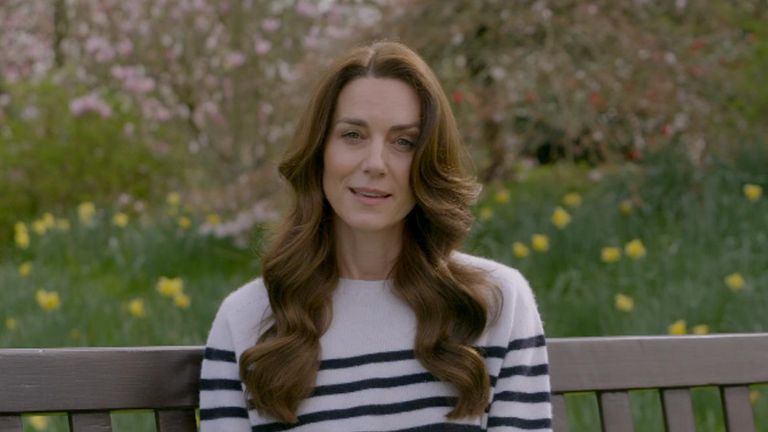
Kate has bravely filmed an unprecedented and highly emotional video message revealing her news, but was keen to stress that she was “going to be OK”.
She said that Prince William and herself had taken time to explain everything to their three children and asked for time to focus on making a full recovery.
Shock to everyone
Catherine’s cancer was not initially discovered, indeed when she underwent major abdominal surgery at The London Clinic in January, it was stressed that it was NOT cancerous. Therefore the news that was released at 6pm on Friday 22 March has come as a huge shock to everyone.
Although the initial operation was a success, Kate’s message which was filmed at Windsor earlier in the week, explained how doctors had carried out post-operative tests and the results of these had revealed that cancer was indeed present. She said that they had been doing everything to process and manage the news privately, for the sake of their young family.
Protecting the children
In her video, Kate sits alone on a bench in a pleasant garden setting and tells the cameras that informing their children – George, Charlotte and Louis – in a way that is appropriate for them, was their first concern.
“We had to reassure them that I am going to be ok” she said, going on to say that she told them that she was well and importantly, that she is getting stronger every day by “focusing on the things that will help me heal; in my mind, body and spirits.”
She also remarked how having William by her side is a great source of comfort, as is the “love, support and kindness that has been shown by so many of you.”
Recovery from surgery held up start of treatment
Kate explained how her medical team advised her to begin a course of preventative chemotherapy, but she needed to recover from her surgery before she was strong enough to start. She said she was now in the early stages of that treatment, believed to have commenced in late February.
She asked that people understood that the family now needed some time, space and privacy while she completed her treatment. “My work has always brought me a deep sense of joy and I look forward to being back when I am able, but for now I must focus on making a full recovery.”

Thoughts for others
Even amidst her own personal anguish, there was a message for fellow cancer sufferers: “At this time, I am also thinking of all those whose lives have been affected by cancer. For everyone facing this disease, in whatever form, please do not lose faith or hope. You are not alone.”
Request to steer clear of speculation
Kensington Palace has said it will not be sharing details of what kind of cancer the princess has, or what stage of cancer it is and has asked people not to speculate. They did say that the Princess is in “good spirits” and is “hugely grateful to the medical team for the care they are providing to her”.
Chance to get away
It is understood that the King and Queen have both been informed of the news and it is thought that the announcement was made not because of unpleasant social media speculation about her health and whereabouts, even though that has been very unpleasant and has caused a lot of upset.
It was instead it appears, more because their children have broken up from school for Easter, giving them the opportunity to get away privately and protect them from the inevitable fall out from the news going public.
This story was first published by Antigua News on : antigua.news/2024/03/22/princess-of-wales-diagnosed-with-cancer. © 2024 Antigua News. Republication without permission is not allowed.

About the author
The Editorial Staff refers to all reporters employed by Antigua.news. When an article is not an original creation of Antigua.news—such as when it is based on a press release, other media articles, letters to the editor, or court decisions—one of our staff members is responsible for overseeing its publication.
Read our editorial standards and corrections policy. Spotted an error? Contact the newsroom.
More from World
View section
Democrats Win Congress in Major Setback for Donald Trump
Victories in Republican strongholds hand Democrats control of the House and Senate.
By Shermain Bique-Charles

Nine Killed as Learjet 60 Crashes Into Florida Neighbourhood
The Learjet 60 crashed near Cresthaven in Palm Beach County while travelling from Texas to the Bahamas, prompting mass evacuations and an investigation by US aviation authorities.
By Cory Wayland

Spain Train Crash: 68 Dead, 77 Injured as Safety Decisions Face Scrutiny
At least 15 people are seriously injured after an AVE hit a stationary Iryo train near Urda. Spain announces national mourning as officials examine the order to restart after a safety-system failure.
By Dario Item

Spain Train Crash: At Least 30 Dead and Dozens Injured in Toledo
Regional authorities confirm a higher death toll and the evacuation of injured passengers after the Renfe–Iryo collision, nine months after Adamuz and 32 days before Spain’s election.
By Dario Item
Comments
Be the first to comment.