
NODS reports successful Tsunami Exercise Caribe Wave

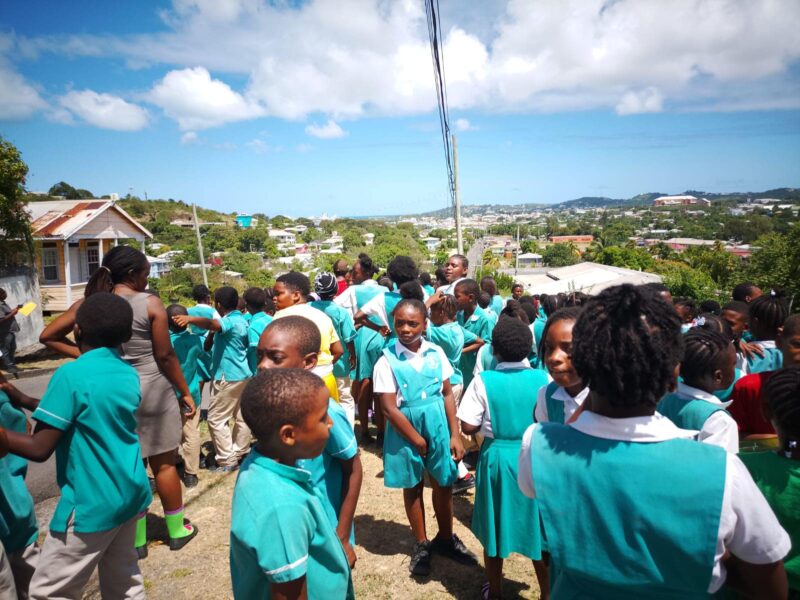
On Thursday gone, a significant number of schools and businesses took part in the Caribe Wave Tsunami Exercise, an annual drill that aims to assess the region’s preparedness in the event of a possible tsunami.
The turnout was remarkably higher than the previous year’s, with around 70 participants compared to only 25.
Among the participants were pre-schoolers, primary, secondary, and tertiary students, and employees from both public and private sectors.
To ensure the event’s success, the National Office of Disaster Services (NODS) led the coordination in Antigua and Barbuda with the help of several partners, including the District Disaster Committees, the Met Office, the police and defence forces, the Antigua and Barbuda Red Cross, the Emergency Medical Services (EMS), and the Antigua and Barbuda Search and Rescue (ABSAR).
To simulate a possible tsunami, the exercise involved an earthquake that occurred in the Puerto Rico Trench. Participants were required to evacuate to their designated tsunami safe areas promptly and safely, which they achieved overall.
However, the drill also revealed some issues that require attention, such as the need for entities to develop disaster management plans that cover all hazards, including tsunamis, and to conduct regular drills.

It is crucial that individuals are aware of the plan’s contents and the necessary actions to take in an emergency.
The drill was initiated through an alert sent via the Common Alerting Protocol (CAP) app, which some residents have downloaded on their smartphones.
Despite its usefulness, NODS noted several challenges with the app, such as some individuals’ inability to access it on their phones or get it downloaded.
Therefore, NODS continues to collaborate with its partners to rectify these issues and ensure that everyone is well-prepared in the event of a tsunami.
This story was first published by Antigua News on : antigua.news/2024/03/23/nods-reports-successful-tsunami-exercise-caribe-wave. © 2024 Antigua News. Republication without permission is not allowed.

About the author
The Editorial Staff refers to all reporters employed by Antigua.news. When an article is not an original creation of Antigua.news—such as when it is based on a press release, other media articles, letters to the editor, or court decisions—one of our staff members is responsible for overseeing its publication.
Read our editorial standards and corrections policy. Spotted an error? Contact the newsroom.
More from Antigua and Barbuda
View section
Three-Year-Old Girl Found in Nut Grove Safely Reunited with Family
Police thank the public for responding to an appeal and urge parents and guardians to remain vigilant.
By Shermain Bique-Charles

Italis Among Two Killed in Creek Side Shooting
A 49-year-old man and an 18-year-old woman died after gunmen reportedly opened fire outside a shop.
By Shermain Bique-Charles

Police Seek Family of Three-Year-Old Girl Found Alone in Nut Grove
The child, who identified herself as Mya, is being cared for at Grays Farm Police Station.
By Shermain Bique-Charles

Matthew Condemns Fatal Creek Side Shooting of Two Rastafarian Community Members
St. John’s Rural South representative urges calm and acknowledges residents’ longstanding concerns about crime and safety.
By Shermain Bique-Charles
Comments
Be the first to comment.