
Ex-PM honored with Lifetime Achievement Award for public service and advocacy.

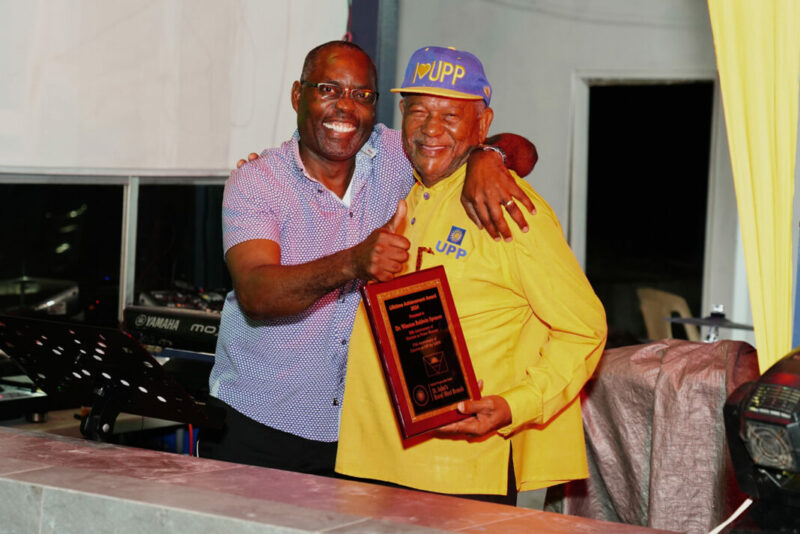
Over the weekend of March 23-24, the United Progressive Party (UPP) administration hosted a two-day celebration of the “Sunshine Legacy” of former Prime Minister Dr. Winston Baldwin Spencer.
The celebrations began on Saturday with a Community Social at Pensioner’s Beach, which provided the perfect setting for the 20th anniversary of Dr. Spencer’s election.
Attendees enjoyed cocktails, local cuisine and music, and electrifying performances from the Halcyon Steel Orchestra, Queen Ivena and the Kaution Band.
Dr. Spencer served as the first Political Leader of the UPP for 25 years and was first elected as Member of Parliament for St. John’s Rural West in March 1989.
He served for six terms, two of which he also served as Prime Minister. At the Community Social, Richard Lewis, the current MP of St. John’s Rural West, presented Dr. Spencer with a Lifetime Achievement Award for his outstanding service to the community and the nation.
In his acceptance speech, Dr. Spencer expressed pride in his Party’s accomplishments and philosophy of putting people first.

He highlighted the UPP’s initiatives that brought relief to the people, including the Millennium Act that helped to regularize the status of many non-nationals.
Former Political Leader of the UPP, Mr. Harold Lovell, praised Dr. Spencer for restoring the country’s reputation on the international stage, after years of scandals and mismanagement.
The celebrations continued on Sunday with a morning worship service at the Green Bay Moravian Church, where Dr. Spencer was honored and congratulated by constituents.
Members of the Constituency Branch presented him with a gift basket of locally crafted products. The event was a testament to Dr. Spencer’s deep love for, and commitment to the people of St. John’s Rural West and Antigua and Barbuda.
This story was first published by Antigua News on : antigua.news/2024/03/25/ex-pm-honored-with-lifetime-achievement-award-for-public-service-and-advocacy. © 2024 Antigua News. Republication without permission is not allowed.

About the author
The Editorial Staff refers to all reporters employed by Antigua.news. When an article is not an original creation of Antigua.news—such as when it is based on a press release, other media articles, letters to the editor, or court decisions—one of our staff members is responsible for overseeing its publication.
Read our editorial standards and corrections policy. Spotted an error? Contact the newsroom.
More from Antigua and Barbuda
View section
Missing Man Ackly Roberts, 92, Found Dead by Police
Roberts had been reported missing after he was last seen on November 2.
By Shermain Bique-Charles

Commonwealth Plans Trade and Investment Conference to Advance US$2 Trillion Goal
Botchwey says ministers and business leaders will meet next year to tackle barriers and support investment.
By Shermain Bique-Charles

Gaston Browne Takes Commonwealth Chair as Samoa Hands Over Leadership
A ceremonial presentation marks the transfer of the Chair-in-Office role to Antigua and Barbuda.
By Shermain Bique-Charles

King Charles Expresses Profound Sorrow Over Transatlantic Slavery
Commonwealth head calls for partnerships that address historic wrongs through education, jobs and resilience.
By Shermain Bique-Charles
Comments
Be the first to comment.