
Japan to Appoint New Ambassador to Antigua and Barbuda as Matsubara Yutaka Concludes Tenure

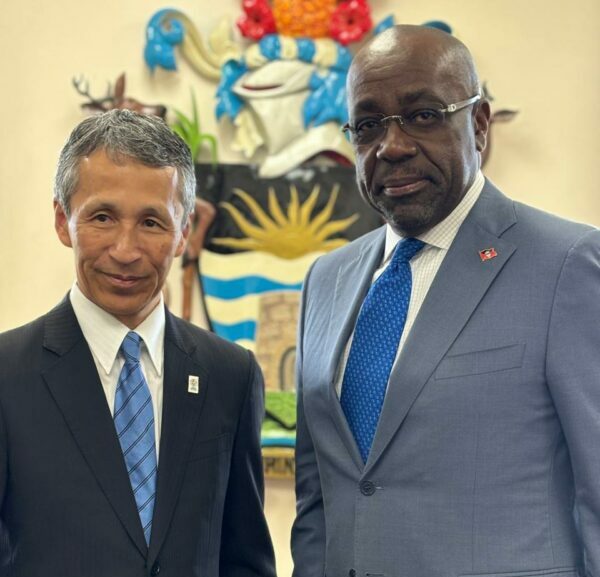
Japan is set to appoint a new Ambassador to Antigua and Barbuda as the current ambassador, Matsubara Yutaka, will conclude his tenure on December 10, 2024.
The ambassador made a farewell visit to St. John’s on Tuesday, engaging with Foreign Affairs Minister E.P. Chet Greene and Permanent Secretary Ambassador Clarence Pilgrim.
Minister Greene expressed his gratitude to the ambassador and the Japanese government for their longstanding support of Antigua and Barbuda since the establishment of diplomatic relations following independence.
He particularly acknowledged Japan’s contributions, including the donation of equipment to help tackle the annual sargassum seaweed issue.
“The seaweed poses a significant challenge for us as we strive to attract tourists to our country. When it washes ashore from across the Atlantic, it renders our beaches unusable and creates an unpleasant odor as it begins to decompose,” he explained.
The ambassador mentioned that the next funding cycle from the Japanese government will commence in April next year and encouraged the minister to submit requests for support for both the 2025 and 2026 cycles.
He also highlighted that a Japanese professor has been conducting a short course at the University of the West Indies FIC.
In response, Minister Greene thanked the ambassador again for the assistance, sharing that the government has ambitious plans for the university, particularly in developing human resources, and welcomed the specialized training in the blue economy.
He expressed hope that the new ambassador will continue the positive initiatives initiated by Ambassador Matsubara.

This story was first published by Antigua News on : antigua.news/2024/11/27/japan-to-appoint-new-ambassador-to-antigua-and-barbuda-as-matsubara-yutaka-concludes-tenure. © 2024 Antigua News. Republication without permission is not allowed.

About the author
The Editorial Staff refers to all reporters employed by Antigua.news. When an article is not an original creation of Antigua.news—such as when it is based on a press release, other media articles, letters to the editor, or court decisions—one of our staff members is responsible for overseeing its publication.
Read our editorial standards and corrections policy. Spotted an error? Contact the newsroom.
More from World
View section
Powerful Earthquake Strikes China Leaving 16 Dead And Hundreds Of Homes Destroyed
Rescue teams race against time in Tibet after a magnitude 7 earthquake leaves dozens injured, displaces thousands and triggers widespread destruction.
By Cory Wayland

Kenyan Preacher Paul Mackenzie Convicted of Murdering 191 People in Shakahola Massacre
Former church leader found guilty alongside 28 others in a case involving the deaths of 190 children and one adult who were allegedly subjected to deadly religious fasting.
By Cory Wayland

Priest Speaks About Life and Death in Final Sermon Before Falling Crucifix Kills Him During Mass
Father Patricio Sánchez urged worshippers to cherish their time with God and loved ones before a large wooden crucifix fell and fatally struck him during a church service in Ecuador.
By Cory Wayland

Florida Attorney General James Uthmeier Announces Arrest Warrant for Former Cuban Leader Raúl Castro Over 1996 Aircraft Shootdown
James Uthmeier confirms murder conspiracy charge against the 95-year-old former president over the 1996 shootdown of two civilian aircraft that killed four men.
By Cory Wayland
Comments (1)
Just wanna visit more November 27, 2024, 7:53 AM