
Opposition Buried a Seed That Has Now Grown, Says Lamin Newton

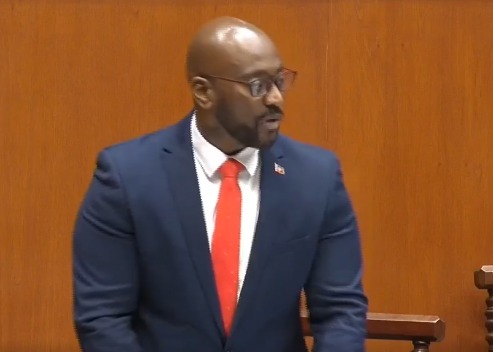
Senator Lamin Newton, the newest ABLP Senator, delivered his inaugural speech at the Upper House of Parliament, recalling how opposition members “buried him.”
“You see, a few years ago, Madame President, the members of the other side, I’m going to say the opposition, they buried me, but what they didn’t understand is that they were burying a seed, and once you bury a seed, more than likely it will germinate, he said
Newton, who previously was a prominent member of the United Progressive Party, made the difficult decision to leave the organization due to his dissent on numerous key issues.
His departure did not go unnoticed, and shortly thereafter, he was embraced by the Antigua and Barbuda Labour Party (ABLP).
In a notable turn of events, he was recently appointed as a senator, marking a significant new chapter in his political career.

“Madam President, I also want to use this opportunity to express gratitude to our Prime Minister, the Honourable Gaston Browne, for reposing his confidence in me and appointing me to this Honourable House,” he said
Meanwhile, Opposition Senator Pearl Quinn Williams, another new addition, expressed her gratitude and excitement about joining the distinguished group.
“I rise to say how honored I am to be a member of this august body. I want to thank the Honourable Leader of the Opposition for reposing confidence in me. I also want to thank you, Madam President, and the Honourable Members of this House for the warm welcome that I received.
I assure you that I will uphold the Standing Orders of this Honourable House. I look forward to fostering a productive working relationship with you and all the other members as we serve the interests of the people of this country,” she said
This story was first published by Antigua News on : antigua.news/2024/12/19/opposition-buried-a-seed-that-has-now-grown-says-lamin-newton. © 2024 Antigua News. Republication without permission is not allowed.

About the author
The Editorial Staff refers to all reporters employed by Antigua.news. When an article is not an original creation of Antigua.news—such as when it is based on a press release, other media articles, letters to the editor, or court decisions—one of our staff members is responsible for overseeing its publication.
Read our editorial standards and corrections policy. Spotted an error? Contact the newsroom.
More from Antigua and Barbuda
View section
Minister Fernandez Hails Exceptional Performance of Antigua and Barbuda Airport Authority During Historic CHOGM 2026
Tourism and Civil Aviation Minister Charles Fernandez commends airport employees and supporting agencies for their coordination, professionalism and service during the historic Commonwealth gathering.
By Editorial Staff

Browne Says Commonwealth Trade Expansion Could Benefit Antigua and Barbuda
Prime Minister points to sourcing opportunities as leaders pursue closer economic ties
By Shermain Bique-Charles

VIDEO: Ministry of Education Investigating Confrontation Involving Secondary School Students
Students from Jennings Secondary School and Princess Margaret Secondary School were reportedly involved in an incident captured on video and circulated on social media.
By Cory Wayland

Browne Hails Billions in Funding Pledges as Major Success of CHOGM 2026
Eye health and nature initiatives among the outcomes highlighted by the Prime Minister
By Shermain Bique-Charles
Comments (3)
Stone December 19, 2024, 5:45 AM
True anu December 19, 2024, 6:51 AM
Shina Charles December 19, 2024, 8:43 AM