
Chairman and Member Appointed to Public Service Commission

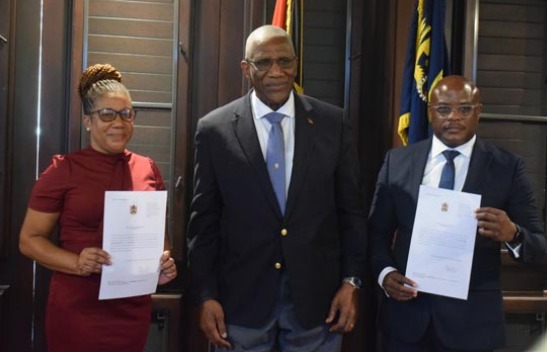
A new chairman has been appointed for the Antigua and Barbuda Public Service Commission (PSC), succeeding Lauchland Lake, who retired after a distinguished career spanning over fifty years.
Attorney at law, Peyton Knight, was sworn in during a ceremony at Government House, officiated by Governor General Sir Rodney Williams. Tracy Whity-Browne also took her oath as a member of the PSC during this event.
Sir Rodney remarked on Knight’s qualifications, stating, “Peyton Knight is no stranger to the public service realm.
With extensive experience as an attorney and a former public servant in the Ministry of Legal Affairs, he has a deep understanding of government operations.
His appointment as Chairman reflects the Cabinet’s confidence in him and his dedication to ensuring fair and just public service administration as well as reinforcing our governance values.”

Expressing gratitude towards the outgoing chairman, Knight acknowledged Lake’s exemplary leadership and integrity, recognizing the valuable role Lake played in guiding the PSC.
He stated, “I intend to draw on your expertise and knowledge in the years ahead.”
Knight outlined his vision for the reconstituted PSC, asserting the need for the Commission to actively pursue and implement government policies and agendas during its term.
He emphasized that the dedication of civil servants is crucial for achieving the nation’s socio-economic progress, which he deemed a top priority.
“The civil service has evolved into an effective and vibrant entity,” he affirmed, urging members not to remain passive in their responsibilities.
“We have a duty and an obligation to adapt to an ever-evolving world,” he declared.
Other members of the PSC include Aaron Armstrong and Nurse Natalie Southwell.
This story was first published by Antigua News on : antigua.news/2025/01/07/chairman-and-member-appointed-to-public-service-commission. © 2025 Antigua News. Republication without permission is not allowed.

About the author
The Editorial Staff refers to all reporters employed by Antigua.news. When an article is not an original creation of Antigua.news—such as when it is based on a press release, other media articles, letters to the editor, or court decisions—one of our staff members is responsible for overseeing its publication.
Read our editorial standards and corrections policy. Spotted an error? Contact the newsroom.
More from Antigua and Barbuda
View section
Minister Fernandez Hails Exceptional Performance of Antigua and Barbuda Airport Authority During Historic CHOGM 2026
Tourism and Civil Aviation Minister Charles Fernandez commends airport employees and supporting agencies for their coordination, professionalism and service during the historic Commonwealth gathering.
By Editorial Staff

Browne Says Commonwealth Trade Expansion Could Benefit Antigua and Barbuda
Prime Minister points to sourcing opportunities as leaders pursue closer economic ties
By Shermain Bique-Charles

VIDEO: Ministry of Education Investigating Confrontation Involving Secondary School Students
Students from Jennings Secondary School and Princess Margaret Secondary School were reportedly involved in an incident captured on video and circulated on social media.
By Cory Wayland

Browne Hails Billions in Funding Pledges as Major Success of CHOGM 2026
Eye health and nature initiatives among the outcomes highlighted by the Prime Minister
By Shermain Bique-Charles
Comments
Be the first to comment.