
ED Cards test to be carried out this weekend

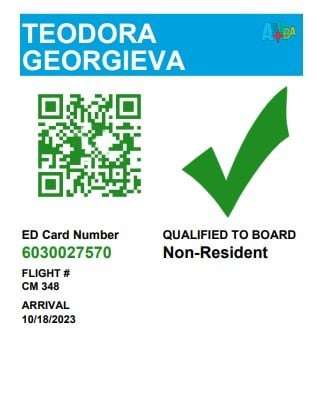
As Government continues to push forward in transitioning to electronic cards, necessary steps are being taken to ensure that the right system will be selected and used going forward.
A pilot study on the ED cards will be carried out this weekend at the VC Bird Airport. Once, successful a final decision will be made.
Cabinet Spokesperson Lionel ‘Max’ Hurst did however indicate that they would be able to give more information following the test this weekend.
A specific timeline for when this final decision will be made was not given. Initially, a December 31st deadline was shared for the initiative to be rolled out.
Three firms made proposals to Cabinet late last year.
An ED card, or Embarkation-Disembarkation card, is a mandatory online document that travelers must complete before entering certain destinations.

In presenting to Cabinet, all three firms addressed the capability of better marketing, improved research capability, and identification of persons of interest from any police database.
The Customs and Excise Division, The Immigration Department, the Inland Revenue Department, and Officials from the Ministry of Tourism and the Ministry of Finance were all present to evaluate the proposals and to help the Cabinet determine which is the better-suited firm.
Several Caribbean countries have implemented this new form.
The Virgin Islands and Dominica were the most recent islands to step into the digital age. Both country’s systems went live last November.
They join other islands like Aruba, Barbados, Bermuda, Curacao, St. Lucia, St. Kitts, Jamaica, The Bahamas, St. Maarten, and the Dominican Republic.
Turks and Caicos and Trinidad and Tobago are presently working on their portals.
This story was first published by Antigua News on : antigua.news/2025/01/23/ed-cards-test-to-be-carried-out-this-weekend. © 2025 Antigua News. Republication without permission is not allowed.

About the author
The Editorial Staff refers to all reporters employed by Antigua.news. When an article is not an original creation of Antigua.news—such as when it is based on a press release, other media articles, letters to the editor, or court decisions—one of our staff members is responsible for overseeing its publication.
Read our editorial standards and corrections policy. Spotted an error? Contact the newsroom.
More from Antigua and Barbuda
View section
Browne Vows to Defend China Partnership Despite Threat of Consequences
Prime Minister says Antigua and Barbuda will stand by its largest development partner as Pelican Court demonstrates the relationship’s benefits.
By Shermain Bique-Charles

Former Booby Alley Homeowners to Receive EC$350,000 Condos Without Extra Payment
Browne outlines replacement-home arrangements and subsidised mortgages as Pelican Court prepares for occupancy.
By Shermain Bique-Charles

Chinese Ambassador to Take Perry Bay Housing Request to Beijing
Jiang Wei promises to convey Browne’s proposal for 300 homes while confirming preparations for another 100 units are underway.
By Shermain Bique-Charles

“Transformational Leadership”: Maria Browne Praises PM’s Pelican Court Vision
Housing Minister says the completed development reflects years of work and a commitment to improving the circumstances of vulnerable residents.
By Shermain Bique-Charles
Comments
Be the first to comment.