
Dominica: No permission granted to stage protest in Roseau – Acting Police Chief says

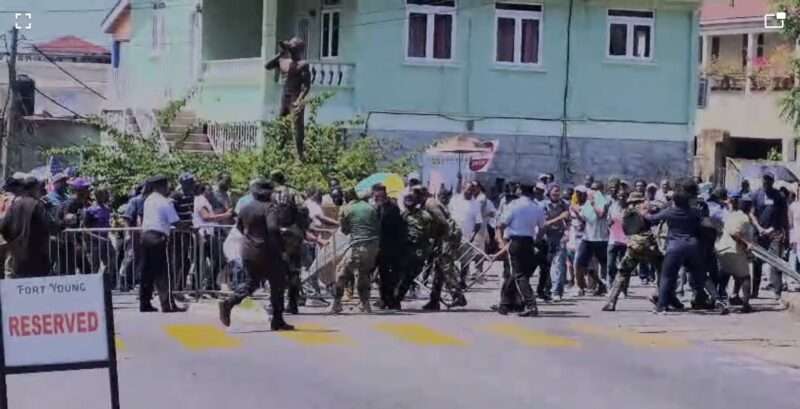
Acting Police Chief Davidson Valerie said no permission was granted by the Chief of Police to stage any protest in Roseau on Wednesday.
Protesters clashed with police outside of parliament forcing the lawmen to use teargas and rubber bullets to disperse the angry crowd. In their defense the protesters pelted stones after the police demanding voter ID cards, campaigning financing and re-registration while 3 important electoral reform bills were being presented in parliament.
“The Commonwealth of Dominica Police Force [CDPF] advises that the electoral Reform Coalition (ERC), officials of the United Workers Party among other organizers, have been planning a protest action on High Street in the vicinity of the House of Assembly on Wednesday 19, March 2025,” he said. “I wish to inform you that no permission has been sought from the Chief of Police nor has there been any permission granted by the Chief of Police for any protest action.”
Valerie made it clear that any protest action in Dominica on Wednesday was “unlawful”.

He explained that section 3 of the Public Order Act Chapter 15:01 of the laws of Dominica 2017 states that, it shall be unlawful for any public procession to take place unless a permit has been issued in respect thereof in accordance with the act.
Valerie said the CDPF advised the general public to desist from participating in any unlawful or illegal protest action in Dominica.
“The leadership of the Electoral Reform Coalition, officials of the United Workers Party, other organizers and participants in this illegal, unlawful protest action will be held criminally reliable for any public disorder that may arise from this illegal protest action,” he warned.
This story was first published by Antigua News on : antigua.news/2025/03/21/dominica-no-permission-granted-to-stage-protest-in-roseau-acting-police-chief-says. © 2025 Antigua News. Republication without permission is not allowed.

About the author
The Editorial Staff refers to all reporters employed by Antigua.news. When an article is not an original creation of Antigua.news—such as when it is based on a press release, other media articles, letters to the editor, or court decisions—one of our staff members is responsible for overseeing its publication.
Read our editorial standards and corrections policy. Spotted an error? Contact the newsroom.
More from Caribbean
View section
VIDEO: Doctors at Dominica China Friendship Hospital Stage Protest Outside Medical Facility
Healthcare professionals at the Dominica China Friendship Hospital gather outside the medical facility in an apparent protest, raising concerns over issues yet to be officially confirmed.
By Cory Wayland

St. Kitts DPP Seeks Antigua’s Help in Outstanding Case Involving Former Resort Clerk
By Shermain Bique-Charles

Royal Caribbean in Talks to Buy Half of Sandals in Reported $3 Billion Deal
By Shermain Bique-Charles

Four Killed in Latest US Military Strike on Suspected Drug Vessel in Caribbean
By Shermain Bique-Charles
Comments
Be the first to comment.