
Antiguan Among Winners at UWI Postgraduate Conference


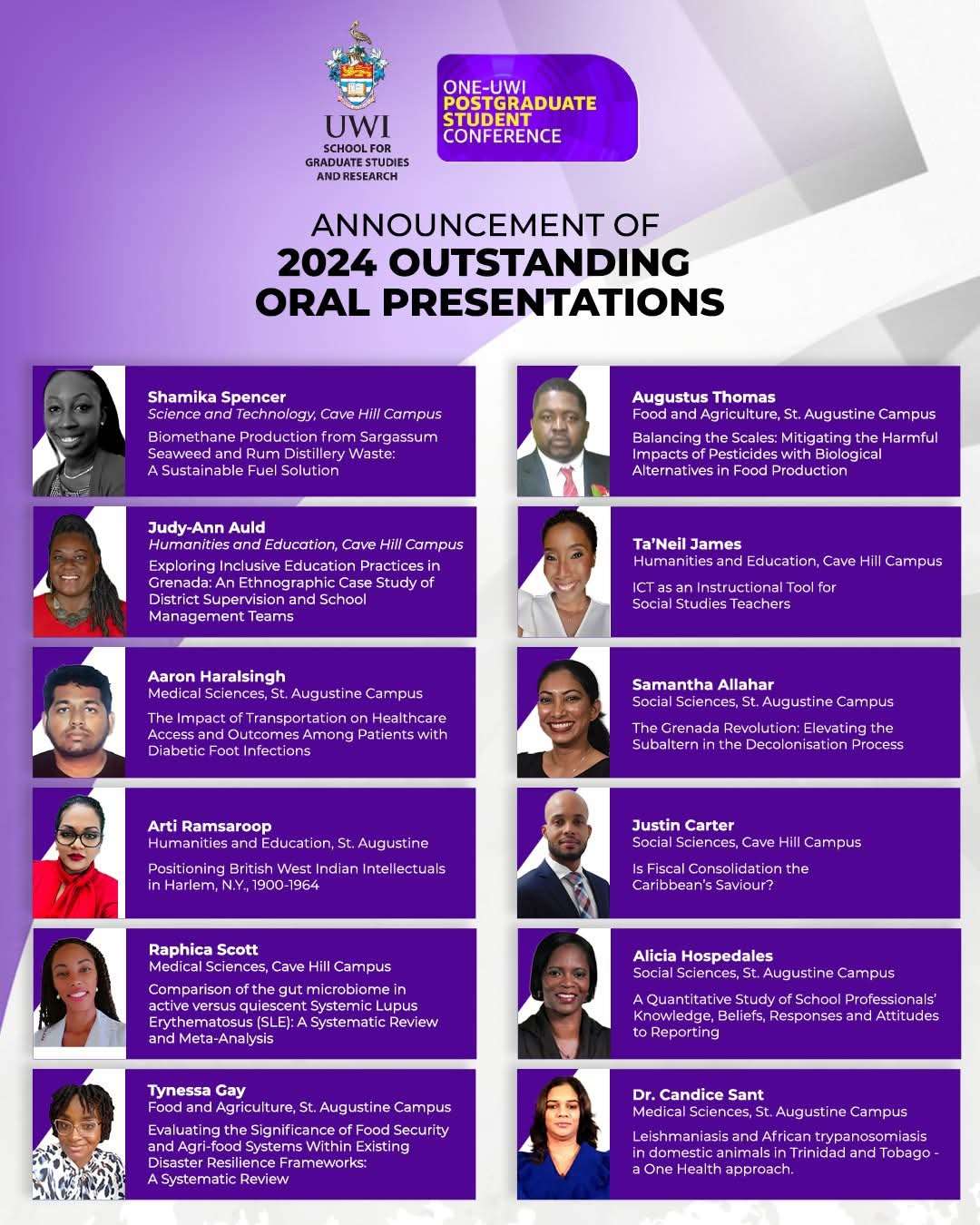
Antiguan scholar Shamika Spencer has been recognized as one of twelve outstanding oral presenters at the 2nd Annual One UWI Postgraduate Student Conference, representing The University of the West Indies (UWI) Cave Hill Campus in Barbados.
Spencer, a student in the Faculty of Science and Technology, impressed judges with her research presentation during the three-day academic gathering held from November 20-22, 2024. The conference operated under the theme “Collaborative Horizons: Interdisciplinary Visions for Caribbean and Global Progress.”
She was among five Cave Hill students honored for their exceptional presentations. The other Cave Hill winners included Judy-Ann Auld and Ta’Neil James from the Faculty of Humanities and Education, Raphica Scott from the Faculty of Medical Sciences, and Justin Carter from the Faculty of Social Sciences.
Seven additional winners came from the St. Augustine Campus in Trinidad, representing faculties including Medical Sciences, Social Sciences, Food and Agriculture, and Humanities and Education.


“I am very pleased with the success of the second postgraduate conference,” said Professor Aldrie Henry-Lee, Pro Vice-Chancellor for Graduate Studies and Research. “We were honored to highlight these remarkable presentations and acknowledge the profound impact of our students’ research.”
All winners received electronic gift vouchers on March 28 in recognition of their academic rigor and clarity of expression. The awards also acknowledged their contributions to advancing knowledge in the conference’s key focus areas.
The third installment of this academic showcase has already been scheduled for November 12-15, 2025, providing another opportunity for Caribbean researchers to present their work on regional and global issues.
This story was first published by Antigua News on : antigua.news/2025/04/17/antiguan-among-winners-at-uwi-postgraduate-conference. © 2025 Antigua News. Republication without permission is not allowed.

About the author
The Editorial Staff refers to all reporters employed by Antigua.news. When an article is not an original creation of Antigua.news—such as when it is based on a press release, other media articles, letters to the editor, or court decisions—one of our staff members is responsible for overseeing its publication.
Read our editorial standards and corrections policy. Spotted an error? Contact the newsroom.
More from Antigua and Barbuda
View section
Emergency Response Teams to Stage Mass Casualty Drill at Scotts Hill Ahead of CHOGM
Emergency personnel will simulate a serious vehicle crash to test hospital readiness, while a separate evacuation exercise is planned for the CHOGM opening ceremony venue.
By Cory Wayland

Karim Edwards’ Trial Over Fatal Friars Hill Road Crash Postponed Until December
More than four years after the collision that claimed the life of medical student Kenneth Mathew and left Priyanjana Das with life-altering injuries, the accused driver is still awaiting trial.
By Cory Wayland

Jury Rejects Self-Defence Claim And Finds Kareem Simon Guilty Of Dennis Edwards’ Murder
Jury rejects Simon’s self-defence claim after video footage reveals details of the fatal confrontation on Lower All Saints Road.
By Cory Wayland

Tourism Ministry and ABTA Working with Bert Kirchner on Proposed Louis Tomlinson Campaign
Minister Michael Freeland has held talks on the project, which aims to turn international exposure into visitor interest and bookings.
By Shermain Bique-Charles
Comments (3)
Luka Johnson April 17, 2025, 2:58 PM
Unruly One April 17, 2025, 9:39 PM
Juju Bee April 17, 2025, 6:28 PM