A&B National Health Delegation Attends CARPHA Meeting in Georgetown

Published
senior officials from the Ministry of Health attend CARPHA meeting
senior officials from the Ministry of Health attend carpha meeting
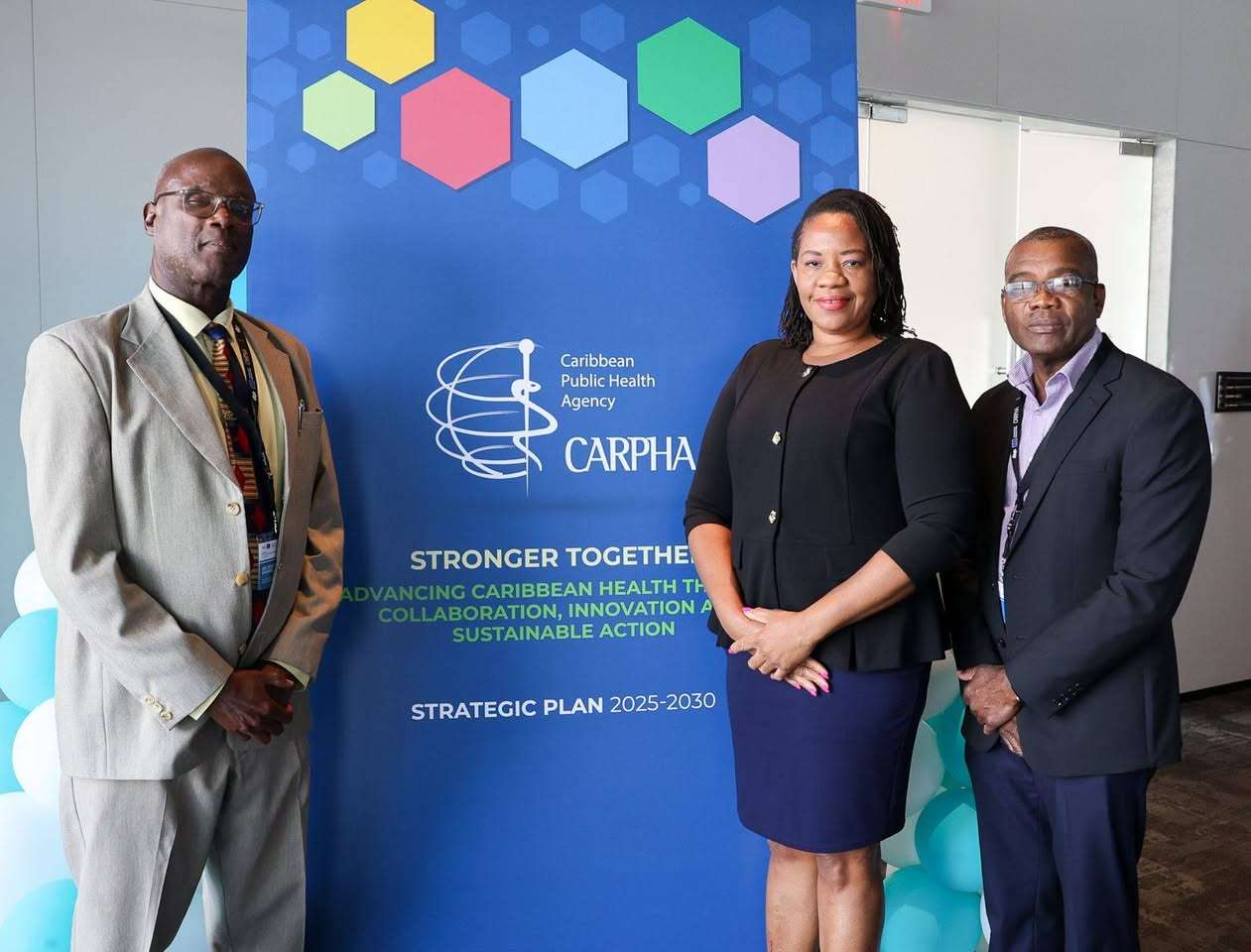
Officials from the Ministry of Health attend CARPHA meeting (photo by Ministry of Health)

The scene is set in Guyana as senior officials from the Ministry of Health, Wellness, Environment, and Civil Service Affairs are presently engaged in a high-level regional meeting. This gathering – taking place in Georgetown – is dedicated to enhancing the Strategic Priority Areas of the Caribbean Public Health Agency (CARPHA).

In attendance are Permanent Secretary Colin O’Keiffe, Chief Medical Officer Kamaria Decastro, and Director of Infrastructure Development Gary Thomas. Attendees are learning and contributing, with the aim of enhancing regional health systems, responses, and development.

senior officials from the Ministry of Health attend CARPHA meeting
Permanent Secretary, Colin O’Keiffe, Chief Medical Officer, Kamaria Decastro, and Director of Infrastructure Development, Gary Thomas (photo by Ministry of Health)

whatsapp-group-names-for-family-friends (1)

Key topics of this landmark meeting include the expansion of access to skilled health professionals, boosting disease surveillance, and ensuring affordable essential medications and vaccines.

senior officials from the Ministry of Health attend CARPHA meeting
(L-R) Colin O’Keiffe, Gary Thomas, and Kamaria Decastro, (photo by Ministry of Health)

Delegates also took the time to focus on improving lab services, preparing for health emergencies, and tackling non-communicable diseases. The utilization of data for informed health planning was also a highlighted area of discussion.

The delegation of Antigua and Barbuda is waving the flag for regional teamwork and public health goals across the Caribbean!

This story was first published by Antigua News on : antigua.news/2025/08/01/national-health-delegation-attends-carpha-strategic-planning-meeting-in-georgetown. © 2025 Antigua News. Republication without permission is not allowed.

Step 1

Add Antigua.news to your Home Screen

✕ antigua.news ⋯ Open in Safari Copy link Share…

First, open this page in Safari

You are reading inside another app (Instagram, Facebook…). Tap ⋯ at the top right and choose Open in Safari (or Open in browser).

No such option? Copy the link, open Safari and paste it in the address bar.

⚙️ Settings General › Software Update

Update your iPhone first

Alerts need iOS 16.4 or newer. Open Settings → General → Software Update and install the update. You can still add the icon now: tap Next.

‹ antigua.news ⋯

Tap the ⋯ button

It is at the bottom right of Safari, next to the address bar. Don't see the bar? Scroll up a little.

Share Add Bookmark New Tab Find on Page

Tap Share

It is the first option of the menu, with a square-and-arrow icon.

antigua.news ‹ › ▢ ⧉

Tap the Share button

The square with an arrow pointing up, in the middle of the bar at the bottom (on iPad: at the top right).

antigua.news

Tap the Share button

The square with an arrow, at the right of the address bar at the top. (Firefox: tap ☰ at the bottom, then Share.)

Copy Add to Reading List Add to Home Screen

Tap Add to Home Screen

Scroll down the list to find it (icon: a square with a +). Not there? Tap Edit Actions or View More at the bottom.

Cancel Add to Home Screen Add Antigua.news Open as Web App

Keep Open as Web App on, then tap Add

The switch must be green — without it, alerts can't work. Then tap Add at the top right.

Cancel Add to Home Screen Add Antigua.news An icon will be added to your Home Screen so you can quickly access this website.

Tap Add

At the top right. If you see an Open as Web App switch, leave it on (green).

Antigua.news

Close the browser and open Antigua.news from its new icon

Go to your Home Screen: the Antigua.news icon is there now (swipe left if you don't see it). Alerts only work when you open us from this icon.

“Antigua.news” Would Like to Send You Notifications Notifications may include alerts, sounds and icon badges. Don’t Allow Allow

Tap 🔔 Turn on alerts, then Allow

In the app you will see a red box asking to turn on alerts: choose your sections, tap the button, then tap Allow. That's it — breaking news will reach you even with the phone locked.

Orville Charles

About the author

Orville Charles grew up in Potters Village, Antigua. After graduating from the University of Baltimore with a degree in Digital Communication, he spent years in the Social Work field, serving vulnerable populations and doing community outreach. He is an avid student of History, with many years of freelance experience in Multimedia.

Read our editorial standards and corrections policy. Spotted an error? Contact the newsroom.

Comments (3)

  • Rhea August 1, 2025, 2:21 PM

    Proud of our health team representing us so well. Keep pushing for stronger systems and better care!
    Reply
  • Food4thought August 1, 2025, 2:22 PM

    This is the kind of collaboration we need in the Caribbean. One region, one health vision!
    Reply
  • Apex Jones August 1, 2025, 6:40 PM

    Advocacy is important. making all the right moves for the betterment of the people of Antigua and Barbuda
    Reply

Submit a comment

More from Culture, Science and Tech

View section