
CXC Reports 48 per cent Increase in Exam Violations

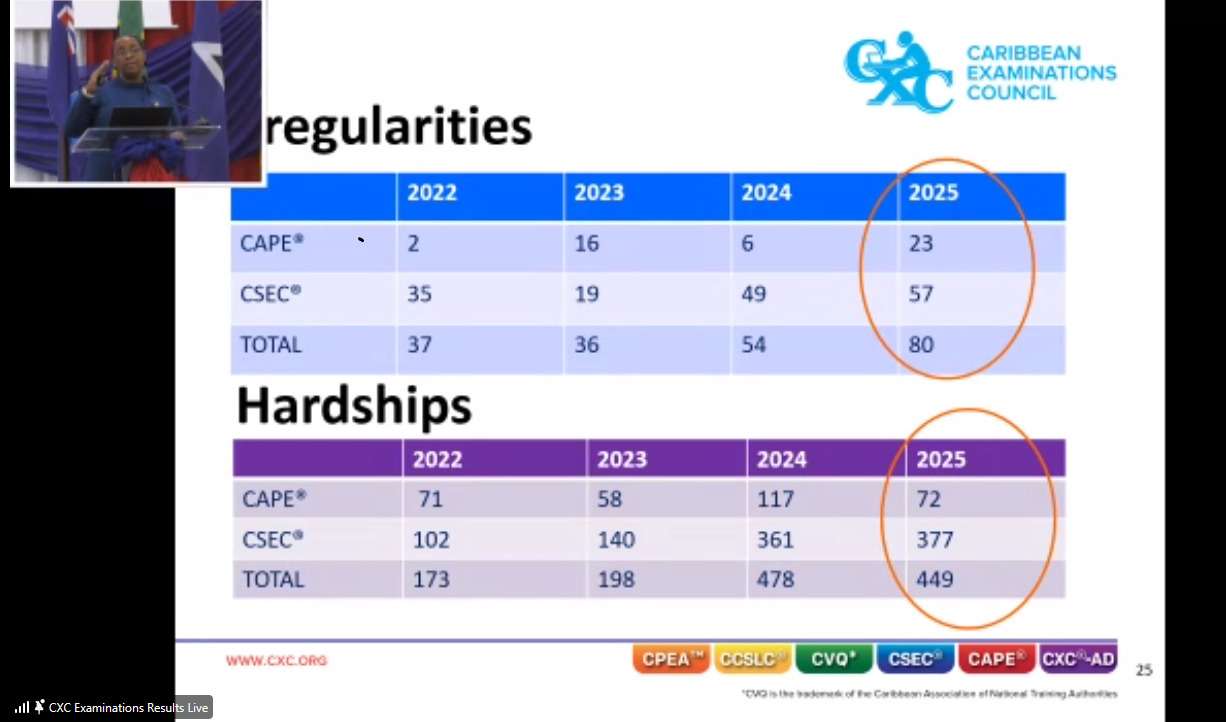
The Caribbean Examinations Council (CXC) is grappling with an alarming surge in examination misconduct, with irregularities reaching an all-time high of 80 cases in 2025, officials revealed during Friday’s results ceremony in the Cayman Islands.
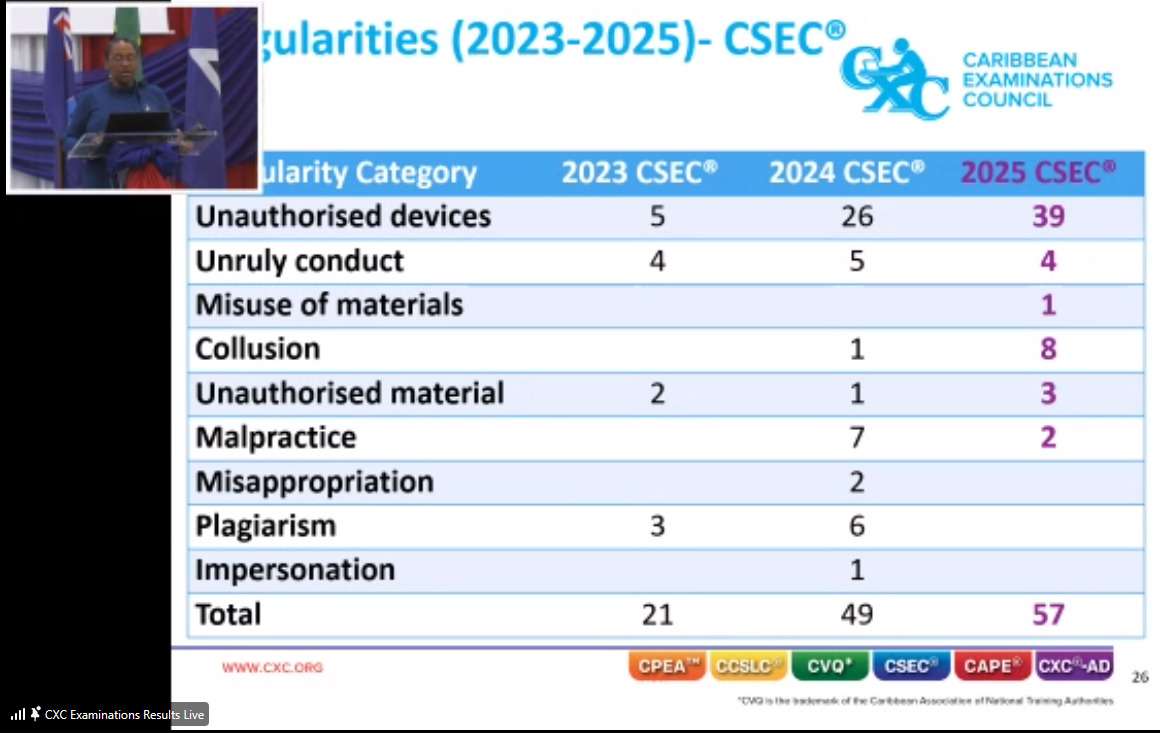
Dr Nicole Manning, CXC’s Director of Operations, expressed deep concern about the unprecedented spike in cheating incidents across both CSEC and CAPE examinations. CSEC alone recorded 57 irregularities, up from 49 in 2024, while CAPE saw 23, an additional 17 cases compared to last year.
“This year we saw an all-time high of 80 irregularities, not good, not good,” Manning stated during the ceremony where CXC released its May-June 2025 examination results. “It therefore means that these candidates of the 80 may have different penalties and I can tell you majority of these candidates, in fact we had it was about for over 40-50 percent of them would have their results cancelled.”
The data reveals a troubling pattern of misconduct. CSEC violations included 39 cases of unauthorized devices – an increase from just 5 in 2023 and 26 in 2024. Collusion cases jumped to 8 in 2025, up from zero the previous year, while unruly conduct remained relatively stable at 4 cases.
Manning explained the severe consequences students face when caught with prohibited items. “So it means that that candidate’s result is cancelled,” she said.
The Director made an impassioned plea to students about the risks of bringing unauthorized devices into examination halls. “We beg, we plead, we say do not take it in the exam. You also have situations where candidates use the cell phones, they’ll tell you that oh I can’t find the answer, I didn’t remember the answer so I googled it and so those candidates are not only, the results for them are not only cancelled but it affects their other subjects, in fact they are disqualified.”
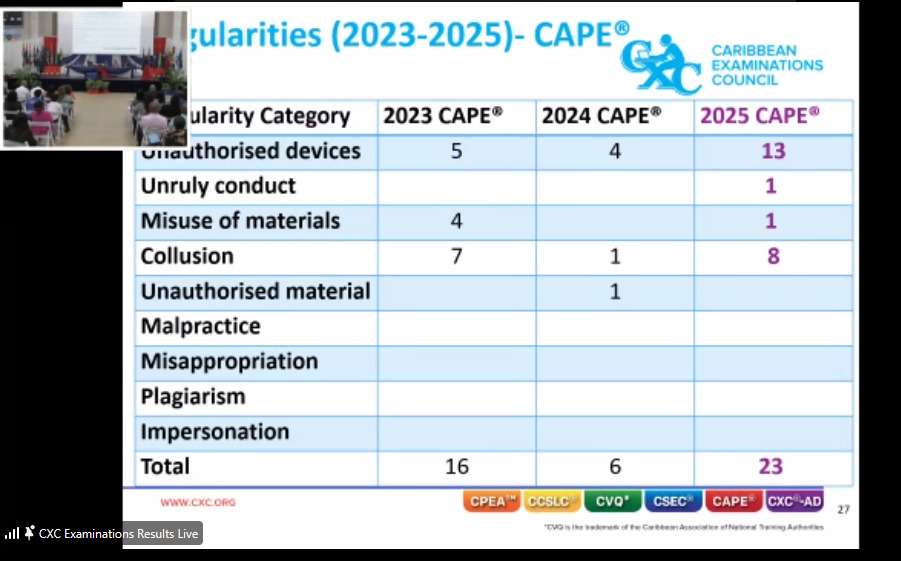
CAPE examinations showed similar concerning trends, with irregularities rising from 6 in 2024 to 23 in 2025. However, Manning noted the increase was “not as much” as CSEC, suggesting this “may speak to the fact that they are a little bit more mature or it may speak to the cohort because it’s a smaller group.”
To address the growing problem, CXC has implemented a graduated penalty system for different types of violations. “So in the past we had a penalty for having a cell phone whether it’s in your bag or on your person but we have changed that we have introduced what we call a graduated scale,” Manning explained. “So if it is the candidate can have the phone on them but they may not have been using the phone there’s no evidence of them using the phone. The penalty could never be the same.”
Beyond cheating concerns, student absenteeism continues to challenge the examination body. Despite 98,160 subject entries, 3,593 students were absent across all subjects, though this represents an improvement from previous years.
Manning identified five main reasons for absences: “Personal emergency they weren’t adequately prepared so they didn’t turn up a documented illness as I said we treat with those two middle ones death in the family but they preferred not to attend for whatever reason.”
She expressed frustration with students who simply choose not to attend after paying examination fees. “Now just imagine you have paid and you have decided not to attend and so we always encourage it’s an opportunity to try it’s better to try than not to do anything at all.”
The examination body also faces challenges with students reporting hardships such as the death of a family member, which totaled 449 in 2025 – down from a peak of 478 in 2024 but still significantly higher than the 173 recorded in 2022. CSEC accounted for 377 hardship cases while CAPE had 72.
CXC results became available to students at 1 PM on Friday through the official student portal.
This story was first published by Antigua News on : antigua.news/2025/08/16/cxc-reports-48-per-cent-increase-in-exam-violations. © 2025 Antigua News. Republication without permission is not allowed.

About the author
The Editorial Staff refers to all reporters employed by Antigua.news. When an article is not an original creation of Antigua.news—such as when it is based on a press release, other media articles, letters to the editor, or court decisions—one of our staff members is responsible for overseeing its publication.
Read our editorial standards and corrections policy. Spotted an error? Contact the newsroom.
More from Antigua and Barbuda
View section
Antigua and Barbuda Uses CHOGM to Showcase Conference Tourism Potential
Tourism Minister Charles Fernandez welcomes Commonwealth delegates as Antigua and Barbuda showcases its conference facilities, culture and visitor experiences.
By Shermain Bique-Charles

Liat Air Urges Passengers To Arrive Three Hours Early As CHOGM Security Could Disrupt Travel
The airline warns that enhanced security, official movements and possible road restrictions could affect airport access and flight schedules from November 1 to 4.
By Cory Wayland

UPP To Host Town Hall On Environment Democracy And Women’s Rights Ahead Of CHOGM
The meeting, titled “The People’s Message to the CHOGM Delegates,” is scheduled for Friday at Freedom Hall.
By Cory Wayland

Antiguans And Barbudans In New York Open Independence Celebrations With Harlem Church Service
Diaspora members gathered in prayer and song as speakers reflected on national progress and called for unity ahead of Antigua and Barbuda’s 45th anniversary of Independence.
By Cory Wayland
Comments (6)
Gigi August 16, 2025, 12:07 PM
Kiara August 16, 2025, 12:24 PM
News Readers August 16, 2025, 12:20 PM
Rhea August 16, 2025, 12:25 PM
Informed citizen August 16, 2025, 3:46 PM
Apex Jones August 16, 2025, 5:52 PM