
Nighttime Road Works Resume Between Townhouse Megastore and FADI Building Supplies

By Cory Wayland
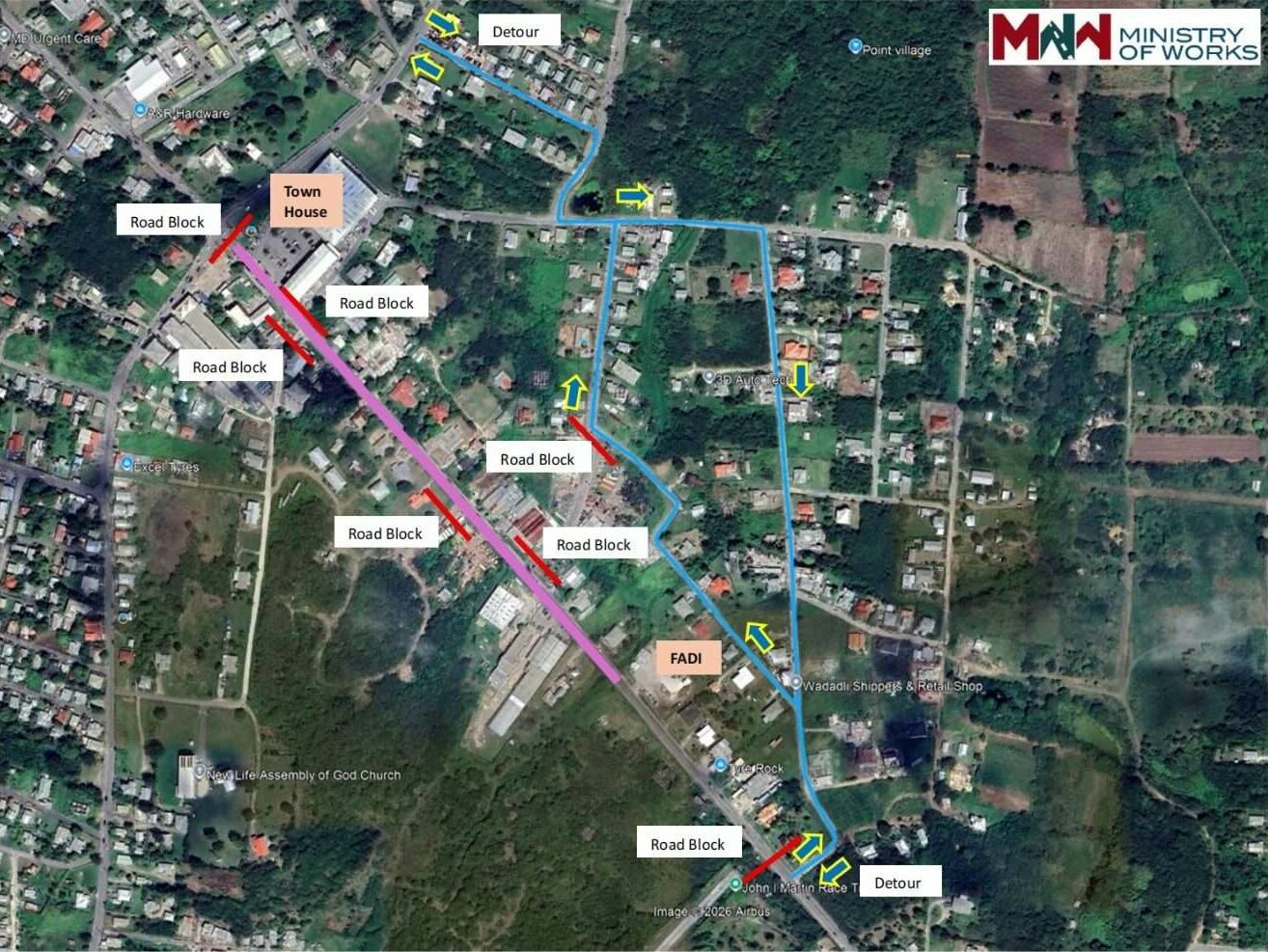
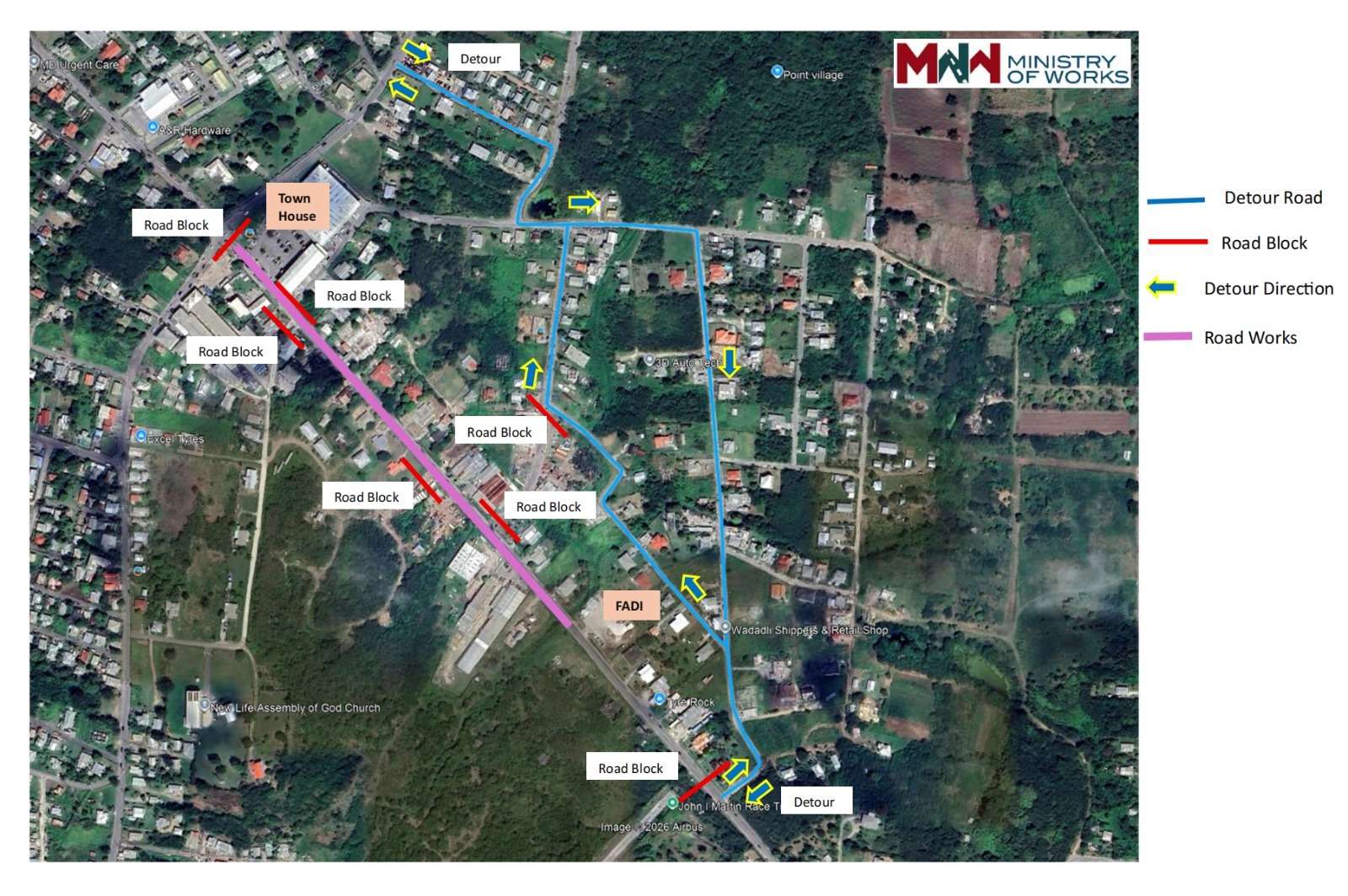
Motorists travelling along All Saints Road are being advised to prepare for temporary disruptions tonight as the Ministry of Works resumes major infrastructure rehabilitation works along a key section of the roadway.
The works will take place between Townhouse Megastore and FADI Building Supplies as part of the ongoing All Saints Road Project being carried out by the Government of Antigua and Barbuda.
According to the ministry, two road blockages will be implemented to facilitate the exercise. The first will affect west-to-east bound traffic at the Bendals junction stoplight near Townhouse Megastore. The second will impact east-to-west bound motorists approaching the immediate right-hand turn into Briggins after the John I. Martin Racetrack.
A temporary detour will be put in place near the Briggins area beginning from the right turn after the racetrack for east-to-west bound traffic. The diversion is scheduled to take effect from 6:30 p.m. Friday and will remain in place until 7:00 a.m. the following morning.
Flag persons will be stationed along the affected corridor to assist with traffic flow, and motorists are being urged to follow all instructions and proceed with caution, as heavy-duty equipment will be operating in close proximity to the roadway.
The Ministry of Works has also assured the public that businesses along the corridor will remain open while the works are underway.
The rehabilitation forms part of the wider All Saints Road upgrade project aimed at improving road conditions and strengthening infrastructure along one of the island’s major transportation routes.
This story was first published by Antigua News on : antigua.news/2026/04/10/nighttime-road-works-resume-between-townhouse-megastore-and-fadi-building-supplies. © 2026 Antigua News. Republication without permission is not allowed.

About the author
Cory Wayland is the Social Media Co-ordinator at Antigua.News, where he manages digital content strategy, audience engagement, and real-time news publications across social platforms. With a keen eye for trending topics and a commitment to factual storytelling, Cory plays a key role in shaping the online voice of Antigua.News.
Read our editorial standards and corrections policy. Spotted an error? Contact the newsroom.
More from Antigua and Barbuda
View section
Chase Supermarket to Host Two-Day Job Fair for Full-Time Positions
Applicants are invited to explore vacancies across several departments on October 31 and November 1 at the supermarket’s Herbert’s location.
By Editorial Staff

Dwayne George Demands Accountability in Management of New Arts Centre
The Creative Industries Minister says responsible spending, maintenance and professional management must protect the national investment.
By Shermain Bique-Charles

Maria Browne: Culture Deserves Infrastructure and Creatives Deserve Opportunity
The Housing and Works Minister says the new performing arts centre places artistic ambition firmly within national development.
By Shermain Bique-Charles

Turner Reveals Team Feared Arts Centre Could Not Be Completed in Time
The minister credits National Housing workers with overcoming setbacks and an imposing workload to deliver the cultural landmark.
By Shermain Bique-Charles
Comments
Be the first to comment.