
Driver kills 2, injures 14 in a car crash in Berlin
By Tata
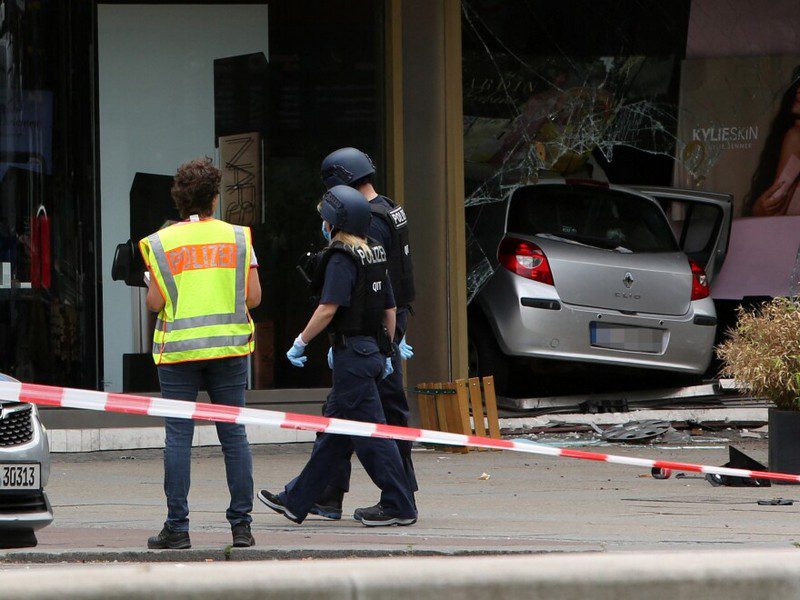
It was a sad Wednesday afternoon in the German Capital of Berlin after a car crashed into a crowd, killing one person and causing injuries to dozens. The one person that died was a teacher, while 14 of her students sustained various degrees of harm, with at least 6 in critical conditions.
Iris Spranger, a top security official in Berlin, said the woman died while on a trip to Hesse alongside a group of students. The car had hit them while they were on the sidewalk. Apart from the 14 students, three other people also sustained injuries.
The driver was a 29-year-old German-Armenian citizen. The reason for the accident is yet to be determined. However, there are speculations that the driver deliberately rammed into the crowd after placards were mistaken for a confession note.
There are also speculations that the accident was politically motivated. The police have also denied that.
“I am told there are posters in the car, but there are no actual letters of confession. But one needs to be very careful with such statements,” Spranger Iris told newsmen.
While reacting to the accident, the Mayor of Berlin expressed his sadness and promised that the Police will conduct a thorough investigation.
“I am deeply affected by this incident. We know that there is one dead and several seriously injured. The police are working flat out to clarify the matter,” Franziska Giffey said on Twitter.
Berlin Police President Barbara Slowik confirmed that the driver was detained at the scene until the police came to arrest him. He has been arrested and is currently receiving treatment for the injuries sustained during the accident.
The police are currently investigating the incident, and they are interestingly looking at all the options.
“We currently do not have conclusive evidence for a politically motivated act,” the Police chief said on Wednesday. He added that there is a possibility that the man was a “mentally impaired man.”
The police have asked eyewitnesses to send photos and videos taken at the scene to facilitate the investigation process.
CNN reported that “the incident happened close to the same spot where a Tunisian national with Islamist terrorist links, rammed a tractor-trailer truck into a crowded Christmas market, killing 12 people and injuring 48. Amri was later killed by police in Italy.
This story was first published by Antigua News on : antigua.news/2022/06/10/driver-kills-2-injures-14-in-a-car-crash-in-berlin. © 2022 Antigua News. Republication without permission is not allowed.
Read our editorial standards and corrections policy. Spotted an error? Contact the newsroom.
More from World
View section
Powerful Earthquake Strikes China Leaving 16 Dead And Hundreds Of Homes Destroyed
Rescue teams race against time in Tibet after a magnitude 7 earthquake leaves dozens injured, displaces thousands and triggers widespread destruction.
By Cory Wayland

Kenyan Preacher Paul Mackenzie Convicted of Murdering 191 People in Shakahola Massacre
Former church leader found guilty alongside 28 others in a case involving the deaths of 190 children and one adult who were allegedly subjected to deadly religious fasting.
By Cory Wayland

Priest Speaks About Life and Death in Final Sermon Before Falling Crucifix Kills Him During Mass
Father Patricio Sánchez urged worshippers to cherish their time with God and loved ones before a large wooden crucifix fell and fatally struck him during a church service in Ecuador.
By Cory Wayland

Florida Attorney General James Uthmeier Announces Arrest Warrant for Former Cuban Leader Raúl Castro Over 1996 Aircraft Shootdown
James Uthmeier confirms murder conspiracy charge against the 95-year-old former president over the 1996 shootdown of two civilian aircraft that killed four men.
By Cory Wayland
Comments
Be the first to comment.