
Earthquake strikes the Philipines, killing 4 people and injuring another 60
By Tata
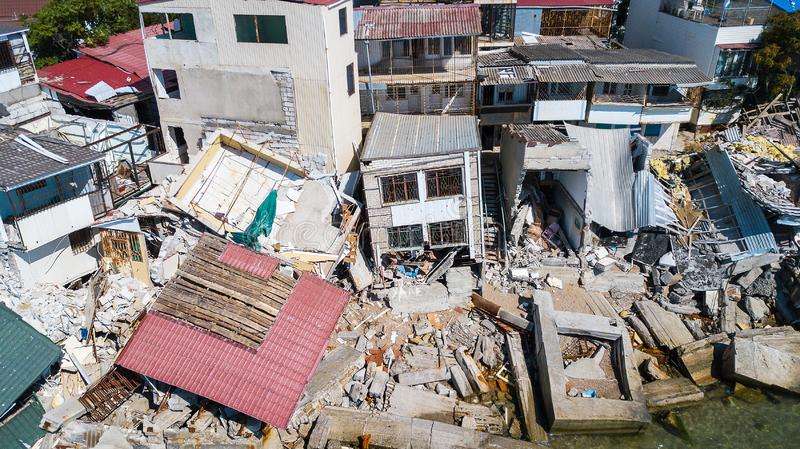
At least four people have died, and 60 were injured as a 7.1 magnitude earthquake hit the Philipino province of Abra in the early hours of Wednesday. The interior minister of the Philipines confirmed the incident soon after it happened. He also confirmed the number of casualties caused by the earthquake.
Although the actual measurement of the earthquake has not been confirmed, it is unarguably the worse quake to hit the country in many years. It was measured at a magnitude of 7.1 by the US Geological Survey, and 7.3 by the Philipines Institute of Volcanology and Seismology, which was later adjusted to 7.0. The European Mediterranean Seismological Centre (EMSC) also measured the quake at 7.2 magnitudes.
One congressman from the Northern Region, Eric Singson, said the “earthquake lasted 30 seconds or more,” and he thought his house would fall.
Although the Abra Province on Luzon is far off from the capital city of Manila, the tremors shook high rising towers more than 249 miles (400km) away in the capital city located on the South of the Island.
Police Major Edwin Sergio told the AFP news agency that the quake was very strong and it affected parts of the Police station. Reports also indicated that the one hospital in the region was evacuated after one building was affected by the quake.
The government has quickly responded to the incident, and officials are currently on top of the issue.
“Despite the sad reports about the damages caused by the earthquake, we are assuring quick response to those in need and affected by this calamity,” President Ferdinand Marcos Jr said on Facebook.
The chairman of the Philipines red cross society directed all members to assess the areas of the quake to see what they can do.
“[Philipines Red Cross Chairman Richard Gordon] directed all PRC Chapters to be on standby and perform assessment within their areas of responsibility following the big earthquake,” the Philippine Red Cross said on Twitter.
There are no new casualties at the moment, but the injured victims are receiving treatment. Survivors and eyewitnesses are also dealing with the shock that came with the incident.
“We are still experiencing aftershocks. We have received reports of damages to houses. But so far no casualties,” said the Mayor of Lagangilang, Rovelyn Villamor.
This story was first published by Antigua News on : antigua.news/2022/07/27/earthquake-strikes-the-philipines-killing-4-people-and-injuring-another-60. © 2022 Antigua News. Republication without permission is not allowed.
Read our editorial standards and corrections policy. Spotted an error? Contact the newsroom.
More from World
View section
Powerful Earthquake Strikes China Leaving 16 Dead And Hundreds Of Homes Destroyed
Rescue teams race against time in Tibet after a magnitude 7 earthquake leaves dozens injured, displaces thousands and triggers widespread destruction.
By Cory Wayland

Kenyan Preacher Paul Mackenzie Convicted of Murdering 191 People in Shakahola Massacre
Former church leader found guilty alongside 28 others in a case involving the deaths of 190 children and one adult who were allegedly subjected to deadly religious fasting.
By Cory Wayland

Priest Speaks About Life and Death in Final Sermon Before Falling Crucifix Kills Him During Mass
Father Patricio Sánchez urged worshippers to cherish their time with God and loved ones before a large wooden crucifix fell and fatally struck him during a church service in Ecuador.
By Cory Wayland

Florida Attorney General James Uthmeier Announces Arrest Warrant for Former Cuban Leader Raúl Castro Over 1996 Aircraft Shootdown
James Uthmeier confirms murder conspiracy charge against the 95-year-old former president over the 1996 shootdown of two civilian aircraft that killed four men.
By Cory Wayland
Comments
Be the first to comment.