
Venezuela makes largest drug bust in 10 years en route to Martinique

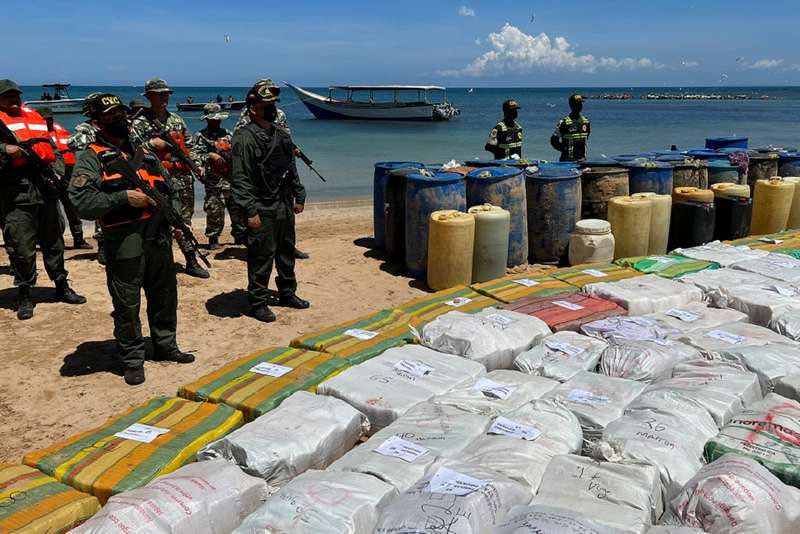
Authorities in Venezuela stumbled upon what they have said was the largest drug bust in a decade.
On Monday this week, lawmen in the South American country seized a vessel carrying marijuana and cocaine amounting to millions of dollars. The well-packed boat was intercepted off the Caribbean coast.
On that vessel, 3.1 US tonnes (2.8 metric tonnes) of marijuana, almost 18 pounds (8 kg) of cocaine and extra outboard boat motors were found.
The general commander of the Operational Strategic Command of the Bolivarian National Armed Forces Domingo Hernández, said the vessel had departed Colombia and was en route to the island of Martinique.
“Twelve men traveling on the boat were arrested. Hernández said all are Venezuelans and were working for the Colombia-based Cartel of the Guajira. Nearly 6,293 pounds (2,857 kilos) of marijuana were seized from the boat, which lacked identification and had seven extra motors as well as 33 large storage containers with fuel and a satellite phone,” General Hernandez said.
According to law enforcement officials in Venezuela, the arrests and seizures were part of special operations of the armed forces across Venezuela’s border.
Soldiers in the area have also seized makeshift buildings that store the fuel for airplanes used by drug traffickers who land on nearby illegal runways. Since 2012, we saw, that this is the most important stash of marijuana, and also, since 2012, we have disabled 305 airplanes, 27 (of them) this year with a lot of intelligence and prevention against micro trafficking and macro trafficking because this is another exponential sum as well,” Hernández said.
Additionally, Hernández said more than 40.2 US tonnes (36.5 metric tonnes) of illegal drugs have been seized so far this year in Venezuela. That’s up 29.2 percent compared to the same period last year.
This story was first published by Antigua News on : antigua.news/2022/09/07/venezuela-makes-largest-drug-bust-in-10-years-en-route-to-martinique. © 2022 Antigua News. Republication without permission is not allowed.

About the author
Shermain Bique-Charles is an accomplished journalist with over 24 years of dynamic experience in the industry. Renowned for her exceptional storytelling and investigative skills, she has garnered numerous awards that highlight her commitment to journalistic integrity and excellence. Her work not only informs but also inspires, making her a respected voice in the field.
Read our editorial standards and corrections policy. Spotted an error? Contact the newsroom.
More from Caribbean
View section
BREAKING | Dominica Heads to the Polls on December 16
Nomination Day is November 30 as Prime Minister Roosevelt Skerrit seeks a fresh mandate for the Dominica Labour Party.
By Shermain Bique-Charles

DOMINICA: Relief as Three Missing Men Are Found Alive at Sea Near Aves Islands
Davel Baron, Ryan Royer and a third man were rescued by a cargo vessel after being found drifting at sea, bringing relief following days of uncertainty over their whereabouts.
By Cory Wayland

Two Men Vanish at Sea in Dominica, Sparking Growing Fears for Their Safety
Police issue missing-person alerts for Davel Baron and Ryan Royer as concerns grow over their whereabouts.
By Cory Wayland

Saint Lucia Makes Decision on Citizenship by Investment Programme Amid EU Pressure
Prime Minister Philip J. Pierre confirms his government has formally responded to the European Union but says the decision will remain confidential until Brussels acknowledges receipt of the correspondence.
By Cory Wayland
Comments
Be the first to comment.