
The date of Queen Elizabeth II funeral is announced as Monday 19 September

By Mick the Ram
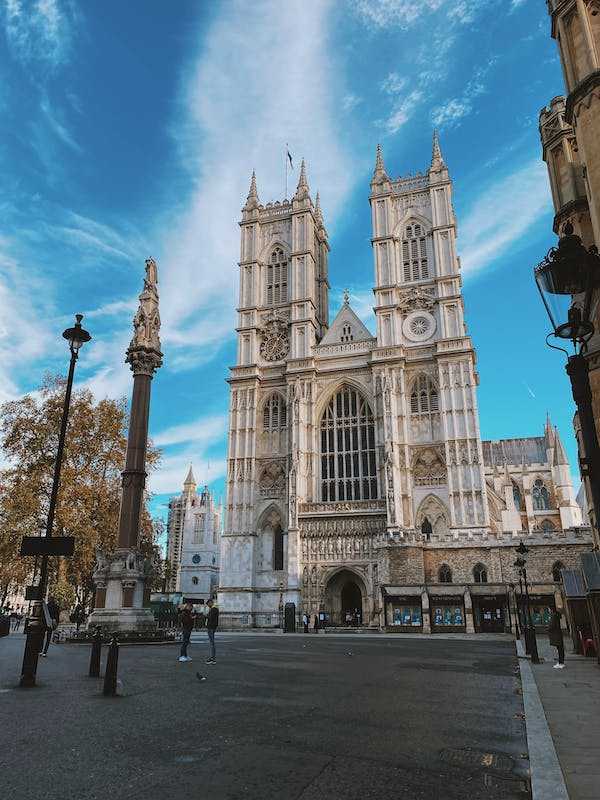
The funeral of Queen Elizabeth II will take place at 11am on Monday 19 September, at Westminster Abbey, it has been announced today.
Full details of the service and events in the coming days have been released by Buckingham Palace and the Earl Marshal, the Duke of Norfolk, who is responsible for all of the arrangements. It was also announced that the day of the funeral will be a bank holiday for the United Kingdom and will mark the final stage of a period of national mourning.
Journey to Edinburgh
The Queen’s final journey will begin tomorrow, 11 September at 10am, with her oak coffin being carried by her Balmoral gamekeepers, her own staff bringing her to a hearse that will take her to Edinburgh and St Giles Cathedral the following day.
The King and Queen Consort will travel to Edinburgh to join a procession from Holyroodhouse to the Cathedral. It will leave at 2.35pm with the King and some members of the Royal Family following behind on foot. At 2.55pm the coffin will be carried into the cathedral with the Crown of Scotland on top. The coffin will rest in the cathedral, and members of the public can pay their respects.
Coffin to be flown to London
Her Majesty’s coffin will then leave Scotland on Tuesday 13 September at 5pm, with a hearse taking it to Edinburgh airport arriving at 6pm. The Princess Royal will fly with the coffin for the 55-minute flight to RAF Northolt. Guards of honour will salute the departure from Scotland and the arrival in England. The state hearse will take the Queen’s coffin to Buckingham Palace, where King Charles III and Queen Camilla will witness its arrival. It will then be placed in the centre of the ballroom to give members of the royal household the chance to pay their respects.
Procession to Westminster Hall
The following day, on Wednesday 14 September, at 2.22pm she will be taken in procession by gun carriage, from Buckingham Palace to Westminster Hall, where the coffin will be rested on a raised platform, known as a catafalque. Her coffin will be draped in the Royal Standard flag and once in Westminster Hall it will be topped with the Imperial State Crown, orb and sceptre. The King and other royals, along with staff from the royal household will walk behind. A senior palace official said this silent procession will be “relatively small and personal”.
Period of lying in state begins on Wednesday 14 September
The coffin will arrive at the Palace of Westminster at 3pm where the Archbishop of Canterbury will conduct a short service. Immediately after the conclusion of this service, the four days of lying in state will begin. In this period members of the public will be able to file past and pay their respects. Full details of this will be released by the government, but huge crowds are expected.
The last member of the Royal Family to lie in state in the hall was the Queen Mother in 2002, when more than 200,000 people queued to view her coffin.
Who will attend?
Details of who will attend the funeral, together with the order of service are expected early next week. Heads of state from across the world will be invited to join members of the Royal Family to remember the life and service of the Queen. Senior UK politicians and former prime ministers are also expected to be in attendance. The service will likely be conducted by the Dean of Westminster David Hoyle, with the Archbishop of Canterbury Justin Welby giving the sermon.
King to visit other UK countries
A spokesperson for the King said as well as carrying out official duties, he will be meeting members of the public “to share their grief”. He will visit Northern Ireland on Tuesday 13 September, and Wales on Friday 16 September in the lead up to the funeral on the 19th, which is sure to be an incredibly sad occasion, but also possibly a chance to celebrate a wonderful life.
This story was first published by Antigua News on : antigua.news/2022/09/10/the-date-of-queen-elizabeth-ii-funeral-is-announced-as-monday-19-september. © 2022 Antigua News. Republication without permission is not allowed.

About the author
Mick Burrows is an independent freelance author based in the UK, boasting over 20 years of experience in the online writing landscape. His extensive background has enabled him to develop a diverse range of material, marked by a unique and distinct style. Recognized as a platinum-level expert author by leading e-zine publications, Mick excels in optimizing content for Search Engine Optimization (SEO) through effective keyword density and distribution. He has served as the lead reviewer for a travel enterprise and the senior previewer at a sports prediction company, melding his passions for sport—particularly football and cricket—with his love for travel, having explored more than 50 countries worldwide.
Read our editorial standards and corrections policy. Spotted an error? Contact the newsroom.
More from World
View section
Powerful Earthquake Strikes China Leaving 16 Dead And Hundreds Of Homes Destroyed
Rescue teams race against time in Tibet after a magnitude 7 earthquake leaves dozens injured, displaces thousands and triggers widespread destruction.
By Cory Wayland

Kenyan Preacher Paul Mackenzie Convicted of Murdering 191 People in Shakahola Massacre
Former church leader found guilty alongside 28 others in a case involving the deaths of 190 children and one adult who were allegedly subjected to deadly religious fasting.
By Cory Wayland

Priest Speaks About Life and Death in Final Sermon Before Falling Crucifix Kills Him During Mass
Father Patricio Sánchez urged worshippers to cherish their time with God and loved ones before a large wooden crucifix fell and fatally struck him during a church service in Ecuador.
By Cory Wayland

Florida Attorney General James Uthmeier Announces Arrest Warrant for Former Cuban Leader Raúl Castro Over 1996 Aircraft Shootdown
James Uthmeier confirms murder conspiracy charge against the 95-year-old former president over the 1996 shootdown of two civilian aircraft that killed four men.
By Cory Wayland
Comments
Be the first to comment.