
Fiona kills One in Guadeloupe

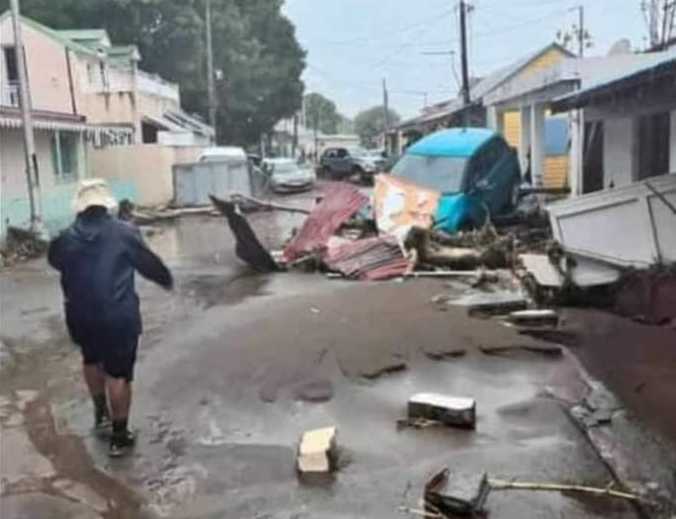
Authorities in the French island of Guadeloupe said one person has died after Tropical Storm Fiona dumped several inches of rain on the Caribbean island last night.
When Fiona made landfall on the island, it recorded wind gusts of up to 74 mph, which would be considered a Category 1 hurricane. They also said 9 inches of rain fell in three hours in the Gros Morne area.
Regional prefect Alexandre Rochatte told reporters Saturday that the body was found on the side of a road after floods washed away a home in the capital of Basse-Terre. More than 20 other people were rescued amid heavy wind and rain that left 13,000 customers without power.
Fiona had maximum sustained winds of 60 mph (95 kph). It was moving west at 8 mph (13 kph) on a path forecast to pass near or over Puerto Rico on Sunday night.
Fiona was expected to become a hurricane while moving near Puerto Rico.
Forecasters say the heavy rains anticipated are dangerous because the island’s soil is already saturated.
Meanwhile, many Puerto Ricans worried about serious power outages since the reconstruction of the island’s power grid razed by Hurricane Maria in 2017 only recently began.
The grid remains fragile and power outages occur daily, with some 80,000 customers already in the dark on Saturday.
Fiona is expected to swipe past the Dominican Republic on Monday.
Forecasters issued a hurricane watch for the southern coast of the Dominican Republic from Cabo Engaño westward to Cabo Caucedo and for the northern coast from Cabo Engaño westward to Puerto Plata. The U.S. Virgin Islands are also under a hurricane watch.
At least one cruise ship visit and several flights to the island were canceled while authorities in the eastern Caribbean islands canceled school and prohibited people from practicing aquatic sports as Fiona battered the region.
Fiona, is the Atlantic hurricane season’s sixth named storm.
This story was first published by Antigua News on : antigua.news/2022/09/18/fiona-kills-one-in-guadeloupe. © 2022 Antigua News. Republication without permission is not allowed.

About the author
Shermain Bique-Charles is an accomplished journalist with over 24 years of dynamic experience in the industry. Renowned for her exceptional storytelling and investigative skills, she has garnered numerous awards that highlight her commitment to journalistic integrity and excellence. Her work not only informs but also inspires, making her a respected voice in the field.
Read our editorial standards and corrections policy. Spotted an error? Contact the newsroom.
More from Caribbean
View section
BREAKING | Dominica Heads to the Polls on December 16
Nomination Day is November 30 as Prime Minister Roosevelt Skerrit seeks a fresh mandate for the Dominica Labour Party.
By Shermain Bique-Charles

DOMINICA: Relief as Three Missing Men Are Found Alive at Sea Near Aves Islands
Davel Baron, Ryan Royer and a third man were rescued by a cargo vessel after being found drifting at sea, bringing relief following days of uncertainty over their whereabouts.
By Cory Wayland

Two Men Vanish at Sea in Dominica, Sparking Growing Fears for Their Safety
Police issue missing-person alerts for Davel Baron and Ryan Royer as concerns grow over their whereabouts.
By Cory Wayland

Saint Lucia Makes Decision on Citizenship by Investment Programme Amid EU Pressure
Prime Minister Philip J. Pierre confirms his government has formally responded to the European Union but says the decision will remain confidential until Brussels acknowledges receipt of the correspondence.
By Cory Wayland
Comments
Be the first to comment.