
Late Queen Elizabeth II image remains on Bank Notes

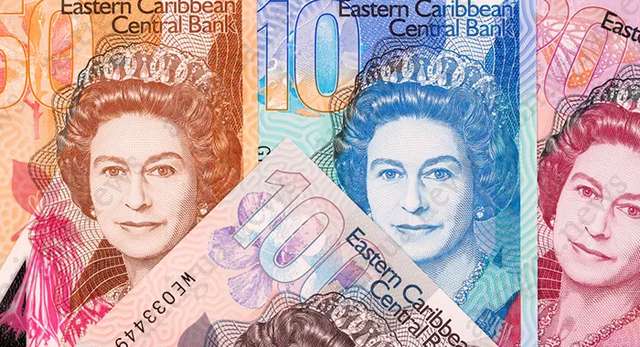
For all inquiring minds, just so you know, the late Queen Elizabeth II’s image will remain on bank notes across the Eastern Caribbean Currency Union for the near future.
Governor of the Eastern Caribbean Central Bank (ECCB) Timothy NJ Antoine confirmed that there are about three years of stock that have to be used.
“Nothing happens right now. The fact of the matter is, we have three to four years of inventory of stock of these beautiful polymer notes and we plan to use them,” he stated.
“We have a lot in stock waiting to be used. We spent money on those and we are certainly not going to be throwing them away,” he said.
In recent times, there have been discussions within the economic union about removing the Queen and her heirs as sovereign and the recent death of Queen Elizabeth II has caused even more concern.
Antoine said he looks forward to furthering discussion on the matter among member states.
“I look forward to that discussion, which has just begun, and in time we would make some determination and make some announcements,” he stated, saying however that having the face of a deceased global icon on local bills is not new to the Eastern Caribbean Currency Union.
To support his statements, he recalled that Nobel laureate and economist Sir Arthur Lewis is featured prominently on the $100 note.
“The same principle being applied by the Eastern Caribbean Currency Union is taking place in the United Kingdom. The pound sterling notes in circulation will remain valid for some time until they are replaced by the updated version which will feature the image of King Charles III,” he added.
With the exception of Dominica, the other seven members of the Eastern Caribbean Currency Union has the British Sovereign as their monarch/head of state.
This story was first published by Antigua News on : antigua.news/2022/09/28/late-queen-elizabeth-ii-image-remains-on-bank-notes. © 2022 Antigua News. Republication without permission is not allowed.

About the author
Shermain Bique-Charles is an accomplished journalist with over 24 years of dynamic experience in the industry. Renowned for her exceptional storytelling and investigative skills, she has garnered numerous awards that highlight her commitment to journalistic integrity and excellence. Her work not only informs but also inspires, making her a respected voice in the field.
Read our editorial standards and corrections policy. Spotted an error? Contact the newsroom.
More from Caribbean
View section
BREAKING | Dominica Heads to the Polls on December 16
Nomination Day is November 30 as Prime Minister Roosevelt Skerrit seeks a fresh mandate for the Dominica Labour Party.
By Shermain Bique-Charles

DOMINICA: Relief as Three Missing Men Are Found Alive at Sea Near Aves Islands
Davel Baron, Ryan Royer and a third man were rescued by a cargo vessel after being found drifting at sea, bringing relief following days of uncertainty over their whereabouts.
By Cory Wayland

Two Men Vanish at Sea in Dominica, Sparking Growing Fears for Their Safety
Police issue missing-person alerts for Davel Baron and Ryan Royer as concerns grow over their whereabouts.
By Cory Wayland

Saint Lucia Makes Decision on Citizenship by Investment Programme Amid EU Pressure
Prime Minister Philip J. Pierre confirms his government has formally responded to the European Union but says the decision will remain confidential until Brussels acknowledges receipt of the correspondence.
By Cory Wayland
Comments
Be the first to comment.