
TnT experiencing “weather emergency” PM Rowley says

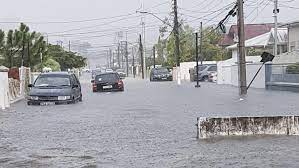
As Trinidad remains under yellow flood alert until today Monday, Prime Minister Dr. Keith Rowley has described the situation as a “weather emergency.”
“The international forecasts are for further incoming heavy rainfall over the next two days. Already there is significant damage to our road infrastructure in very many parts of the country. We are anticipating increased flooding and landslides in susceptible areas.
“Citizens are requested to be very alert to these dangers and, as far as feasible, restrict your movements until the dangers have passed or are abated,” Dr Rowley’s a statement posted on Facebook said adding that all arms and agencies of state are fully mobilized.
At an emergency press conference on Saturday, Local Government and Rural Development Minister Faris Al-Rawi, urged people not to leave their homes unless necessary.
Al-Rawi added that there would be more rainfall within the next five to six days and the Met Office also extended its yellow-level weather alert from midday Saturday to midday on Monday.
The Met Office says TT was experiencing a “low-level trough. We are taking the caution to warn that we do expect significant flooding issues in a circumstance where people wouldn’t normally expect it because there wasn’t a trigger,” Al-Rawi said.
He added that persons who have been affected by the bad weather should call their respective regional corporations and alert them of their current situation, further stating that all resources were deployed to assist those in need.
Significant landslips were seen in San Juan, Quarry Drive, Champs Fleurs, Lady Young Road, Morvant, Lady Hailes Avenue, San Fernando and Maracas Royal Road in Tunapuna with three flooded areas in Sangre Grande.
The minister cautioned persons to conserve water as many water treatment plants in North East and North West and Tobago have been affected.
This story was first published by Antigua News on : antigua.news/2022/11/28/tnt-experiencing-weather-emergency-pm-rowley-says. © 2022 Antigua News. Republication without permission is not allowed.

About the author
Shermain Bique-Charles is an accomplished journalist with over 24 years of dynamic experience in the industry. Renowned for her exceptional storytelling and investigative skills, she has garnered numerous awards that highlight her commitment to journalistic integrity and excellence. Her work not only informs but also inspires, making her a respected voice in the field.
Read our editorial standards and corrections policy. Spotted an error? Contact the newsroom.
More from Caribbean
View section
BREAKING | Dominica Heads to the Polls on December 16
Nomination Day is November 30 as Prime Minister Roosevelt Skerrit seeks a fresh mandate for the Dominica Labour Party.
By Shermain Bique-Charles

DOMINICA: Relief as Three Missing Men Are Found Alive at Sea Near Aves Islands
Davel Baron, Ryan Royer and a third man were rescued by a cargo vessel after being found drifting at sea, bringing relief following days of uncertainty over their whereabouts.
By Cory Wayland

Two Men Vanish at Sea in Dominica, Sparking Growing Fears for Their Safety
Police issue missing-person alerts for Davel Baron and Ryan Royer as concerns grow over their whereabouts.
By Cory Wayland

Saint Lucia Makes Decision on Citizenship by Investment Programme Amid EU Pressure
Prime Minister Philip J. Pierre confirms his government has formally responded to the European Union but says the decision will remain confidential until Brussels acknowledges receipt of the correspondence.
By Cory Wayland
Comments
Be the first to comment.