
Toddler bottles recalled and could lead to poisoning

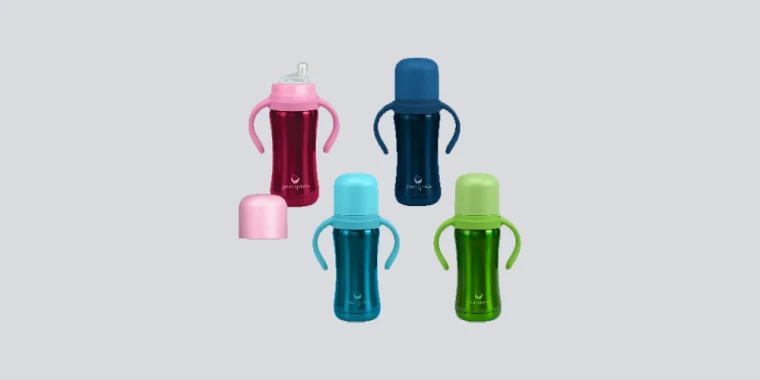
If your toddler has Green Sprouts bottles then you need to ensure that they are not among those that have been recalled.
On Tuesday, the Prices and Consumer Affairs Division advised consumers of a product recall on Green Sprouts stainless-steel Straw Bottles, Sippy Cups, and Sip & Straw Cups.
The recalled products, according to the division may contain lead, posing a lead poisoning hazard to the child.
According to the manufacturer, this recall involves 6 oz and 8 oz Green Sprouts Stainless Steel cups and bottles.
The recalled double-walled stainless steel bottles were sold in aqua, pink, green, and navy colours with one of three closure options: (1) a silicone sippy spout with a coloured plastic lid, collar and handle (2) a silicone sippy spout and a straw spout with a coloured plastic lid, collar and handle, or (3) a silicone straw with plastic screw-on flip cap.
The tracking number is printed on the bottom base. The bottles were sold in one of two sizes as indicated:
6 oz Stainless Steel Sippy Cup 29218V06985 or 35719V06985
6 oz Stainless Steel Sip & Straw Cup 33020V06985
8 oz Stainless Steel Straw Bottle 29218V06985 or 35719V06985
The recalled bottles and cups were sold from January 2020 through September 2022.
The Division is advising consumers who may have purchased these products to discontinue use and return them to the place of purchase for a full refund.
According to the manufacturer, the recalled stainless-steel bottles and cups’ bottom base can break off, exposing a solder dot that contains lead, posing a lead poisoning hazard to the child.
Lead is toxic if ingested by young children, and can cause adverse health effects.
Members of the public may also contact the Prices and Consumer Affairs Division at 462-4347 or [email protected] for additional information or assistance.
This story was first published by Antigua News on : antigua.news/2022/11/29/toddler-bottles-recalled-and-could-lead-to-poisoning. © 2022 Antigua News. Republication without permission is not allowed.

About the author
The Editorial Staff refers to all reporters employed by Antigua.news. When an article is not an original creation of Antigua.news—such as when it is based on a press release, other media articles, letters to the editor, or court decisions—one of our staff members is responsible for overseeing its publication.
Read our editorial standards and corrections policy. Spotted an error? Contact the newsroom.
More from Antigua and Barbuda
View section
Canada, UK and Regional Partners Supporting CHOGM Security
Greene says international assistance will supplement local forces as Antigua and Barbuda prepares to host Commonwealth delegations.
By Shermain Bique-Charles

Grenada Follows Antigua and Barbuda in Recruiting Healthcare Workers from Ghana
Sixty Ghanaian healthcare professionals arrive in Grenada for an expected two-year assignment to support health services.
By Shermain Bique-Charles

Minister Johnson Champions Education and Entrepreneurship as Pathways to Lasting Economic Independence
Speaking at a regional forum in Panama, Minister Kiz Johnson highlighted education, childcare support and business financing as pathways to lasting economic independence
By Shermain Bique-Charles

Popcaan to Return to Antigua After 13 Years for One Nation Festival
The Jamaican dancehall star is the first headliner announced for the January 9, 2027 festival at the Antigua Recreation Grounds.
By Shermain Bique-Charles
Comments
Be the first to comment.