
Police in Dominica ready to deal with violence on election day

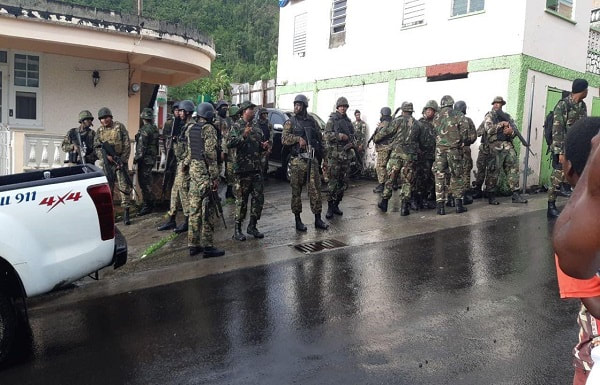
Lawmen in Dominica have put the opposition on notice that they will not tolerate any attempt by residents who may be planning to block entry to any polling station come election day.
Dominicans will go to the polls on Tuesday, December 6th.
Prime Minister Roosevelt Skerrit called a snap election, to the disappointment of the Opposition United Workers Party who decided to boycott the elections.
The opposition parties have been calling on supporters to protest the polls and are also urging the international community not to recognize the government that emerges after Tuesday’s exercise.
Deputy Police Commissioner, Lincoln Corbette, said measures have already been placed on the alert for possible misconduct on election day.
He told a press conference Friday that persons arrested will face the full brunt of the law.
“It has come to the attention of the Dominica Police Force that members of the public will be engaging in criminal actions, namely the blockage and or obstruction of polling stations in Dominica on Tuesday, December 6, 2022, that is election day. For the benefit of the members of the public and caution those inciting unlawful action, this serves to inform that any blockage, obstruction, or any other interference with the free passage and access to and from any polling station in Dominica constitutes an unlawful or interference with the constitutional and legal rights of the citizenry and it is a criminal offense”.
Corbette warned that there should be no assembling of people within 100 yards of a polling station and that on summary conviction anyone found guilty is liable to a fine of EC$400 and or six months in jail.
“Those who are or intent on engaging in any unlawful actions are accordingly hereby warned that the Police Force will not tolerate any attempted blockage, obstruction or free access to an exit from any polling station,” he said adding that perpetrators would be met with “swift arrest. and or remedial action and thereafter prosecution to the fullest of the law”.
This story was first published by Antigua News on : antigua.news/2022/12/02/police-in-dominica-ready-to-deal-with-violence-on-election-day. © 2022 Antigua News. Republication without permission is not allowed.

About the author
The Editorial Staff refers to all reporters employed by Antigua.news. When an article is not an original creation of Antigua.news—such as when it is based on a press release, other media articles, letters to the editor, or court decisions—one of our staff members is responsible for overseeing its publication.
Read our editorial standards and corrections policy. Spotted an error? Contact the newsroom.
More from Caribbean
View section
Dominica Says EU Sets June 2028 Deadline to End CBI Programmes or Risk Visa-Free Access
Government seeks transition support and alternative revenue options as regional talks continue over the future of citizenship by investment.
By Shermain Bique-Charles

VIDEO: Doctors at Dominica China Friendship Hospital Stage Protest Outside Medical Facility
Healthcare professionals at the Dominica China Friendship Hospital gather outside the medical facility in an apparent protest, raising concerns over issues yet to be officially confirmed.
By Cory Wayland

St. Kitts DPP Seeks Antigua’s Help in Outstanding Case Involving Former Resort Clerk
By Shermain Bique-Charles

Royal Caribbean in Talks to Buy Half of Sandals in Reported $3 Billion Deal
By Shermain Bique-Charles
Comments
Be the first to comment.