
CARICOM concerned about situation in Haiti

CARICOM says it is deeply concerned that the contrasting incidents involving the Haitian national Police indicate the severity of the challenges that the police face as well as a further breakdown in security in Haiti.
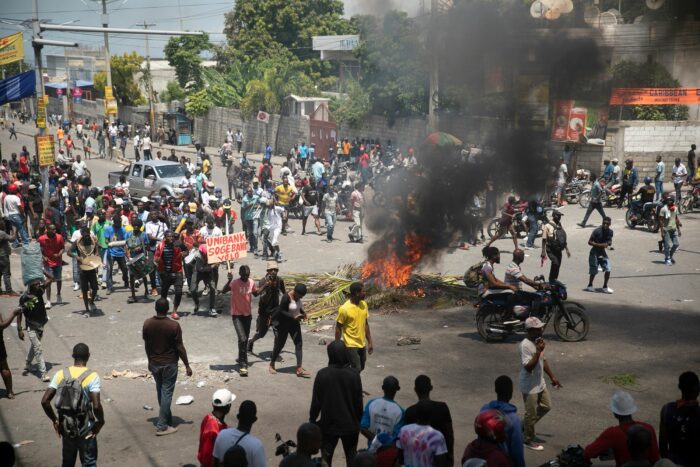
The Haitian government is under mounting pressure amid violent protests by police who accuse interim Prime Minister Ariel Henry of inaction. The UN is considering sending troops to stabilize the nation in crisis.
In a statement released last night, CARICOM strongly condemns the killing of police officers and expresses its condolences to the families of the officers who lost their lives in the line of duty.
The anger and dismay of the police at the gruesome killings of their colleagues, 78 killed since July 2021 and 14 to date this January, are shared by all.
However, abandoning the role of the security forces to protect every citizen and maintain public order further destabilizes the country. The protest actions by members of the police service against the Prime Minister cannot be condoned.
CARICOM urges the members of the Haitian National Police to safeguard peace and order and refrain from actions that could only serve to foster even greater damage to the country and its people.

According to reports from the BBC, Rebel police officers rioted in Haiti’s capital Port-au-Prince on Thursday in protest at the killing of more than a dozen colleagues by criminal gangs.
“The rioting officers blame the government for not taking action. More than 100 demonstrators blocked streets, burned tires, broke security cameras, and damaged vehicles. Local media said several officers broke through the gates of the prime minister’s residence and attempted to enter Haiti’s international airport,” the article said.
This story was first published by Antigua News on : antigua.news/2023/01/29/caricom-concerned-about-situation-in-haiti. © 2023 Antigua News. Republication without permission is not allowed.

About the author
The Editorial Staff refers to all reporters employed by Antigua.news. When an article is not an original creation of Antigua.news—such as when it is based on a press release, other media articles, letters to the editor, or court decisions—one of our staff members is responsible for overseeing its publication.
Read our editorial standards and corrections policy. Spotted an error? Contact the newsroom.
More from Caribbean
View section
BREAKING | Dominica Heads to the Polls on December 16
Nomination Day is November 30 as Prime Minister Roosevelt Skerrit seeks a fresh mandate for the Dominica Labour Party.
By Shermain Bique-Charles

DOMINICA: Relief as Three Missing Men Are Found Alive at Sea Near Aves Islands
Davel Baron, Ryan Royer and a third man were rescued by a cargo vessel after being found drifting at sea, bringing relief following days of uncertainty over their whereabouts.
By Cory Wayland

Two Men Vanish at Sea in Dominica, Sparking Growing Fears for Their Safety
Police issue missing-person alerts for Davel Baron and Ryan Royer as concerns grow over their whereabouts.
By Cory Wayland

Saint Lucia Makes Decision on Citizenship by Investment Programme Amid EU Pressure
Prime Minister Philip J. Pierre confirms his government has formally responded to the European Union but says the decision will remain confidential until Brussels acknowledges receipt of the correspondence.
By Cory Wayland
Comments
Be the first to comment.