
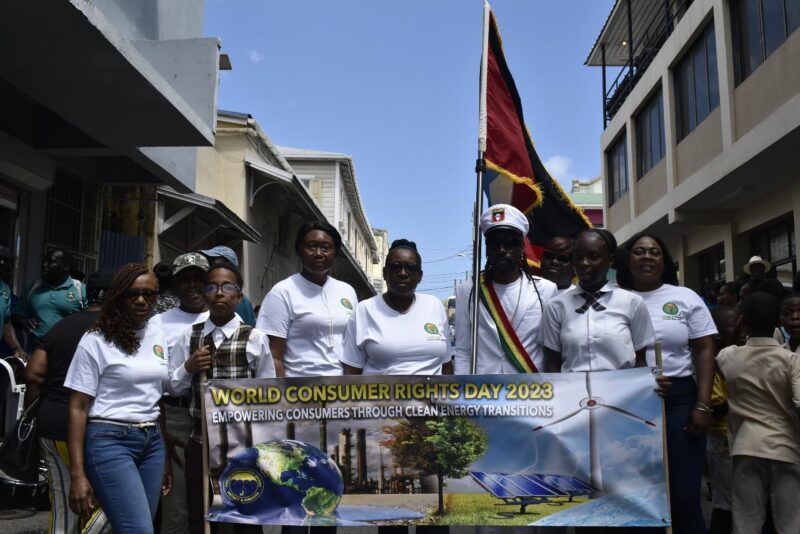
World Consumer Day Parade, celebrated under the theme ‘Empowering Consumers Through Clean Energy Transitions’

Wikipedia
The consumer movement marks 15th March with World Consumer Rights Day every year, as a means of raising global awareness about consumer rights and needs.
Celebrating the day is a chance to demand that the rights of all consumers are respected and protected, and to protest against market abuses and social injustices which undermine those rights.
World Consumer Rights Day is globally recognised and accredited by the United Nations.
For 40 years Consumers International has run the campaign, uniting the consumer movement to celebrate together.
Consumers International Members help to select the campaign topic each year to help mobilise global action on pressing issues impacting consumers.

This story was first published by Antigua News on : antigua.news/2023/03/15/world-consumer-day-parade-celebrated-under-the-theme-empowering-consumers-through-clean-energy-transitions. © 2023 Antigua News. Republication without permission is not allowed.

About the author
The Editorial Staff refers to all reporters employed by Antigua.news. When an article is not an original creation of Antigua.news—such as when it is based on a press release, other media articles, letters to the editor, or court decisions—one of our staff members is responsible for overseeing its publication.
Read our editorial standards and corrections policy. Spotted an error? Contact the newsroom.
More from Antigua and Barbuda
View section
Victory Centre and Cedar Grove Primary Mark Handover of Hydroponics System and Nursery
School gardening project brings students and teachers together to develop practical agricultural skills following a journey that began in 2024.
By Shermain Bique-Charles

Remove Abandoned Vessels by October 28 or Face Cleanup Costs, Fisheries Division Warns
Final notice gives owners two weeks to clear derelict boats, vehicles and fishing gear from the Point Wharf Fisheries Complex.
By Shermain Bique-Charles

VIDEO: Senator Jamilla Kirwan Breaks Silence on Childhood Sexual Abuse During Senate Debate
Independent Senator Jamilla Kirwan shares a painful childhood experience while urging stronger penalties and greater support for survivors of sexual abuse.
By Cory Wayland

Minister Nicholas Says Regional Cooperation Can Help Improve Antigua’s Water Supply
Utilities minister highlights disaster insurance, reduced water losses and shared expertise at Caribbean water conference in Grenada.
By Shermain Bique-Charles
Comments
Be the first to comment.