
L’Express des Îles brings over 400 passengers to Antigua

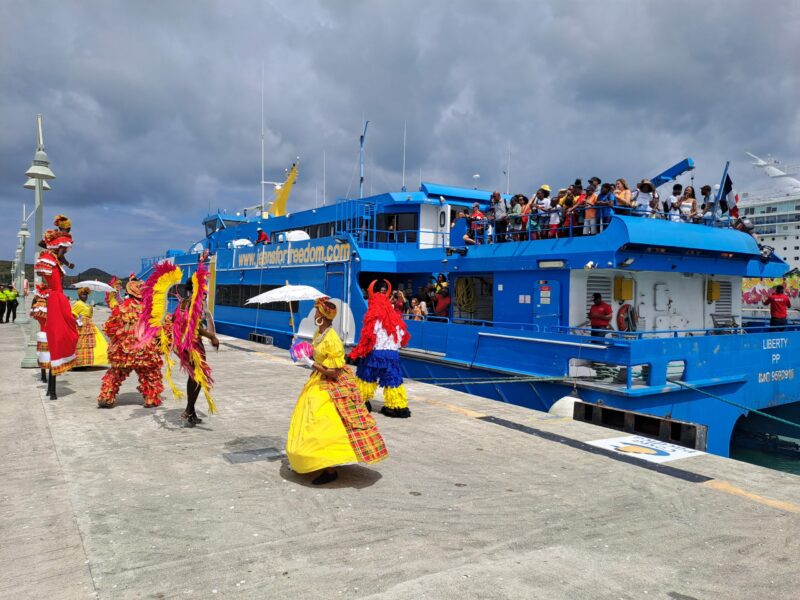
Over 400 passengers from the French neighboring island Guadeloupe arrived in Antigua and Barbuda last weekend on the L’Express des Îles ferry, following its return last year.
After a three-year hiatus due to the pandemic, the Guadeloupe-based ferry arrived in Antigua in December carrying 415 passengers.
And on Saturday gone, 427 passengers from Guadeloupe arrived at the Nevis Street Pier.
The visitors were welcomed with steel pan music, dancers, and a cultural show organized by the Antigua & Barbuda Tourism Authority in collaboration with the Antigua & Barbuda Festivals Commission and Antigua Cruise Port.
The passengers were also given flyers promoting Antigua’s Carnival, which is July 27- August 8.
Charmaine Spencer, Antigua & Barbuda Tourism Authority Director for the Caribbean & Latin American Markets, encouraged the French visitors to return to participate in Antigua’s carnival celebrations this summer.
“It (the ferry) is a great way for us to build our interregional travel and tourism,” she said.
Meanwhile, Antigua Cruise Port General Manager, Dona Regis- Prosper said, “With our increased port capacity and focus on service quality, we can now accommodate more ferries. We are pleased to partner with the Antigua and Barbuda Tourism Authority and the Festivals Commission in creating the initial port-side welcome and look forward to future calls. As the Cruise Port Operator, we are always looking for ways to increase visitation to Antigua via the cruise port. We believe that ferries present an excellent option for interregional travel that can positively impact the port and destination.”
L’Express des Îles, according to the tourism authority, is “already been fully booked for its return to Antigua on May 18. The ferry will also visit in July and December”

This story was first published by Antigua News on : antigua.news/2023/04/26/lexpress-des-iles-brings-over-400-passengers-to-antigua. © 2023 Antigua News. Republication without permission is not allowed.

About the author
The Editorial Staff refers to all reporters employed by Antigua.news. When an article is not an original creation of Antigua.news—such as when it is based on a press release, other media articles, letters to the editor, or court decisions—one of our staff members is responsible for overseeing its publication.
Read our editorial standards and corrections policy. Spotted an error? Contact the newsroom.
More from Caribbean
View section
BREAKING | Dominica Heads to the Polls on December 16
Nomination Day is November 30 as Prime Minister Roosevelt Skerrit seeks a fresh mandate for the Dominica Labour Party.
By Shermain Bique-Charles

DOMINICA: Relief as Three Missing Men Are Found Alive at Sea Near Aves Islands
Davel Baron, Ryan Royer and a third man were rescued by a cargo vessel after being found drifting at sea, bringing relief following days of uncertainty over their whereabouts.
By Cory Wayland

Two Men Vanish at Sea in Dominica, Sparking Growing Fears for Their Safety
Police issue missing-person alerts for Davel Baron and Ryan Royer as concerns grow over their whereabouts.
By Cory Wayland

Saint Lucia Makes Decision on Citizenship by Investment Programme Amid EU Pressure
Prime Minister Philip J. Pierre confirms his government has formally responded to the European Union but says the decision will remain confidential until Brussels acknowledges receipt of the correspondence.
By Cory Wayland
Comments
Be the first to comment.