
Tourism CEO plans to discuss tourism with Keisha and Anastasia after space trip.

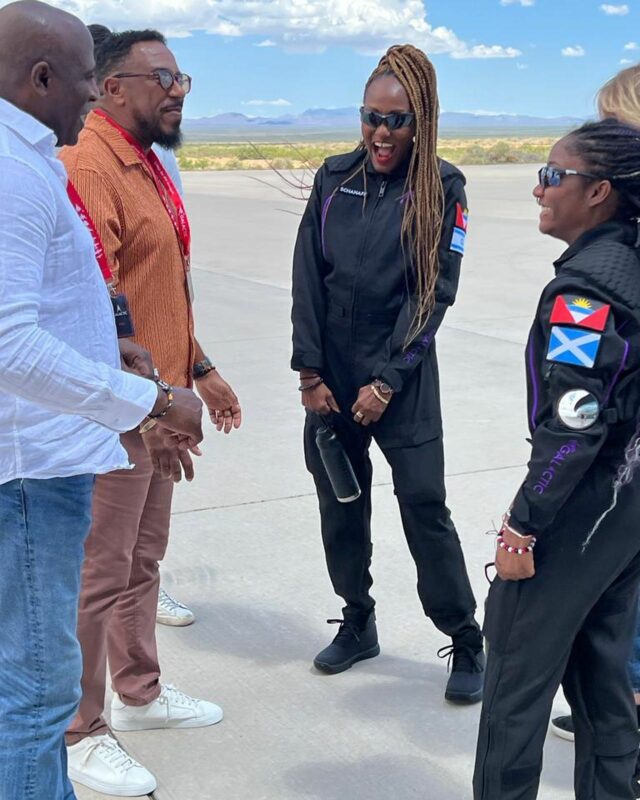
Antigua and Barbuda Tourism Authority CEO, Colin James, has expressed his excitement about the recent achievement of Keisha Schahaff and Anastasia Mayers, who became the first black Caribbean women to go to space and the first mother-daughter duo to do so.
James shared that his agency hopes to commemorate this historic achievement by erecting a monument to celebrate the duo’s accomplishment, putting Antigua and Barbuda on the map.
He also discussed plans to work with Schahaff to promote the island as a wellness destination, utilizing her experience as a wellness counselor.
“First and foremost, we discussed with our team to have some kind of monument where we could celebrate that achievement…which is historic not just for Antigua and Barbuda, but the entire region for what our women are achieving,” he said.
James, a guest on Observer’s Big Issues program Sunday, emphasized the importance of respecting the duo and not exploiting their achievement.
He highlighted the overwhelming support shown by the community, particularly the youth, during the celebration at the Antigua Recreation Grounds.
The CEO believes that this achievement has given Antigua and Barbuda a unique opportunity to establish their national flag as a brand, and he considers this one of the proudest moments of his career in the tourism industry.
“We have four strategic pillars that we balance our marketing on yachting, heritage and culture, romance, and wellness, so utilizing the wellness aspect of the destination and what she does as a wellness counselor is remarkable.
The fact that your flag sells out on Amazon, that you are trending [on social media], and that hundreds of news outlets pick you up…tells you something,” he said.

This story was first published by Antigua News on : antigua.news/2023/08/14/tourism-ceo-plans-to-discuss-tourism-with-keisha-and-anastasia-after-space-trip. © 2023 Antigua News. Republication without permission is not allowed.

About the author
The Editorial Staff refers to all reporters employed by Antigua.news. When an article is not an original creation of Antigua.news—such as when it is based on a press release, other media articles, letters to the editor, or court decisions—one of our staff members is responsible for overseeing its publication.
Read our editorial standards and corrections policy. Spotted an error? Contact the newsroom.
More from Tourism
View section
Freeland Congratulates Fernandez on Election as CTO Chairman
Minister of State pledges support for Fernandez’s regional tourism leadership and welcomes his focus on women, youth and connectivity.
By Shermain Bique-Charles

Antigua has 365 beaches. Can it make AI’s shortlist?
As travellers ask chatbots to find their ideal holiday, Antigua and Barbuda faces a new challenge: being recommended before anyone thinks to search for it.
By Dario Item
Nikki Beach Antigua Makes Waves in Monaco as Freeland and Sales Team Meet 30 Potential Buyers
By Shermain Bique-Charles
Freeland Heads to Monaco to Promote Antigua and Barbuda’s Yachting Sector
By Editorial Staff
Comments
Be the first to comment.