
Saharan dust returns to Caribbean; Those with underlying health conditions put on notice

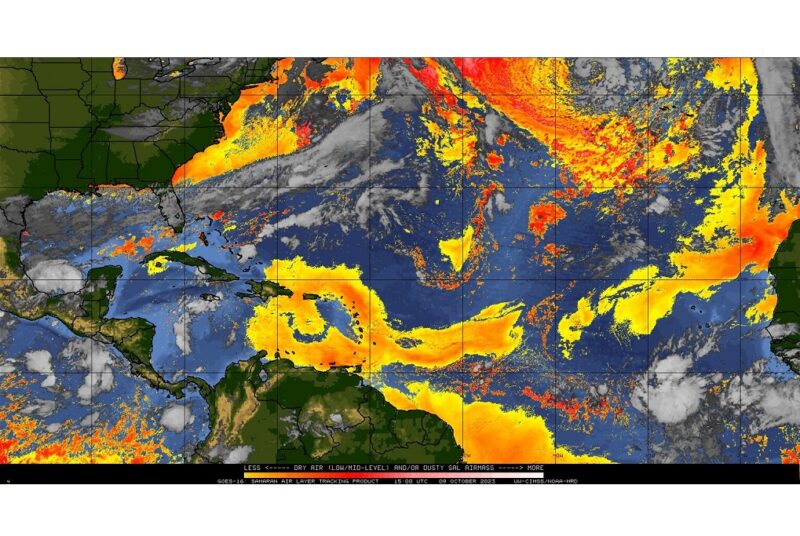
Individuals who suffer from sinus or respiratory ailments may be affected by the presence of Saharan dust in the Caribbean region.
The Antigua and Barbuda Meteorological Service has forecasted that air quality will be moderate for Antigua and Barbuda from Monday to Wednesday.
They have also stated that air quality will be affected by particulate matters 2.5 and 10 due to a fresh surge in Saharan Dust.
This fresh surge may elevate the threat of health problems, especially for those who are unusually sensitive, such as asthmatics, and could potentially cause them limited health impacts.
Montserrat’s Disaster Management Coordination Agency has also warned citizens that air quality has dropped to Moderate Levels across Montserrat on Monday, October 9 due to a fresh surge in the Saharan Dust.
The agency has advised sensitive groups such as the elderly, children, and those with respiratory and cardiovascular ailments to take the necessary precautions.
The Dominica Meteorological Service, in its weather outlook for Dominica and the Lesser Antilles on October 9, says that the presence of dust haze could lead to a reduction in visibility. It advises people with respiratory sensitivities to take the necessary precautions to avoid complications.
The Meteorological Office for St. Maarten warns that varying concentrations of Saharan dust will affect air quality over the next few days and urges persons with allergies or respiratory illnesses to remain vigilant.
The Trinidad and Tobago Meteorological Office mentions that a mild concentration of Saharan dust is present.
Lastly, the St. Vincent and the Grenadines Meteorological Service, in its 72-hour weather outlook on October 8, states that a film of haze may be noticeable across the area at times.
This story was first published by Antigua News on : antigua.news/2023/10/09/saharan-dust-returns-to-caribbean-those-with-underlying-health-conditions-put-on-notice. © 2023 Antigua News. Republication without permission is not allowed.

About the author
The Editorial Staff refers to all reporters employed by Antigua.news. When an article is not an original creation of Antigua.news—such as when it is based on a press release, other media articles, letters to the editor, or court decisions—one of our staff members is responsible for overseeing its publication.
Read our editorial standards and corrections policy. Spotted an error? Contact the newsroom.
More from Caribbean
View section
VIDEO: Doctors at Dominica China Friendship Hospital Stage Protest Outside Medical Facility
Healthcare professionals at the Dominica China Friendship Hospital gather outside the medical facility in an apparent protest, raising concerns over issues yet to be officially confirmed.
By Cory Wayland

St. Kitts DPP Seeks Antigua’s Help in Outstanding Case Involving Former Resort Clerk
By Shermain Bique-Charles

Royal Caribbean in Talks to Buy Half of Sandals in Reported $3 Billion Deal
By Shermain Bique-Charles

Four Killed in Latest US Military Strike on Suspected Drug Vessel in Caribbean
By Shermain Bique-Charles
Comments
Be the first to comment.