
Blue Waters Resort Promotes Community Outreach

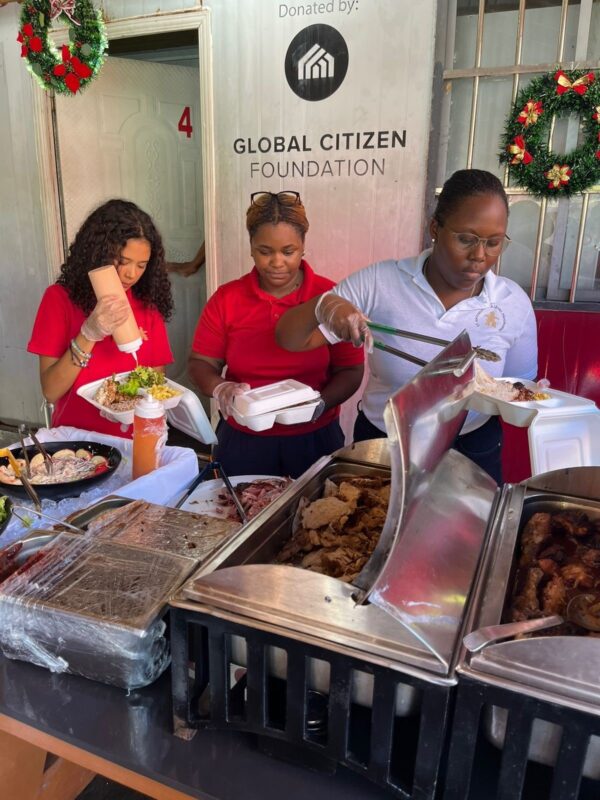
Blue Waters Resort & Spa, led by their Executive Chef, Mr. Michael Harrison, has taken an initiative to promote community outreach.
The resort’s ownership has approved this initiative, which involves the entire team. The team members volunteer once a month to prepare, cook and serve meals for the homeless at the Soup Kitchen near the St. John’s Market.
The resort provides the ingredients. This program began in June 2023.
This year, the Antigua Barbuda Hotels & Tourism Association (ABHTA) and the Ministry of Tourism, Education Division have come together to create a comprehensive School Visitation Program.
The program aims to enrich the educational experience of school students while uplifting the tourism industry. By providing firsthand knowledge of the tourism industry, the program hopes to inspire their interest and curiosity.
Blue Waters Resort & Spa, based in the north of the island, has committed to work with both the St. Anthony’s Secondary School and the Cedar Grove Primary School.
The first activity began in Christmas 2022 with the St. Anthony’s Secondary School (SASS) serenading the guests and staff of the resort with carols by the school band “The SASS Renegades”.
During the year, members of the Blue Waters’ team participated in student development activities with their CAPE Department to guide students on resume writing and prepare them for the world of work.
On Thursday, December 7, 2023, both Team Blue Waters and the CAPE students of SASS, along with their Principal, Mrs. Joann Boulous-Callias, brought festive cheer to the Soup Kitchen. The teams put up decorations, provided music, a delectable menu and cheer for the season.

This story was first published by Antigua News on : antigua.news/2023/12/09/blue-waters-resort-promotes-community-outreach. © 2023 Antigua News. Republication without permission is not allowed.

About the author
The Editorial Staff refers to all reporters employed by Antigua.news. When an article is not an original creation of Antigua.news—such as when it is based on a press release, other media articles, letters to the editor, or court decisions—one of our staff members is responsible for overseeing its publication.
Read our editorial standards and corrections policy. Spotted an error? Contact the newsroom.
More from Tourism
View section
‘A Beautiful Soul’: St. John’s Taxi Association Remembers Denyse Hamilton’s Kindness and Service
Leroy John-Baptiste remembers Denyse Hamilton as a colleague who always made time to help and says the St. John’s Taxi Association will reach out to support her family.
By Shermain Bique-Charles

Tourism Week 2026 Opens with Thanksgiving at Spring Gardens Moravian Church
Tourism Minister Charles Fernandez called for investment in the skills of Antiguans and Barbudans as AI reshapes the industry, while Michael Freeland thanked the workers who make the visitor experience possible.
By Shermain Bique-Charles

Antigua and Barbuda Art Week Wraps Up After Eight Days of Exhibitions and Performances
Antigua and Barbuda Art Week Wraps Up After Eight Days of Exhibitions and Performances
By Shermain Bique-Charles

American Airlines Expo Introduces Antigua’s Students to Aviation Careers
Flight simulators, hands-on demonstrations and conversations with industry professionals gave students a closer look at careers in aviation and tourism.
By Shermain Bique-Charles
Comments
Be the first to comment.