
Election officials in South Africa rush to register 100,000 prisoners to vote

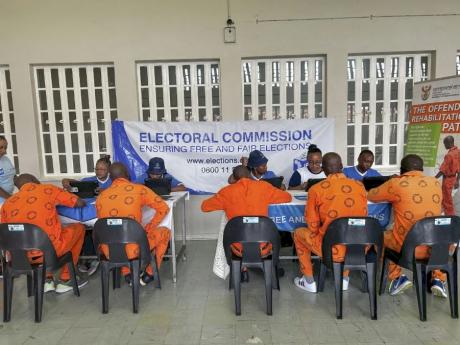
South Africa, a country grappling with one of the highest crime rates in the world, is gearing up for this year’s national election.
In an attempt to boost the number of voters, officials from the Electoral Commission of South Africa have embarked on a mission to register at least 100,000 inmates from the 240 correctional facilities across the country.
This is a significant increase from the 15,000 prisoners who voted in the last national election in 2019.
Despite being incarcerated, adult citizens have the right to vote in South Africa, a constitutional guarantee that sets the country apart from most of its African counterparts where prisoners are often disqualified from voting.
The Electoral Commission of South Africa hopes to conclude their visit to all 240 prisons by the end of Thursday, but the exact number of registered inmates is yet to be determined.
At the all-male Zonderwater Correctional Centre, located on the outskirts of the capital, Pretoria, prisoners in bright orange uniforms queued up in a hall to register as first-time voters or update their details on electoral rolls if they have recently been incarcerated.
Guards closely monitored the process, while a banner with the words “Ensuring Free and Fair Elections” hung on the wall to remind everyone of the importance of this democratic right. However, not all inmates participated in the registration process, with some chatting with each other or focusing on their work, preparing lunch in the cafeteria.

The exact date for the vote is yet to be announced, but it is expected to take place sometime between May and August.
The success of this ambitious project to register inmates as voters is yet to be determined, but it is a significant step towards ensuring that every adult citizen in South Africa exercises their right to vote.
This story was first published by Antigua News on : antigua.news/2024/02/02/election-officials-in-south-africa-rush-to-register-100000-prisoners-to-vote. © 2024 Antigua News. Republication without permission is not allowed.

About the author
The Editorial Staff refers to all reporters employed by Antigua.news. When an article is not an original creation of Antigua.news—such as when it is based on a press release, other media articles, letters to the editor, or court decisions—one of our staff members is responsible for overseeing its publication.
Read our editorial standards and corrections policy. Spotted an error? Contact the newsroom.
More from World
View section
Spain Votes After an Eviction Shook Its Government
An elderly tenant’s eviction helped trigger the November 29 snap election. Pedro Sánchez is recovering in some polls, but the right still has the clearer route to a governing majority.
By Dario Item

Dozens of KFC Restaurants Closing Across 10 U.S. States as Major Franchise Operator Files for Bankruptcy
Financial troubles, falling sales and millions in unpaid franchise fees have forced a major KFC operator into bankruptcy, with 72 restaurant locations affected and more closures possible.
By Cory Wayland

Robert Pattinson is the new James Bond
The Twilight and The Batman star succeeds Daniel Craig as 007 in the next James Bond film, directed by Denis Villeneuve and written by Steven Knight.
By Mick the Ram

Microsoft Outage cripples millions globally
Outlook, Teams and Copilot users reported disruptions across 74 countries as Microsoft cited increased load on its infrastructure.
By Mick the Ram
Comments
Be the first to comment.