
Cricket match distraction was cause of fatal train crash in India

by Mick the Ram
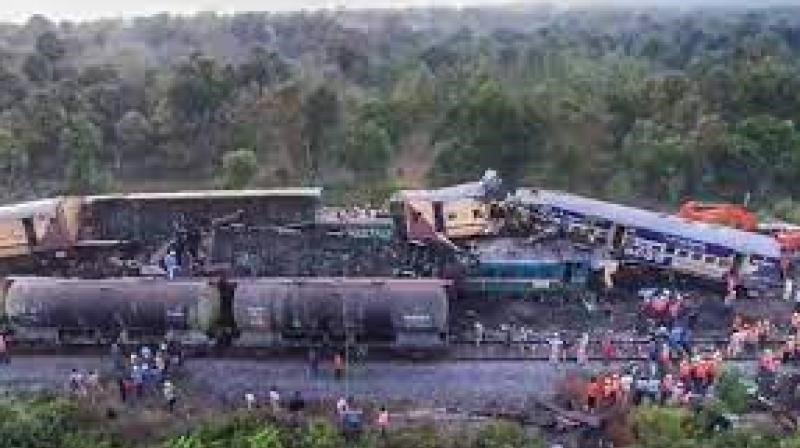
A fatal train crash that occurred last year in India was caused by the driver and his assistant of one of the two trains involved, being distracted due to them watching a cricket match on a mobile phone.
The collision took place in October 2023, when the Visakhapatnam to Rayagada service ploughed into the rear of a train that had the same departure point, but was heading to Palasa, causing a derailment in Vizianagaram district, in southern Andhra Pradesh state.
The two drivers were among fourteen who lost their lives after they missed a crucial signal, and left more than 50 others injured.
The Indian Railways Minister confirmed that investigations had found that the two men had been watching India playing against England in a World Cup one-day international match taking place at the same time.
Driver and assistant missed the signal
Following the shocking crash, hundreds of ambulances, doctors, nurses and rescue personnel were sent to the scene, with heroic efforts taking place to aid passengers, as well as retrieving bodies.
A preliminary investigation by the railway authorities immediately after the incident, found that the driver and assistant driver of the train were at fault for the collision, but it was not known why both had failed to spot the signal.
Concentration switched to cricket with tragic consequences
Now however, despite the official report by the Commissioners of Railway Safety not yet being released, the Railway Minister, Ashwini Vaishnaw, has taken the surprise step of explaining the reasons to the media.
He said: “The recent case in Andhra Pradesh happened because both the loco pilot and co-pilot were distracted by the cricket match which was going on.”
Hundreds of millions of Indian cricket fans were tuned in at the time, but passengers and employers had the right to expect the drivers to act professionally, with lives in their hands.
Systems put in place to avoid repeat
Discussing the safety measures brought in since the incident, Mr Vaishnaw said they would “make sure that the pilots and the assistant pilots are fully focused on running the train,” stating that the government was installing systems to detect such distractions.
He insisted that they would continue to put their focus on safety, adding that they always try to find out the root cause of every incident and subsequently come up with a solution to ensure it is not repeated.

Massive investment coming for overdue network upgrade
India has the world’s second-largest railway network, with millions of people using it on a daily basis.
In recent years, safety standards have improved and the number of accidents has fallen; although that is no consolation to the families of the dead and injured in this case.
There are plans to invest about $130 billion to modernise the decades-old network and upgrade it with modern stations and electronic signalling systems.
Potential disaster averted in separate incident
Only last month, a separate investigation was ordered to establish how a freight train was able to travel more than 70km (43.4 miles)… without a driver!
The incident happened early on a Sunday morning, and involved a 53-wagon train carrying stone chippings from Jammu and Kashmir to the Hoshiarpur district in Punjab.
The train stopped in Kathua for a change of crew, but had not been secured by the driver or his assistant and it is understood that it began moving down a slope, with nobody at the controls. Picking up speed, it zoomed through several stations, with level-crossings being closed along its path for public safety.
It was eventually brought to a halt by quick thinking officials who were able to place wooden blacks on the tracks to gradually reduce its speeds, allowing it to come to a stop before reaching the Punjab.
Fortunately nobody was injured, although both drivers were removed from their posts for gross negligence.
This story was first published by Antigua News on : antigua.news/2024/03/07/cricket-match-distraction-was-cause-of-fatal-train-crash-in-india. © 2024 Antigua News. Republication without permission is not allowed.

About the author
The Editorial Staff refers to all reporters employed by Antigua.news. When an article is not an original creation of Antigua.news—such as when it is based on a press release, other media articles, letters to the editor, or court decisions—one of our staff members is responsible for overseeing its publication.
Read our editorial standards and corrections policy. Spotted an error? Contact the newsroom.
More from World
View section
Spain Votes After an Eviction Shook Its Government
An elderly tenant’s eviction helped trigger the November 29 snap election. Pedro Sánchez is recovering in some polls, but the right still has the clearer route to a governing majority.
By Dario Item

Dozens of KFC Restaurants Closing Across 10 U.S. States as Major Franchise Operator Files for Bankruptcy
Financial troubles, falling sales and millions in unpaid franchise fees have forced a major KFC operator into bankruptcy, with 72 restaurant locations affected and more closures possible.
By Cory Wayland

Robert Pattinson is the new James Bond
The Twilight and The Batman star succeeds Daniel Craig as 007 in the next James Bond film, directed by Denis Villeneuve and written by Steven Knight.
By Mick the Ram

Microsoft Outage cripples millions globally
Outlook, Teams and Copilot users reported disruptions across 74 countries as Microsoft cited increased load on its infrastructure.
By Mick the Ram
Comments
Be the first to comment.