
Pink Lover Beatrice Thomas Turns 100

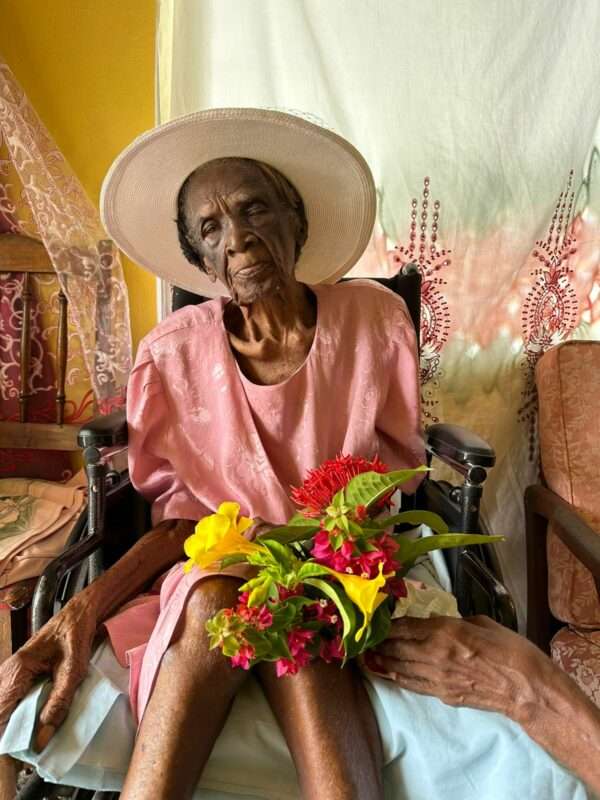
Get ready to hear an amazing story about the incredible Beatrice Thomas!
Born on May 5th, 1924 in Christian Hill, Beatrice’s life has been nothing short of extraordinary. Although her birth certificate had a different date, she has always celebrated both May 3rd and May 5th with her loved ones.
From a young age, Beatrice was a hard worker, taking on various jobs such as washing, ironing, cooking, and sewing. She learned valuable skills from her parents and loved doing pastries.
Beatrice worked for the Blanchards and Mamora Bay, now known as St. James, where she truly enjoyed her work.
Beatrice is a shining example of a people person. She is kind, loving, and always willing to lend a helping hand to those in need. She lives with her two children, Foster Payne and Lucinda Payne, and is the proud grandmother of seven beautiful grandchildren.

One of her biggest passions in life is her faith. Beatrice is a proud Methodist and enjoys attending church on Sundays, where she sings and worships God.
Her favorite songs are “Blessed Assurance” and “The Lord is my Shepherd”, while her favorite passage of scripture is “let the word of my mouth”. Beatrice believes in Jesus and that he died for us and will come again.
One of her favorite sayings is “I can do all things through Christ who strengthens me”. In her free time, Beatrice loves to cook and enjoys her favorite foods such as Fungi, Chop up, Fish & Pepperpot.
Her favorite color is pink, which suits her bubbly personality perfectly. Beatrice’s incredible journey is an inspiration to us all. Her hard work, kindness, and faith have made her an invaluable asset to her community, and a beloved member of her family.
This story was first published by Antigua News on : antigua.news/2024/05/03/pink-lover-beatrice-thomas-turns-100. © 2024 Antigua News. Republication without permission is not allowed.

About the author
The Editorial Staff refers to all reporters employed by Antigua.news. When an article is not an original creation of Antigua.news—such as when it is based on a press release, other media articles, letters to the editor, or court decisions—one of our staff members is responsible for overseeing its publication.
Read our editorial standards and corrections policy. Spotted an error? Contact the newsroom.
More from Antigua and Barbuda
View section
Hopeful Hearts Foundation Introduces Minds in Motion: Bringing Yoga into Schools to Promote Emotional Wellness and Conflict Resolution
Hopeful Hearts Foundation has launched its Minds in Motion initiative, introducing yoga and mindfulness into schools to help children manage their emotions, resolve conflicts, build confidence and develop healthier relationships.
By Editorial Staff

Antigua Girls’ High School Unveils Mural to Break the Stigma Around Periods
Scrub Life Cares founder and AGHS Old Girl Tanya Ambrose brought the organisation’s first mural project to her alma mater, where students helped paint it and brought its new mascot, Una, to life.
By Shermain Bique-Charles

Protection Order Requests Surge 93% in Antigua and Barbuda, but Fewer Than Half Complete Process
The Directorate of Gender Affairs received 116 requests from January to October, up from 60 a year earlier. Advocates say intimidation, financial dependence and fears about confidentiality can keep survivors from pursuing protection.
By Shermain Bique-Charles

Scholarship Recipients Seek Payment Dates as January Tuition Deadline Looms
Students and parents used Pointe FM’s call-in programme to ask about outstanding scholarship disbursements.
By Shermain Bique-Charles
Comments
Be the first to comment.