
Mexico elects its first woman president

by Mick the Ram
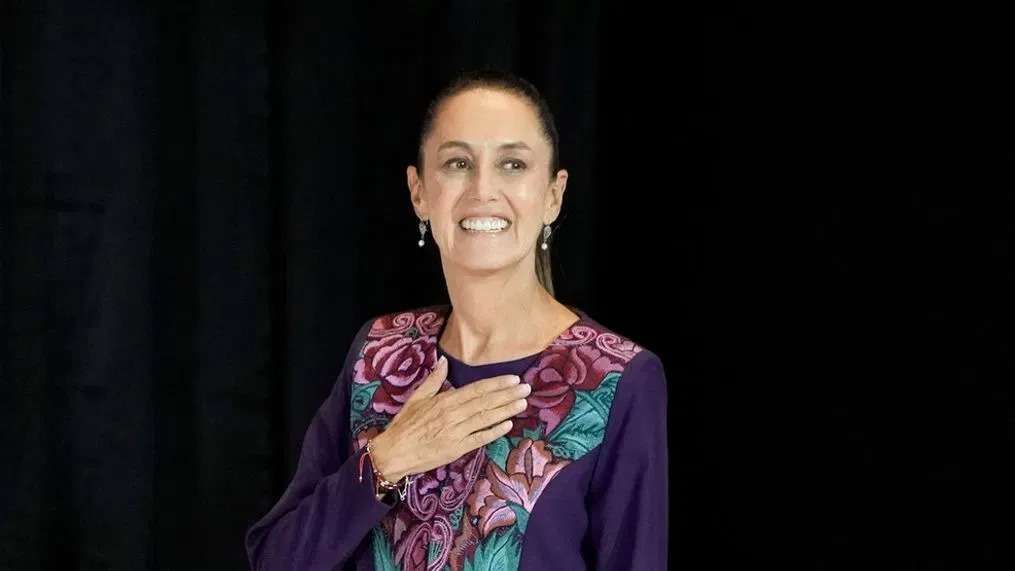
In a historic election, Claudia Sheinbaum has become Mexico’s first woman president in the 200 years of the country being a Republic.
The 61-year-old who had an illustrious career as a scientist before delving into politics, replaces her mentor and close confidante, the outgoing President Andrés Manuel López Obrador, who was not allowed to run for office again after his six-year term.
Her rival, Xóchitl Gálvez, conceded victory to the former mayor of Mexico City, whose maternal grandparents were Jewish and moved to Mexico from Bulgaria fleeing the Nazis. Her paternal grandparents hailed from Lithuania.
Thousands of soldiers were deployed across the country to facilitate a peaceful voting day, but that didn’t stop a town council candidate being shot dead in the hours leading up to the election.

“Achievement for all women”
Ms Sheinbaum becomes the first Jewish person to lead one of the world’s largest predominantly Catholic countries. She said her success was an achievement not just for her but for all women.
She has promised continuity, saying that she will continue to build on the welfare programmes which have made Mr López Obrador so popular, adding that it is important to tackle the roots of violence in the country and has promised to invest in welfare programmes to prevent poor young Mexicans from being recruited by criminal groups.
“Although many Mexicans do not fully agree with our project, we will have to walk in peace and harmony to continue building a fair and more prosperous Mexico,” was her persuasive message to the people.
Aiming to be a good neighbour
Relations between the US and Mexico suffered under Mr López Obrador, who has been in power since 2018
Ms Sheinbaum, who received nearly 58 percent of the vote, made it clear that although her intention was to foster “a relationship of friendship, mutual respect and equality” with their powerful neighbour, she would “always defend the Mexicans who are on the other side of the border”.
Messages of support
The new President received messages of congratulations from Spanish President Pedro Sánchez, who promised her that the two countries will “continue to work to strengthen relations.”
Also posting her best wishes was Commission President Ursula von der Leyen, who stressed that “Mexico and the EU share deep historical, economic and cultural ties,” before adding how she looked forward to “strengthening our bilateral relations under your leadership”.
Tackling security and the environment
The new leader studied physics before going on to receive a doctorate in energy engineering, spending years at a renowned research lab in California studying Mexican energy consumption patterns, which has helped her to become an expert on climate change.
The environment is one of the two big issues that Ms Sheinbaum has to tackle from day one, with the other being security, as no Mexican president in recent memory has managed to find a winning policy formula for confronting the threat that the organised crime gangs consistently bring.
This story was first published by Antigua News on : antigua.news/2024/06/05/mexico-elects-its-first-woman-president. © 2024 Antigua News. Republication without permission is not allowed.

About the author
The Editorial Staff refers to all reporters employed by Antigua.news. When an article is not an original creation of Antigua.news—such as when it is based on a press release, other media articles, letters to the editor, or court decisions—one of our staff members is responsible for overseeing its publication.
Read our editorial standards and corrections policy. Spotted an error? Contact the newsroom.
More from World
View section
Powerful Earthquake Strikes China Leaving 16 Dead And Hundreds Of Homes Destroyed
Rescue teams race against time in Tibet after a magnitude 7 earthquake leaves dozens injured, displaces thousands and triggers widespread destruction.
By Cory Wayland

Kenyan Preacher Paul Mackenzie Convicted of Murdering 191 People in Shakahola Massacre
Former church leader found guilty alongside 28 others in a case involving the deaths of 190 children and one adult who were allegedly subjected to deadly religious fasting.
By Cory Wayland

Priest Speaks About Life and Death in Final Sermon Before Falling Crucifix Kills Him During Mass
Father Patricio Sánchez urged worshippers to cherish their time with God and loved ones before a large wooden crucifix fell and fatally struck him during a church service in Ecuador.
By Cory Wayland

Florida Attorney General James Uthmeier Announces Arrest Warrant for Former Cuban Leader Raúl Castro Over 1996 Aircraft Shootdown
James Uthmeier confirms murder conspiracy charge against the 95-year-old former president over the 1996 shootdown of two civilian aircraft that killed four men.
By Cory Wayland
Comments
Be the first to comment.