
Addressing the Situation at Cook’s Landfill: Setting the Record Straight

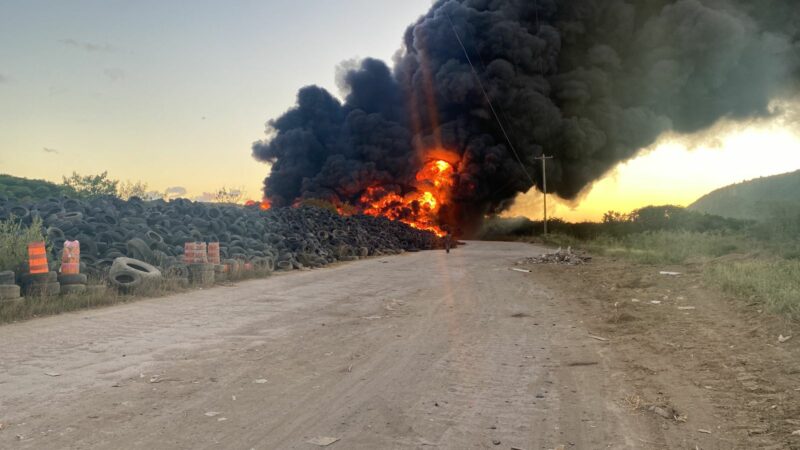
St. John’s, Antigua and Barbuda – The National Solid Waste Management Authority (NSWMA) wishes to address recent claims regarding the operational status and management of Cook’s Landfill.
We are committed to transparency and would like to clarify several points to ensure the public is accurately informed.
Contrary to reports, NSWMA has not received any complaints from staff at the landfill regarding their working conditions or equipment. Our Human Resources team is regularly engaged with staff, and any issues raised are promptly addressed.
The Authority further clarifies that there have been no new requests for equipment beyond what has been traditionally used and currently available at the landfill.
All necessary tools and machinery are in place to manage landfill operations effectively.
Regarding the timeline of the fire, while circulating statements falsely claim the fire at Cook’s Landfill started in May, we confirm that the incident began on the 9th of June.
We have been actively working to control and extinguish the fire since its onset, despite consistent heavy rainfall during this period causing delays.
While there is still some residual smoke, we are on track to have the fire completely extinguished by tomorrow. Our dedicated team is working around the clock to ensure this matter is resolved swiftly and safely.

We are actively exploring new waste disposal methods such as incineration and collaborating with key partners to transition away from the burial method used at Cook’s Landfill for the past 20 years.
NSWMA remains committed to engaging with the community. We encourage residents to report any concerns directly to us through our official channels.
We are dedicated to maintaining open lines of communication with the public. Updates on the situation at Cook’s Landfill and other NSWMA operations will be regularly posted on our social media platforms.
NSWMA appreciates the patience and understanding of the surrounding residents as we work to ensure a safe and healthy environment for all.
For any further information or to report concerns, please contact us at 562-1348.
This story was first published by Antigua News on : antigua.news/2024/06/27/addressing-the-situation-at-cooks-landfill-setting-the-record-straight. © 2024 Antigua News. Republication without permission is not allowed.

About the author
The Editorial Staff refers to all reporters employed by Antigua.news. When an article is not an original creation of Antigua.news—such as when it is based on a press release, other media articles, letters to the editor, or court decisions—one of our staff members is responsible for overseeing its publication.
Read our editorial standards and corrections policy. Spotted an error? Contact the newsroom.
More from Antigua and Barbuda
View section
Antigua-Filmed Love Link Caribbean Reaches Jamaican TV After 2.3 Million Digital Views
The reality dating series is expanding its regional audience while showcasing Antigua and Barbuda to potential visitors.
By Shermain Bique-Charles

Airport Authority Announces Temporary Traffic and Parking Changes Ahead of CHOGM
Travellers using V.C. Bird International Airport are being urged to prepare for delays, with the heaviest traffic disruptions expected between November 2 and 4.
By Cory Wayland

Cuban Ambassador Praises Caribbean Support Against US Embargo as Antigua and Barbuda Records No Vote
Sergio Martínez Gonzalez thanks nations that supported Cuba, accusing Washington of pressuring countries ahead of the UN vote.
By Shermain Bique-Charles

Hurst Tips PM Browne for Future National Hero Recognition
Ambassador Lionel Hurst points to economic development and expanded access to university education as reasons he believes Browne could receive the honour.
By Shermain Bique-Charles
Comments (1)
Jezz June 27, 2024, 5:05 PM