
TROPICAL STORM CONDITIONS SPREADING ACROSS JAMAICA WITH HURRICANE CONDITIONS EXPECTED DURING THE NEXT SEVERAL HOURS

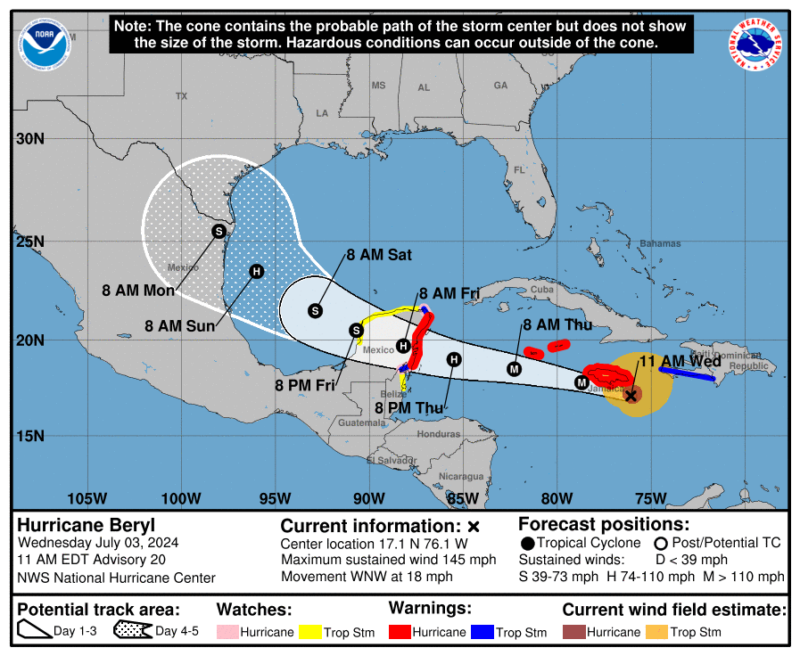
Hurricane Beryl, a powerful Category 4 storm with maximum sustained winds of 145 mph, is bearing down on Jamaica as it moves through the Caribbean Sea. As of 11:00 AM EDT, the hurricane was located about 75 miles southeast of Kingston, Jamaica, and 365 miles east-southeast of Grand Cayman, moving west-northwest at 18 mph.
The National Hurricane Center has updated its warnings:
- Hurricane Warnings are now in effect for Jamaica, Grand Cayman, Little Cayman, Cayman Brac, and the Yucatan Peninsula coast from Puerto Costa Maya to Cancun.
- Hurricane Watches extend to additional parts of the Yucatan Peninsula.
- Tropical Storm Warnings and Watches cover parts of Haiti, Belize, and more of the Yucatan Peninsula.
Beryl is forecast to pass near or over Jamaica within hours, approach the Cayman Islands tonight or early Thursday, and reach the Yucatan Peninsula Thursday night or early Friday. While some weakening is expected, Beryl is likely to remain a major hurricane as it approaches these areas.

Key hazards include:
- Winds: Hurricane-force winds extend up to 45 miles from the center, with tropical-storm-force winds reaching 185 miles outward.
- Storm surge: Water levels could rise 6 to 9 feet above normal in Jamaica, 2 to 4 feet in the Cayman Islands, and 3 to 5 feet along the Yucatan Peninsula’s east coast.
- Rainfall: Jamaica could see 4 to 8 inches of rain, with localized amounts up to 12 inches. The Cayman Islands may receive 4 to 6 inches. The Yucatan Peninsula and northern Belize could see 4 to 6 inches, with isolated areas receiving up to 8 inches.
- Dangerous surf: Life-threatening surf and rip currents are expected across the affected areas, including Puerto Rico, Hispaniola, Jamaica, the Cayman Islands, and parts of Cuba and the Yucatan Peninsula.
Residents in warned areas should complete preparations immediately and follow local authorities’ guidance. The next intermediate advisory will be issued at 2:00 PM EDT, with a complete advisory at 5:00 PM EDT.
This story was first published by Antigua News on : antigua.news/2024/07/03/tropical-storm-conditions-spreading-across-jamaica-with-hurricane-conditions-expected-during-the-next-several-hours. © 2024 Antigua News. Republication without permission is not allowed.

About the author
The Editorial Staff refers to all reporters employed by Antigua.news. When an article is not an original creation of Antigua.news—such as when it is based on a press release, other media articles, letters to the editor, or court decisions—one of our staff members is responsible for overseeing its publication.
Read our editorial standards and corrections policy. Spotted an error? Contact the newsroom.
More from Caribbean
View section
VIDEO: Doctors at Dominica China Friendship Hospital Stage Protest Outside Medical Facility
Healthcare professionals at the Dominica China Friendship Hospital gather outside the medical facility in an apparent protest, raising concerns over issues yet to be officially confirmed.
By Cory Wayland

St. Kitts DPP Seeks Antigua’s Help in Outstanding Case Involving Former Resort Clerk
By Shermain Bique-Charles

Royal Caribbean in Talks to Buy Half of Sandals in Reported $3 Billion Deal
By Shermain Bique-Charles

Four Killed in Latest US Military Strike on Suspected Drug Vessel in Caribbean
By Shermain Bique-Charles
Comments
Be the first to comment.