
Ffryes Beach Reverse Osmosis Plant to Boost Water Production by October

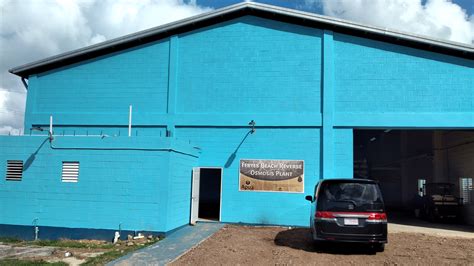
By October of this year, the Ffryes Beach Reverse Osmosis plant will be producing more water.
Public Utilities Minister Melford Nicholas said the process was delayed due to developmental plans for lands adjacent to the plant.
The Antigua Public Utilities Authority would need to acquire a bit of land adjacent to the facilities and plant at Ffryes. On all accounts, that process is now complete.
“I believe the foundation footprints have already been demarcated and they will be moving towards building the concrete slab. The timeline has slipped a little bit. We would have expected the plant to be almost ready for service by the end of September”.
“I think based on the delays that were caused by the acquisition and preparation of that land that we’re looking now more at October,” Nicholas said.

He revealed that the Seven Seas Water Group agreement will become operational once the proprietary work is completed at that site.
“Why we got into an engagement with Seven Seas was for rapid deployment and most of the plants can be deployed because most of it is containerized. So once the demarcation on that plinth is built the plants are ready to be shipped already there in St. Martin”.
Plans for a booster station in the Cades Bay area are also progressing and will bring relief to residents in that area.
“There is another project that is pending implementation and that is a booster station in the Cades Bay area that will allow us to consistently get water over the hillside in to ensure that not only the hotel in that area but all of the residents in that area can have a frequent flow of water and the pumps already acquired and it’s just for the construction of the particular booster station,” Minister Nicholas said.
This story was first published by Antigua News on : antigua.news/2024/07/12/ffryes-beach-reverse-osmosis-plant-to-boost-water-production-by-october. © 2024 Antigua News. Republication without permission is not allowed.

About the author
The Editorial Staff refers to all reporters employed by Antigua.news. When an article is not an original creation of Antigua.news—such as when it is based on a press release, other media articles, letters to the editor, or court decisions—one of our staff members is responsible for overseeing its publication.
Read our editorial standards and corrections policy. Spotted an error? Contact the newsroom.
More from Antigua and Barbuda
View section
Emergency Response Teams to Stage Mass Casualty Drill at Scotts Hill Ahead of CHOGM
Emergency personnel will simulate a serious vehicle crash to test hospital readiness, while a separate evacuation exercise is planned for the CHOGM opening ceremony venue.
By Cory Wayland

Karim Edwards’ Trial Over Fatal Friars Hill Road Crash Postponed Until December
More than four years after the collision that claimed the life of medical student Kenneth Mathew and left Priyanjana Das with life-altering injuries, the accused driver is still awaiting trial.
By Cory Wayland

Jury Rejects Self-Defence Claim And Finds Kareem Simon Guilty Of Dennis Edwards’ Murder
Jury rejects Simon’s self-defence claim after video footage reveals details of the fatal confrontation on Lower All Saints Road.
By Cory Wayland

Tourism Ministry and ABTA Working with Bert Kirchner on Proposed Louis Tomlinson Campaign
Minister Michael Freeland has held talks on the project, which aims to turn international exposure into visitor interest and bookings.
By Shermain Bique-Charles
Comments
Be the first to comment.