
San Francisco man has argument with driverless car – whose electronic voice issues eerie response to his erratic behavior

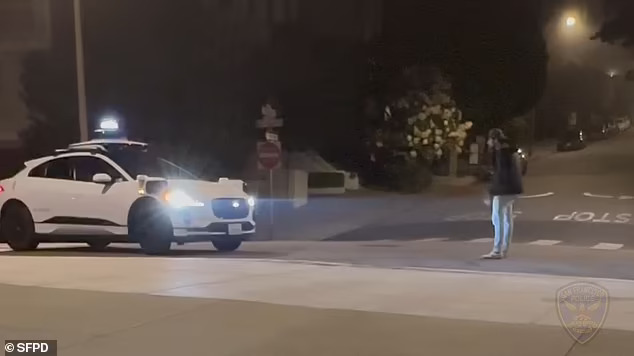
A laughing hooligan blocked a driveless car while taunting it, then allegedly attacked a disabled man who filmed his bizarre antics.
Police are hunting the young man in a backwards cap after the bystander he’s accused of attacking almost died from a fractured skull.
Bizarre footage shows the man, aged 25 to 30, trash talking the Waymo vehicle in the Pacific Heights neighborhood of San Francisco about 1am on July 5.
He stood in front of the white car in the middle of the road, preventing it from moving as the artificial intelligence refused to risk running him over.

‘What are you going to do? I want to see it, come on Waymo, give me something to work with,’ he shouted at the car, despite it being a car.
The video, released by police, skipped to the man having walked right up to the car’s hood and harassing the passenger.
‘Yo, the dude in the car, his testosterone is through the roof,’ he taunted.
Another part of the video showed him banging on the car’s hood and shouting, ‘Hey, come on, let’s work for each other’.
The car responded ‘unsafe behavior detected’ in a robotic voice, along with an alarm sound.
‘You’re no better than me,’ the young man yelled in response.
This story was first published by Antigua News on : antigua.news/2024/07/18/san-francisco-man-has-argument-with-driverless-car-whose-electronic-voice-issues-eerie-response-to-his-erratic-behavior. © 2024 Antigua News. Republication without permission is not allowed.

About the author
The Editorial Staff refers to all reporters employed by Antigua.news. When an article is not an original creation of Antigua.news—such as when it is based on a press release, other media articles, letters to the editor, or court decisions—one of our staff members is responsible for overseeing its publication.
Read our editorial standards and corrections policy. Spotted an error? Contact the newsroom.
More from Style
View section
The Best TV Shows of the 21st Century Didn’t Stay on Screen
Breaking Bad leads the New York Times’ new ranking. But from Mad Men’s tailoring to Fleabag’s confessions, the real story is what these series left behind
By Dario Item
Giorgio Armani Remembered for Contributions to Antigua and Barbuda
By Shermain Bique-Charles

‘BB Service’ Claims Road March Victory
By Editorial Staff
LETTER: Swag or Sag? Boy, Pull Your Pants Up!
By Editorial Staff
Comments
Be the first to comment.