
The ABHTA welcomes audit by the Inland Revenue Department but calls for fair collection of ABST by all accommodation providers


In response to the Cabinet minutes of July 17, 2024, the Antigua & Barbuda Hotels and Tourism Association (ABHTA) and its members express their support for any audit of financials.
The ABHTA recognizes that such audits can bolster government revenue collection, which, when reinvested into the economy, enhances infrastructure and other developments.
This reinvestment ultimately benefits the tourism sector, reinforcing Antigua and Barbuda’s status as a premier destination in the Caribbean.
However, the ABHTA stresses the need for a level playing field in ensuring all accommodation providers in Antigua and Barbuda are compliant, registered, and contributing their fair share of ABST taxes to the Inland Revenue Department.
An analysis of the destination’s performance for the periods of January to May in both 2024 and 2023 reveals that approximately 50% of all arriving guests were accommodated in established or traditional hotels. In contrast, around 32% stayed in accommodations categorized as guest houses or villas, a sub-set of providers often referred to as Airbnb.

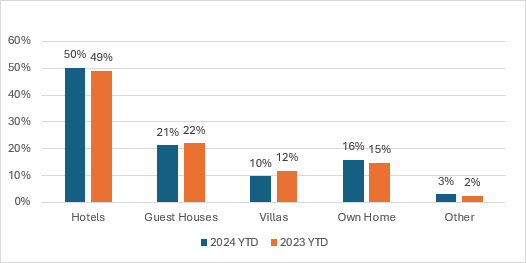
The ABHTA acknowledges the importance of this diverse range of accommodations and supports the growth and development of this sub-sector.
However, it insists that this growth must occur in a fair and balanced manner, with all providers contributing to the tax system.
Craig Marshall, Chairman of the ABHTA, stated, “We encourage the Government to analyze the hotel sector to ensure compliance across the board, and we fully support our members in this exercise. However, we need to urgently come together as a sector to discuss the regulation of all accommodation providers.
This is crucial not only for revenue compliance but also for marketing the destination. The marketing efforts for Antigua and Barbuda should include gaining insights and visibility into all accommodation providers, showcasing the diversity of what we offer.”
The ABHTA looks forward to the upcoming discussions on analyzing the categories of accommodation providers in the destination.
This story was first published by Antigua News on : antigua.news/2024/07/18/the-abhta-welcomes-audit-by-the-inland-revenue-department-but-calls-for-fair-collection-of-abst-by-all-accommodation-providers. © 2024 Antigua News. Republication without permission is not allowed.

About the author
The Editorial Staff refers to all reporters employed by Antigua.news. When an article is not an original creation of Antigua.news—such as when it is based on a press release, other media articles, letters to the editor, or court decisions—one of our staff members is responsible for overseeing its publication.
Read our editorial standards and corrections policy. Spotted an error? Contact the newsroom.
More from Tourism
View section
New York Plans Thanksgiving Service and Gala for Antigua and Barbuda’s 45th Independence Anniversary
Celebrations will include a Harlem church service, a Manhattan flag-raising ceremony and a “Road to Golden” gala featuring Session Starters DJs.
By Shermain Bique-Charles

Freeland Congratulates Fernandez on Election as CTO Chairman
Minister of State pledges support for Fernandez’s regional tourism leadership and welcomes his focus on women, youth and connectivity.
By Shermain Bique-Charles

Antigua has 365 beaches. Can it make AI’s shortlist?
As travellers ask chatbots to find their ideal holiday, Antigua and Barbuda faces a new challenge: being recommended before anyone thinks to search for it.
By Dario Item

Nikki Beach Antigua Makes Waves in Monaco as Freeland and Sales Team Meet 30 Potential Buyers
By Shermain Bique-Charles
Comments
Be the first to comment.