
Police Officer and Crown Counsel Awarded Chevening Scholarships

By Zaya Williams
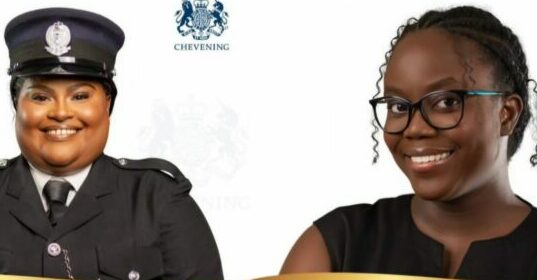
Two Antiguans have been selected for fully funded scholarships to pursue master’s degrees in the UK, joining a prestigious group from the Caribbean.
The first is Latisha Browne, a dedicated resident of Antigua and Barbuda with a strong passion for crime fighting, is currently serving as a Forensics Technician with the Royal Police Force of Antigua and Barbuda.
She holds a Bachelor’s Degree in Criminology and Sociology and a Postgraduate Diploma in Forensic Investigation from the University of the West Indies.
Latisha is committed to excellence and serves as the 18th International Commissioner for the Antigua Girl Guides Association.
Additionally, she is involved with the Halo Foundation’s youth programs, including Generation Y, Cushion Club, and JCl Antigua. Her goal is to become the first female Ballistics Expert in Antigua and Barbuda.
Latisha will pursue an MSc in Forensic Investigation at Cranfield University.
Annetta D. Jackson is a Crown Counsel in the Attorney General’s Chambers, where she handles Child Protection Matters and supports the Human Rights Portfolio.
Her previous role with the Directorate of Gender Affairs involved aiding the Gender-Based Violence Response and Referral Pathway.
Annetta’s expertise in Gender Mainstreaming is reflected in her participation on several Government Technical Gender Advisory Committees, including the Expert Validation Team for the National Gender (and Social Inclusion) Policy and Action Plan, and the Gender and Environment Social Safeguards Advisory Committee.
She has also been active in Gender Justice Advocacy through her work with Intersect Antigua and as a former Black Feminist Fund Fellow.
Annetta will pursue an MSc in Gender, Policy, and Inequalities at the London School of Economics.

This story was first published by Antigua News on : antigua.news/2024/08/28/police-officer-and-crown-counsel-awarded-chevening-scholarships. © 2024 Antigua News. Republication without permission is not allowed.

About the author
The Editorial Staff refers to all reporters employed by Antigua.news. When an article is not an original creation of Antigua.news—such as when it is based on a press release, other media articles, letters to the editor, or court decisions—one of our staff members is responsible for overseeing its publication.
Read our editorial standards and corrections policy. Spotted an error? Contact the newsroom.
More from Antigua and Barbuda
View section
More Than 12,000 Registered for CHOGM as Overseas Participation Nears 5,000
Organisers say the accreditation total includes local workers and participants preparing to support the Commonwealth gathering.
By Shermain Bique-Charles

VIDEO: Sherese ‘Washington’ Bramble Arrested During Live CHOGM Town Hall Broadcast
Sources say police were seeking Bramble in connection with a separate matter unrelated to the meeting.
By Editorial Staff

Emergency Response Teams to Stage Mass Casualty Drill at Scotts Hill Ahead of CHOGM
Emergency personnel will simulate a serious vehicle crash to test hospital readiness, while a separate evacuation exercise is planned for the CHOGM opening ceremony venue.
By Cory Wayland

Karim Edwards’ Trial Over Fatal Friars Hill Road Crash Postponed Until December
More than four years after the collision that claimed the life of medical student Kenneth Mathew and left Priyanjana Das with life-altering injuries, the accused driver is still awaiting trial.
By Cory Wayland
Comments (2)
Lily August 28, 2024, 10:17 AM
Ana August 28, 2024, 10:11 PM