
ABHTA to Host Hospitality Job Fair on World Tourism Day September 27, 2024

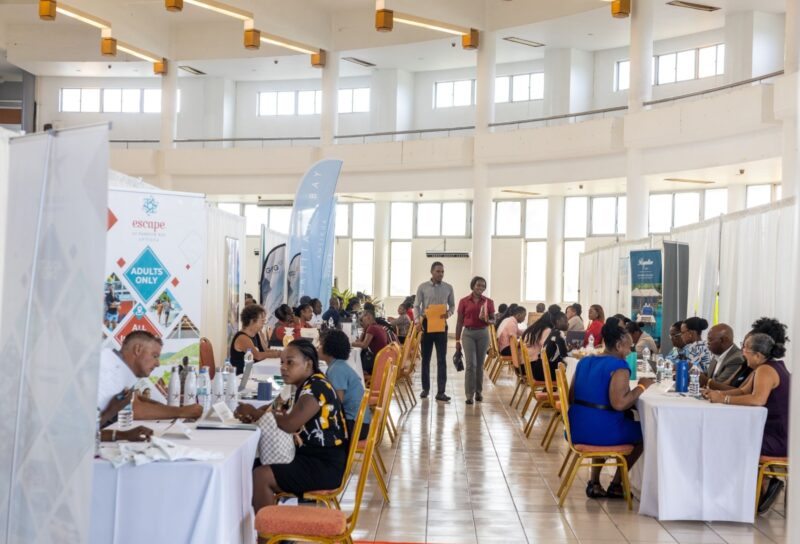
The Antigua and Barbuda Hotels and Tourism Association (ABHTA) brings back its Hospitality Job Fair on Friday, September 27, 2024.
This event will take place at the Multipurpose Cultural and Exhibition Centre, Perry Bay, in celebration of World Tourism Day.
The ABHTA aims to highlight the impact of tourism on the global economy and society and create awareness about the opportunities available within the industry.
Craig Marshall, the Chairman of the ABHTA, emphasizes the importance of the Hospitality Job Fair, stating, “Tourism has the potential to create meaningful change not only economically, but also socially and environmentally. As we prepare to celebrate World Tourism Day, we are reminded of our responsibility to ensure that tourism remains a powerful force for good in our society. Our Job Fair presents a unique opportunity for individuals across Antigua and Barbuda to become part of this transformative industry.”
Job seekers attending the fair will have the chance to explore a diverse range of positions, including Culinary, Food and Beverage, Maintenance, Housekeeping, Tour Guides, Administrative Team, and more.
This year’s participating companies include well-known establishments such as Ana’s on the Beach Restaurant and Art Gallery, Blue Waters Resort & Spa, Sandals Grande Antigua Resort & Spa, and many more.
In addition to job opportunities, attendees will also have the chance to learn about furthering their education in the industry by engaging with representatives from The Antigua and Barbuda Hospitality Training Institute.
To make the process smoother, job seekers are strongly encouraged to pre-register to secure an interview time slot. This event is a fantastic opportunity for individuals looking to join the dynamic world of hospitality and tourism in Antigua and Barbuda.

This story was first published by Antigua News on : antigua.news/2024/09/10/abhta-to-host-hospitality-job-fair-on-world-tourism-day-september-27-2024. © 2024 Antigua News. Republication without permission is not allowed.

About the author
The Editorial Staff refers to all reporters employed by Antigua.news. When an article is not an original creation of Antigua.news—such as when it is based on a press release, other media articles, letters to the editor, or court decisions—one of our staff members is responsible for overseeing its publication.
Read our editorial standards and corrections policy. Spotted an error? Contact the newsroom.
More from Tourism
View section
New York Plans Thanksgiving Service and Gala for Antigua and Barbuda’s 45th Independence Anniversary
Celebrations will include a Harlem church service, a Manhattan flag-raising ceremony and a “Road to Golden” gala featuring Session Starters DJs.
By Shermain Bique-Charles

Freeland Congratulates Fernandez on Election as CTO Chairman
Minister of State pledges support for Fernandez’s regional tourism leadership and welcomes his focus on women, youth and connectivity.
By Shermain Bique-Charles

Antigua has 365 beaches. Can it make AI’s shortlist?
As travellers ask chatbots to find their ideal holiday, Antigua and Barbuda faces a new challenge: being recommended before anyone thinks to search for it.
By Dario Item
Nikki Beach Antigua Makes Waves in Monaco as Freeland and Sales Team Meet 30 Potential Buyers
By Shermain Bique-Charles
Comments
Be the first to comment.