
Superstar singer-songwriter Jon Bon Jovi helps save distressed bridge jumper

By Mick the Ram
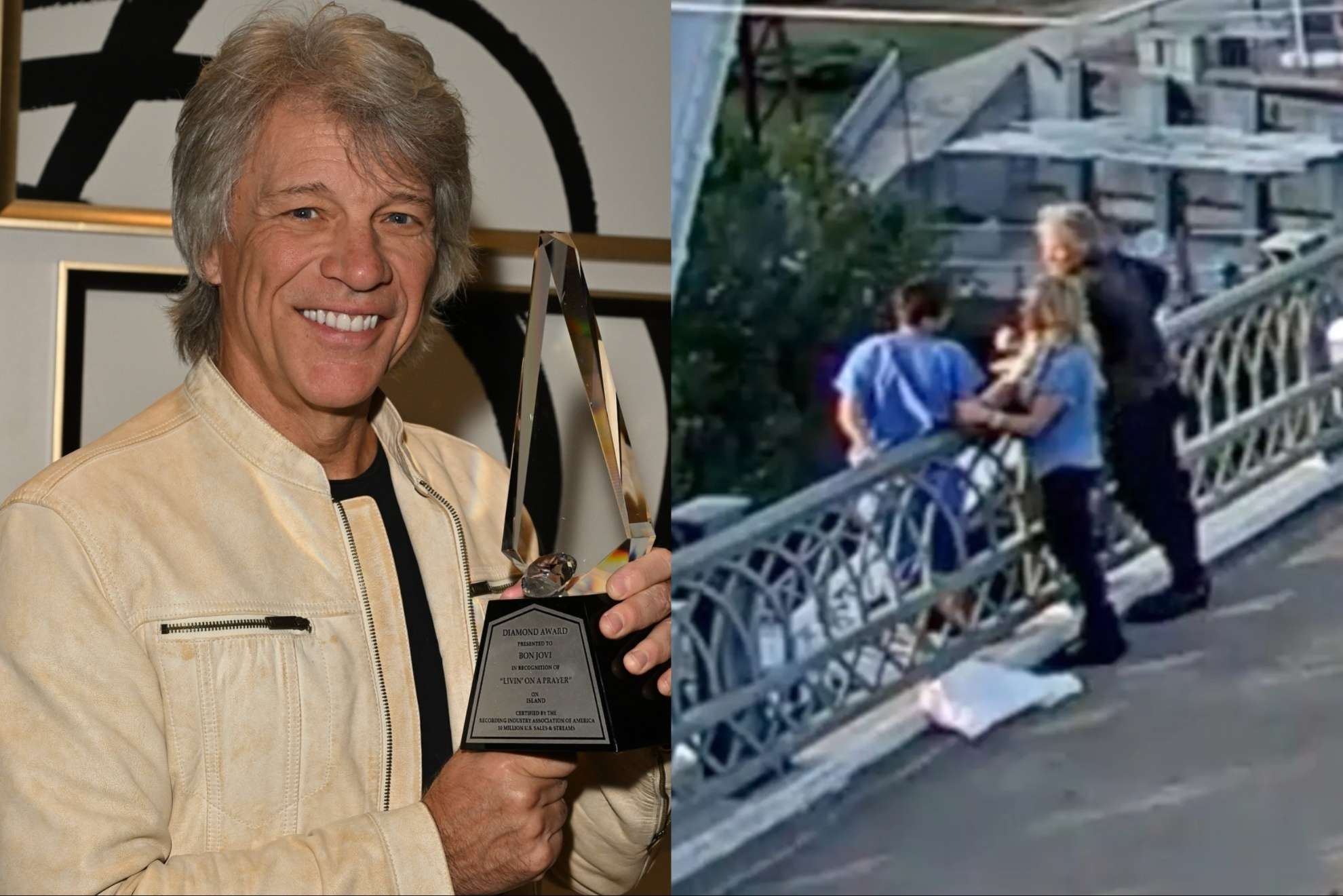
Jon Bon Jovi has received praise from the Nashville police department for helping a distressed woman who had climbed onto the ledge of a bridge and was seemingly considering taking her own life.
The rock legend and his production team were at the John Seigenthaler Pedestrian Bridge in the Tennessee state capital to shoot a music video when their attention was drawn to a female precariously leaning over the Cumberland River.
The 62-year-old approached the unidentified woman and standing several metres away, he engaged in conversation for several minutes before helping her back to safety with the help of another member of the public.
He then was seen to continue to talk to the clearly trouble individual, before embracing her in a hug and then leaving the scene holding her hand.
The popular frontman has an established foundation which routinely deals with people in crisis, so he is familiar with the correct procedure when faced with such circumstances and it is clear that his understanding of situation has probably saved this woman’s life.
On the scene by chance
In surveillance footage released by the Metropolitan Nashville Police Department (MNPD), a woman dressed in blue clothing can be seen holding on to the railings while standing on the ledge of the Seigenthaler Pedestrian Bridge – ironically named after the Tennessean editor John Seigenthaler, who himself prevented a man from jumping off it back in the 1950’s.
People pass her by, several glancing in her direction, but nobody looked to take any preventative measures. That was until Bon Jovi’s team, who had set up their recording equipment further down the bridge to shoot a music video, suddenly became aware of the danger.
Skilful persuasion
The singer calmly walked over to the woman, as his people stood off to give him some space. He is seen to nonchalantly wave at her and then casually lean on the railings himself.
For several minutes he engaged with her, putting her at ease, before with the help of another stranger, they managed to persuade the woman to return to the safe side of the barrier and back onto the walkway.
Obviously concerned for the well-being of the woman, Bon Jovi chatted some more before comforting her with a hug. They are then seen to walk away together, with the woman appearing to be much less agitated.
Praise from the authorities
The MNPD spokesperson, Ch John Drake, said in a brief statement. “It takes all of us to help keep each other safe, so a shout out to Jon Bon Jovi and his team for helping a woman on the Seigenthaler Pedestrian Bridge, come off the ledge over the Cumberland River to safety.”
His actions undoubtedly saved the woman who must have been extremely troubled and frightened, but his carefully chosen words delivered in a calming manner, managed to convince her to pull back from the darkness.
Foundation training
Bon Jovi’s JBJ Soul foundation does have experience in similar situations, so his training must have kicked in at just the right time. The organization support the homeless and individuals in crisis across 11 states as well as in the capital, Washington DC.
“Forever” grateful
New Jersey born Bon Jovi formed his band and named it after himself back in 1983, going on to sell over 130 million records during his celebrated career.
He is actually only just getting back to performing live after undergoing a rare surgery on his throat two years ago.
In 2017 he was was elected to the Rock and Roll Hall of Fame and earlier this year a documentary called “Thank You, Goodnight: The Bon Jovi Story” was released, offering fans a behind-the-scenes look at the lives of all the Bon Jovi band members.
A sixteenth studio album, titled “Forever”, was released in June of this year. Quite possibly an appropriate expression backed up by the phrase “grateful” which the troubled woman would be feeling after the valiant efforts of her life-saver.
This story was first published by Antigua News on : antigua.news/2024/09/13/superstar-singer-songwriter-jon-bon-jovi-helps-save-distressed-bridge-jumper. © 2024 Antigua News. Republication without permission is not allowed.

About the author
Mick Burrows is an independent freelance author based in the UK, boasting over 20 years of experience in the online writing landscape. His extensive background has enabled him to develop a diverse range of material, marked by a unique and distinct style. Recognized as a platinum-level expert author by leading e-zine publications, Mick excels in optimizing content for Search Engine Optimization (SEO) through effective keyword density and distribution. He has served as the lead reviewer for a travel enterprise and the senior previewer at a sports prediction company, melding his passions for sport—particularly football and cricket—with his love for travel, having explored more than 50 countries worldwide.
Read our editorial standards and corrections policy. Spotted an error? Contact the newsroom.
More from World
View section
Spain Votes After an Eviction Shook Its Government
An elderly tenant’s eviction helped trigger the November 29 snap election. Pedro Sánchez is recovering in some polls, but the right still has the clearer route to a governing majority.
By Dario Item

Dozens of KFC Restaurants Closing Across 10 U.S. States as Major Franchise Operator Files for Bankruptcy
Financial troubles, falling sales and millions in unpaid franchise fees have forced a major KFC operator into bankruptcy, with 72 restaurant locations affected and more closures possible.
By Cory Wayland

Robert Pattinson is the new James Bond
The Twilight and The Batman star succeeds Daniel Craig as 007 in the next James Bond film, directed by Denis Villeneuve and written by Steven Knight.
By Mick the Ram

Microsoft Outage cripples millions globally
Outlook, Teams and Copilot users reported disruptions across 74 countries as Microsoft cited increased load on its infrastructure.
By Mick the Ram
Comments
Be the first to comment.