
Governor General Honored with Special Accolades During Visit to India

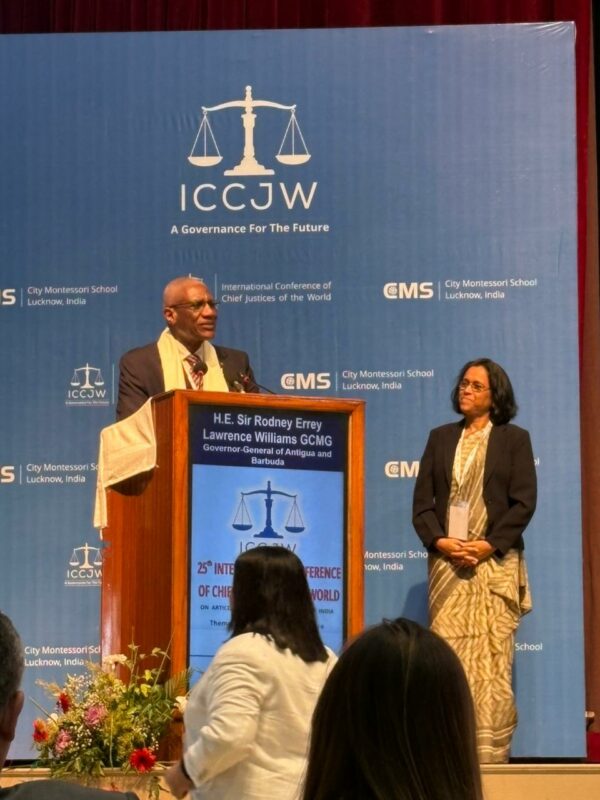
Sir Rodney Williams, the Governor-General of Antigua and Barbuda, recently received two prestigious awards during his visit to India.
At the 25th International Conference of Chief Justices, Heads of States, and Heads of Governments held in Lucknow from November 20 to 24, 2024, he was honored with the Mahatma Gandhi Award for his steadfast commitment to World Unity and Peace.
He was also acknowledged for his notable contributions to Education and Humanitarian efforts. As a Guest of Honour, Sir Rodney led several sessions, sharing his thoughts on vital global topics such as Sustainable Development, Climate Action, Financing, and the challenges that today’s youth face regarding their future development.
The conference brought together 156 delegates from 56 nations, creating a platform for exchanging ideas aimed at improving the social, legal, technological, physical, and moral futures for over 2.5 billion children and generations to come.
In his speech, Sir Rodney highlighted the need to strengthen the relationship between India and the Caribbean, especially in the areas of technology and education.
He mentioned that Prime Minister Gaston Browne of Antigua and Barbuda was simultaneously discussing these initiatives during the 2nd India-CARICOM Summit in Guyana.
Expressing his appreciation, Sir Rodney remarked, “I feel honored to receive this recognition, which reflects the collaborative efforts of many professionals committed to the vision set forth by the late Dr. Jagdish Gandhi and his wife, Mrs. Bharti Gandhi, around twenty-five years ago.”
The awards were presented by Mrs. Gandhi during a special ceremony at the conference.

This story was first published by Antigua News on : antigua.news/2024/11/27/governor-general-honored-with-special-accolades-during-visit-to-india. © 2024 Antigua News. Republication without permission is not allowed.

About the author
The Editorial Staff refers to all reporters employed by Antigua.news. When an article is not an original creation of Antigua.news—such as when it is based on a press release, other media articles, letters to the editor, or court decisions—one of our staff members is responsible for overseeing its publication.
Read our editorial standards and corrections policy. Spotted an error? Contact the newsroom.
More from World
View section
Spain Train Crash: 68 Dead, 77 Injured as Safety Decisions Face Scrutiny
At least 15 people are seriously injured after an AVE hit a stationary Iryo train near Urda. Spain announces national mourning as officials examine the order to restart after a safety-system failure.
By Dario Item

Spain Train Crash: At Least 30 Dead and Dozens Injured in Toledo
Regional authorities confirm a higher death toll and the evacuation of injured passengers after the Renfe–Iryo collision, nine months after Adamuz and 32 days before Spain’s election.
By Dario Item

Meloni’s Security Operation Passes Its First Test in Milan
Five hundred additional troops and a new security decree were in place before protesters returned. Milan avoided another wave of looting, while investigators traced a suspected online organizer.
By Dario Item

Lula Wins Brazil’s Election as Bolsonaro’s Challenge Echoes Abroad
A fourth term preserves Brazil’s independent diplomatic course. A dispute over extended voting hours tests its institutions and the response of foreign governments.
By Dario Item
Comments (1)
Tamisha November 27, 2024, 8:33 AM