
Minister of Tourism, Hon. H. Charles Fernandez, Pays Tribute to the Late Mr. Alexandre De Brito

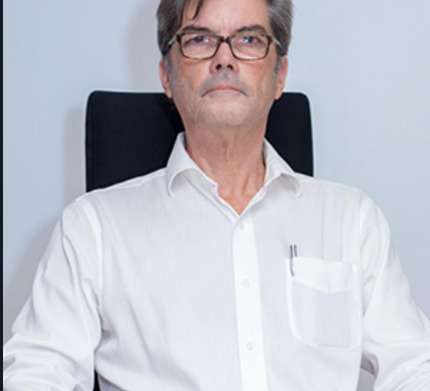
It is with deep sadness that we acknowledge the passing of Mr. Alexandre De Brito E Cunha, the immediate past Chairman of the Antigua & Barbuda Hotels and Tourism Association (ABHTA). Mr. De Brito dedicated his professional life to advancing the hospitality industry in Antigua and Barbuda, leaving an indelible mark on the sector and the many lives he touched.
Reflecting on this loss, the Hon. H. Charles Fernandez, Minister of Tourism, shared:
“Today, I received the heartbreaking news of the passing of Mr. Alex De Brito. From my interactions with him, I came to know a truly remarkable individual whose passion for the hospitality sector transformed the lives of many. His unwavering dedication to Antigua & Barbuda’s tourism industry—particularly during challenging times like the COVID-19 pandemic—has left an indelible mark on our nation.”
“Mr. De Brito was not only a leader in his field but also a mentor and friend to many. His kindness, resilience, and commitment to excellence inspired all who had the privilege of knowing him. He firmly believed in the power of hospitality to bring people together, and he embodied this belief through his daily actions.”
“As we honor his legacy, let us continue his spirit of compassion and service, ensuring that his contributions to the industry endure. On behalf of the Ministry of Tourism, I extend our heartfelt condolences to his family during this difficult time. Our thoughts and prayers are with them.”

On behalf of the Ministry of Tourism, we extend our deepest condolences to his family, friends, and colleagues during this difficult time.
Rest in peace, Mr. De Brito. Your impact will continue to inspire us.
This story was first published by Antigua News on : antigua.news/2025/03/09/minister-of-tourism-hon-h-charles-fernandez-pays-tribute-to-the-late-mr-alexandre-de-brito. © 2025 Antigua News. Republication without permission is not allowed.

About the author
The Editorial Staff refers to all reporters employed by Antigua.news. When an article is not an original creation of Antigua.news—such as when it is based on a press release, other media articles, letters to the editor, or court decisions—one of our staff members is responsible for overseeing its publication.
Read our editorial standards and corrections policy. Spotted an error? Contact the newsroom.
More from Tourism
View section
Freeland Congratulates Fernandez on Election as CTO Chairman
Minister of State pledges support for Fernandez’s regional tourism leadership and welcomes his focus on women, youth and connectivity.
By Shermain Bique-Charles

Antigua has 365 beaches. Can it make AI’s shortlist?
As travellers ask chatbots to find their ideal holiday, Antigua and Barbuda faces a new challenge: being recommended before anyone thinks to search for it.
By Dario Item
Nikki Beach Antigua Makes Waves in Monaco as Freeland and Sales Team Meet 30 Potential Buyers
By Shermain Bique-Charles
Freeland Heads to Monaco to Promote Antigua and Barbuda’s Yachting Sector
By Editorial Staff
Comments (4)
ANYA March 9, 2025, 8:01 PM
Ghetto Yute March 9, 2025, 11:27 PM
Luka Johnson March 9, 2025, 11:28 PM
Juju Bee March 10, 2025, 7:42 AM